We’re sure your app marketing needs a performance lift! This guide will walk you through how to track conversions with AppsFlyer and Adsterra. You’ll learn to attribute and optimize mobile app campaigns, getting clear stats and ensuring accurate ROI measurement.
How does the integration work?
AppsFlyer serves as a mobile attribution platform (MMP), while Adsterra is an ad platform that supplies traffic. When you buy traffic from Adsterra, you can use AppsFlyer to get a clear picture of how profitable your campaigns are.
| Question | AppsFlyer | Adsterra |
| What is? | Tracking and analytics platform (MMP) | Advertising network (traffic provider) |
| What for? | You learn which ads deliver app installs, signups, trials, etc. | You buy traffic (users’ views/clicks/actions) to advertise your app. |
| Who uses it? | App marketers and developers (product owners or agencies). | Advertisers and marketers (media buyers) |
The integration process for Adsterra conversions with AppsFlyer is simplified. It eliminates the need for manual postback setup. All necessary configuration occurs within the AppsFlyer interface, and the result is a ready-to-use URL that serves as your campaign link.
Key integration details:
- Attribution: AppsFlyer records engagements from Adsterra and attributes them to the correct campaigns.
- Postback URLs: Adsterra provides you with postbacks required to track conversions.
- Statistics reports: The data helps advertisers monitor campaign performance in real-time, optimizing costs and investing in the best Adsterra’s traffic slices.
Use cases
- Smart user acquisition: Tracking real app installs driven by Adsterra ads.
- In-app event tracking: Measuring post-install actions (e.g., trials and registrations).
- Whitelisting: Targeting specific audience groups with the highest conversion potential
- Cost reduction: Filtering out users who convert less (device, OS, browsers, etc.).
- Experiment transparency: Launching A/B test campaigns with clear results.
Activation procedure in AppsFlyer
Before you proceed, ensure you have active apps added to AppsFlyer so you can get attribution details on installs and other important events. Read more about adding apps in the Appsflyer Helpcenter.
1. Choose Adsterra count to integrate
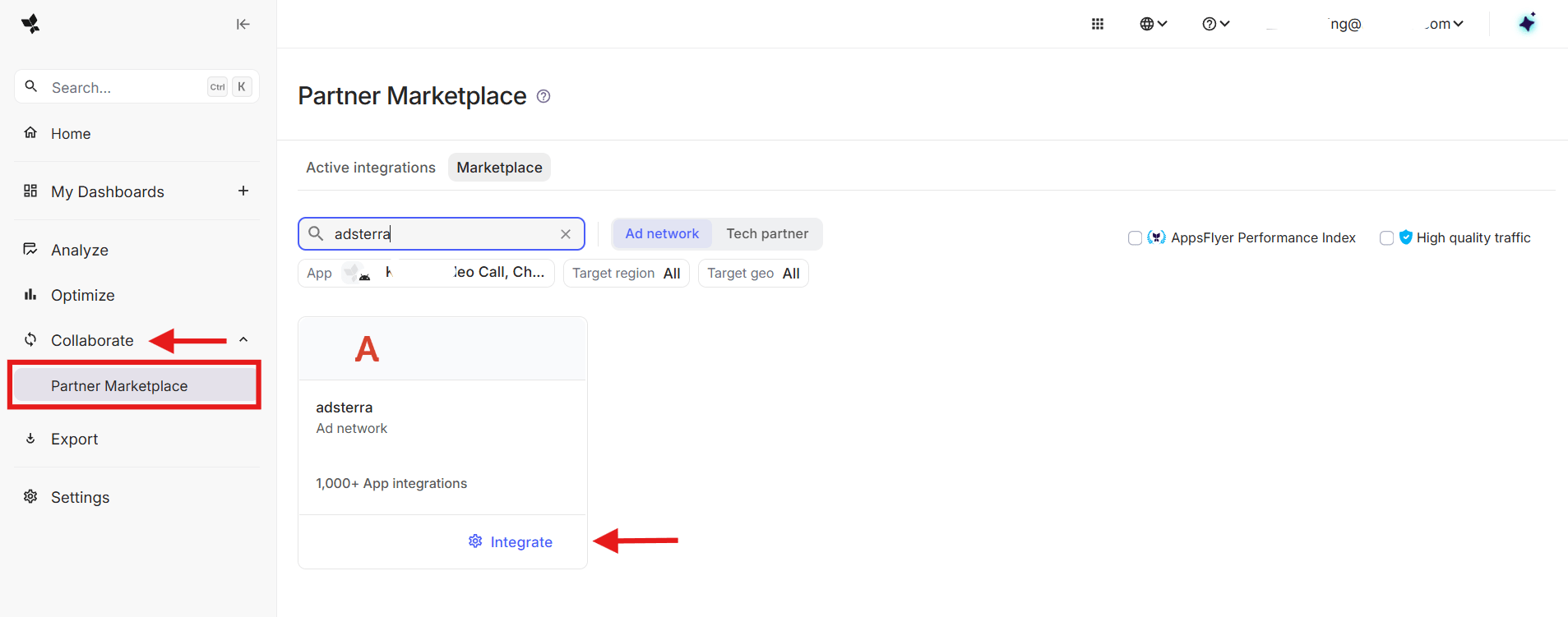
To activate the integration, head over to the side menu and click Collaborate → Partner Marketplace. Search for “adsterra” and select the Ad Network account. Click Integrate. You’ll be directed to a partner integration page.
2. Set up the integration
From the Integration tab, turn the Activate partner toggle on.
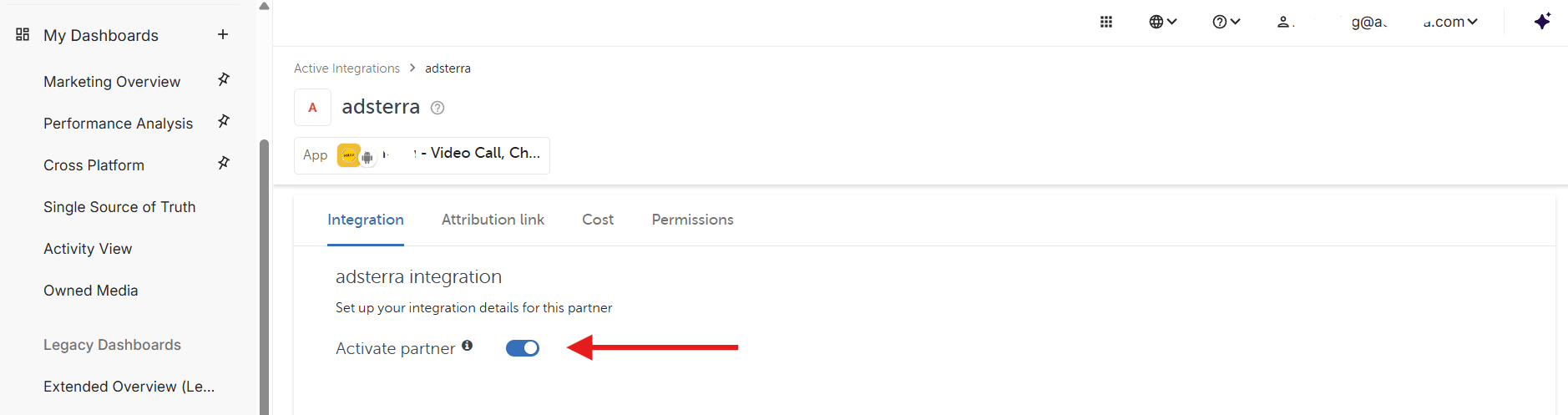
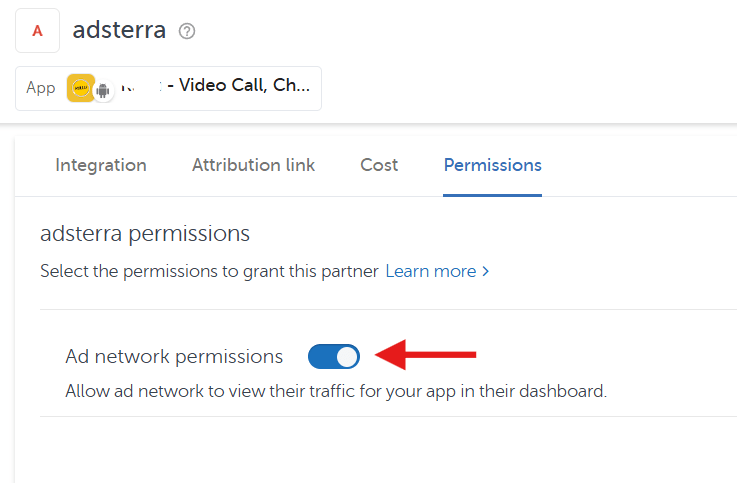
As AppsFlyer demands, the toggle must be on while you’re working with the partner. Click Save integration and move to the last tab, Permissions. Here, activate the toggle and click Save permissions.
3. Complete the configuration
Now, let’s complete the configuration. Go to the Attribution Link tab and generate the link for your campaign. That’s how a typical link looks like:
https://app.appsflyer.com/my.app?pid=adsterra_int&af_click_lookback=7d&clickid={clickid}The clickid={clickid} parameter is the most important. You’ll need to match it with Adsterra’s ##SUB_ID_SHORT(action)## macros to enable conversion tracking.
The final link you’ll then use as the campaign URL on Adsterra will be:
https://app.appsflyer.com/my.app?pid=adsterra_int&af_click_lookback=7d&clickid=##SUB_ID_SHORT(action)##4. Add parameters to track (optional)
You can attach more parameters and match these with Adsterra’s macros (tokens) to track all necessary traffic signals. For example, the aff_sub1= parameter can be matched with the ##PLACEMENT_ID## macros to enable placement performance tracking. You’ll then get more placement-level insights and optimize ad spending: CTR winners, low-performers, top earners, and more.
The link will be:
https://app.appsflyer.com/my.app?pid=adsterra_int&af_click_lookback=7d&clickid=##SUB_ID_SHORT(action)##&aff_sub1=##PLACEMENT_ID##Find all available Attribution link parameters here in the AppsFlyer Help Center. And here are the most common metrics/parameters:
| Parameter | Name | Adsterra Macros |
| &c= | Campaign Name | ##CAMPAIGN_NAME## |
| &af_c_id | ID of Campaign | ##CAMPAIGN_ID## |
| &af_siteid= | Site ID | ##PLACEMENT_ID## |
| &af_cost_value= | Bid value | ##COST_CPA## |
| &af_adset_id= | ID of Banner/Creative | ##BANNER_ID## |
| &country_code= | User’s country code | ##COUNTRY_CODE## |
Setting up a postback on AppsFlyer (app installs only)
You don’t need to manually set up the postback URL if you track app installs. Go back to AppsFlyer and open the Collaborate → Active Integration. Scroll to Default postback option. Leave it as is if you pay Adsterra for app installs.
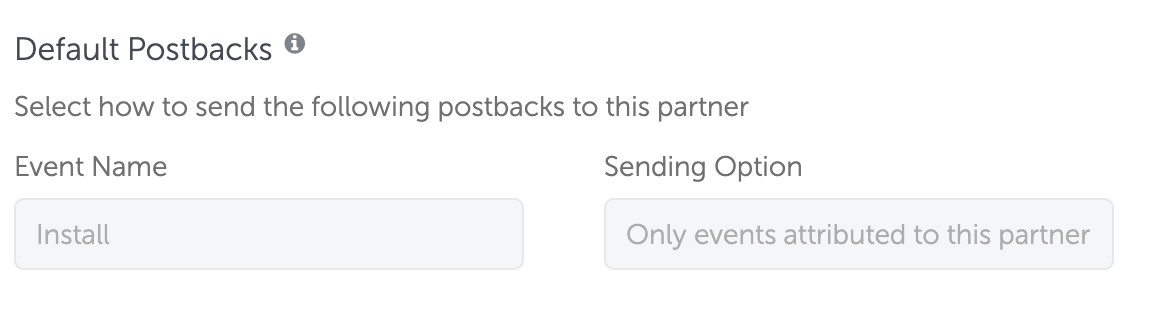
Setting up a postback on AppsFlyer (another paid in-app event)
Let’s now imagine your target conversion is not an app install. If you want to pay only for trials or signups, turn on the In-app postback toggle on the Active Integration page. Add the event according to AppsFlyer’s tutorials. For example, here are some conversion types for Entertainment applications.
In this guide, let’s select the af_start_trial event, which means you’ll be tracking trials and pay Adsterra only if these happen.
Click Add event and paste ‘af_start_trial’ in the AppsFlyer event field. Ensure the event name in the AppsFlyer event exactly matches the name in the “Mapped to partner event” field. For the rest of the fields, choose the following:
- ‘For users from’ → choose This partner only. It means that this setting is only applied to Adsterra.
- ‘Including’ → set Values and no revenue. This setting prevents us from getting revenues from your sales.
Click Save Integration.

Then, set the default postback window and click Add Event.
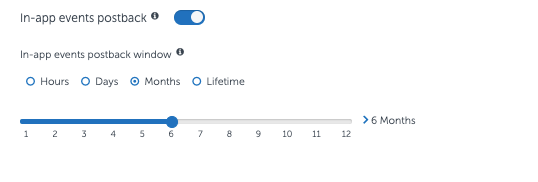
Next, get back to the Attribution Link tab, copy the link and add the ‘af_installpostback=false’ parameter, so the final link looks like this:
https://app.appsflyer.com/your.app?pid=adsterra_int&af_click_lookback=7d&clickid={clickid}&af_installpostback=falseThe ‘&af_installpostback=false’ parameter will allow you to send Adsterra only chosen events without sending app installs.
For more convenience, you can copy the initial attribution link, get back to Adsterra and ask our managers to add all events you want to track and get charged for.
Setting up a multi-event campaign on AppsFlyer
You can send Adsterra all important actions in your app’s funnel: for example, installs, trials and paid subscriptions. This integration provides mutual benefits.
- You monitor campaign performance and optimize directly within the Adsterra statistics interface.
- Adsterra identifies the highest-performing traffic segments, offering you to effectively scale ad performance.
1. Add events to track
To track multiple user actions, enable in-app event postbacks as shown in the previous part, one postback per event.
Please note that you can add up to 3 events to track.
2. Form the correct attribution link
Once you set it, go back to your attribution link. Previously, we outlined how to form the attribution link if you don’t pay for app installs but trials or subscriptions. You need to add the &af_installpostback=false parameter to the attribution link to exclude double conversion count.
https://app.appsflyer.com/your.app?pid=adsterra_int&af_click_lookback=7d&clickid={clickid}&af_installpostback=falseBut if you pay Adsterra for installs, but want to track trials and subscriptions as non-paid conversion, don’t add &af_installpostback=false to your link.
3. Complete the setup
Once you set it up, don’t launch your campaigns just yet. Make sure to contact the Adsterra support team and request to verify the following:
- You are charged for events you selected on AppsFlyer
- The events are passed exactly how you mapped them
- Postbacks work properly
- All conversions fire correctly (paid and non-paid)
Important: Please be aware that once you configure in-app events, these settings will automatically be applied to all your Adsterra campaigns. If you have any campaigns currently running, please reach out to our support team.
Starting new campaigns with proper tracking
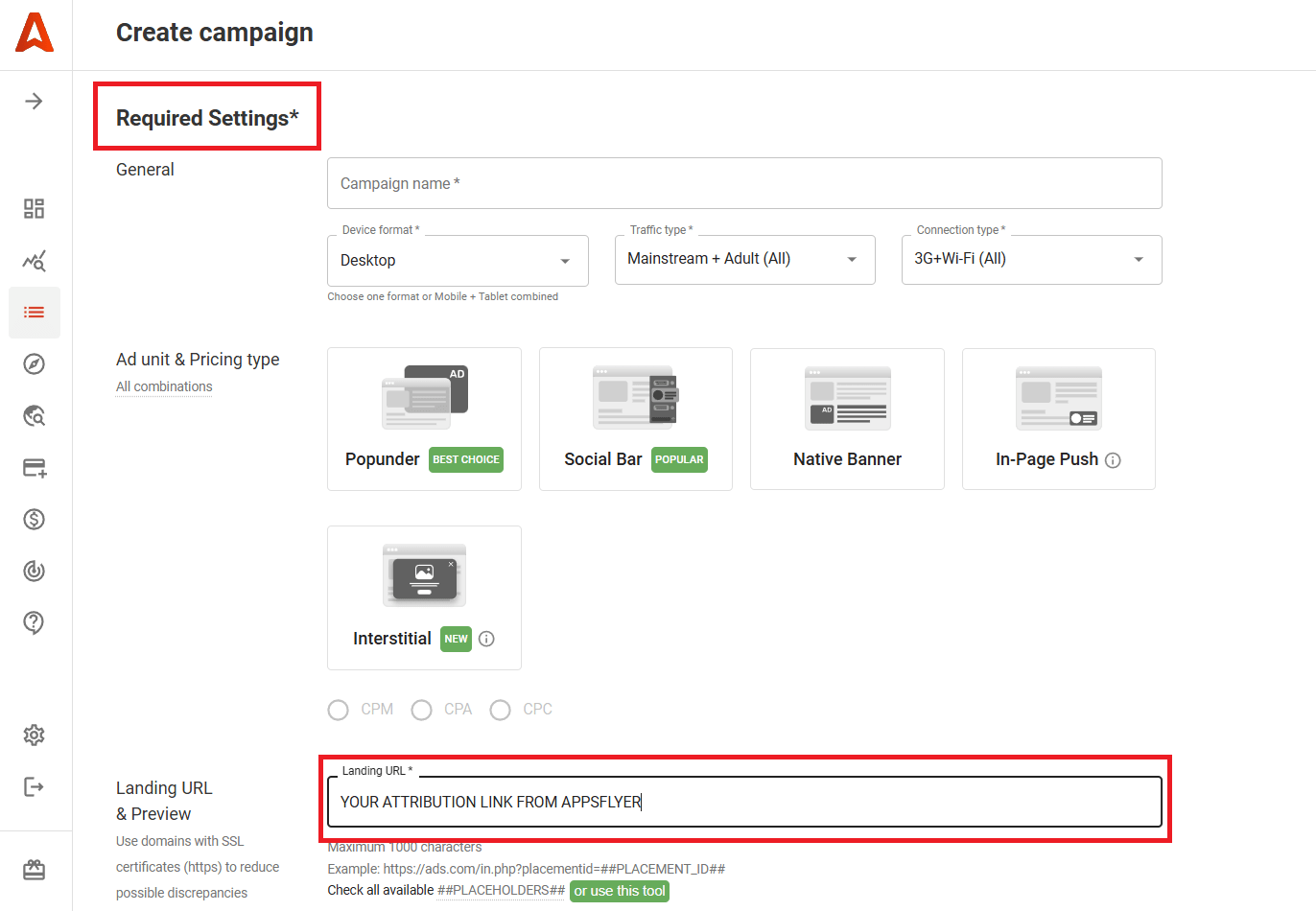
After the successful conversion test, you can add funds to Adsterra account and set up a campaign with the attribution link you got on AppsFlyer.
Click Campaigns → Create and ensure you’ve set all Required Settings (obligatory for sending your campaign for verification). Paste the Attribution (Campaign) Link from AppsFlyer to the corresponding Landing URL field.
Final thoughts
Tracking Adsterra conversions with AppsFlyer serves multiple benefits. App developers and marketers get more accurate, real-time attribution that powers ROI maximization.
Key benefits:
- Precise event tracking: You see exactly which Adsterra ad campaigns and placements are driving high-value users, not just ad views.
- Real-time data: Instant insights into ad performance help you optimize ad spend and performance without budget waste.
- Fraud protection: Both Adsterra and AppsFlyer filter out non-human or fraudulent traffic, ensuring you only invest in real use acquisition.
- Flawless management: Tracking links and postbacks seamlessly connect two platforms, helping you control your marketing in the preferred dashboard.
AppsFlyer conversion tracking FAQs
How do AppsFlyer and Adsterra differ?
AppsFlyer and Adsterra are two different but complementary tools in digital marketing. In short: Adsterra helps you acquire targeted traffic (user acquisition), and AppsFlyer helps you track exactly where users came from and how effective they are for your app.
How to track app conversions with AppsFlyer and Adsterra?
Advertisers and app marketers find Adsterra in the AppsFlyer partner marketplace and activate it with all permissions and the default postback option. Next, they generate the attribution link (or campaign link) on AppsFlyer matching its tokens with Adsterra’s. Finally, advertisers need to run a conversion test and set up a campaign on Adsterra, adding the attribution URL obtained on AppsFlyer.
Why do I need Appsflyer and Adsterra as an app marketer?
Whether you need to attract users to your software or app, you buy traffic on Adsterra. If you want to analyze which marketing channels (Adsterra, Facebook, Google, etc.) serve you the best audiences, you need AppsFlyer.
Which traffic parameters can I track?
Due to app and privacy settings specifics, the range of user parameters can differ. We recommend you to send our managers a brief background about your app, tracking preferences, and AppsFlyer settings to get the exact info. In general, you can track parameters listed in the AppsFlyer macros library if they match Adsterra’s macros.