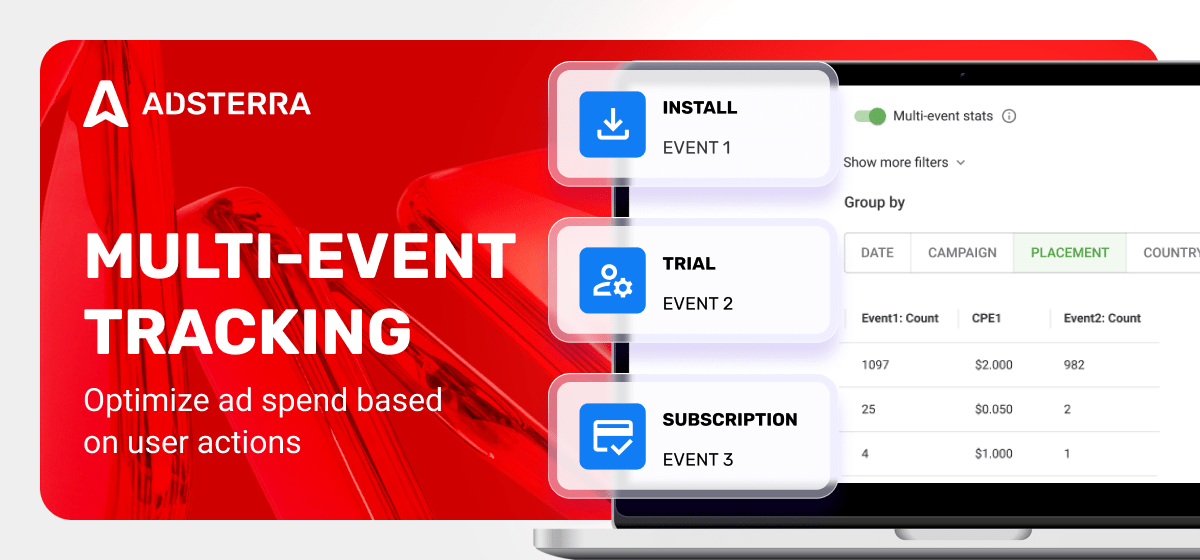
If you’re running ads for your iGaming, mobile app, or utility offer, you want results. Always. Even if you pay for views. Multi-event tracking serves you even more: you see traffic quality based on critical user actions. This guide is the best starting point for making your reports speak so you can refine your budgeting and maximize ROI.
What’s multi-event tracking?
Multiple event tracking allows you to monitor several user actions in the funnel. Many campaigns don’t end with one conversion event. A user might click > install > start a trial > subscribe, etc. But traditional tracking often counts only one conversion.
Multi-event conversion tracking records multiple valuable actions in a single campaign. This provides you with deeper funnel insights and more accurate budget allocation decisions.
Single vs multi-event tracking
| Characteristic | Single Event (traditional) | Multi-Event Tracking |
| Funnels | Limited view. One conversion after user click | Full funnel. Many actions after user click |
| Optimization Data | One conversion only | Several important events |
| Postback URL | Simple | Requires event identifiers |
| User Attribution Quality | Lower | Higher |
Why is it important to track multiple events?
Traditional marketing tools only track a single conversion, which is not enough for today’s complex customer journeys. For example, users may not start a trial but still install your app, indicating they’re interested in the product. Focusing on a single action means missing both campaign weaknesses and growth opportunities. This is why multiple events matter.
Adsterra, as a user acquisition platform, takes raw data and allows you to make it valuable, whether you buy CPA or CPM traffic.
Multi-event tracking use cases
Marketers receive enriched performance reports and can invest in traffic sources with precision. Here are the most common multi-event tracking cases:
VPN, Apps, Mobile Utilities
When you see both app installs and trials, you know how users engage with ads and the product itself. You learn that some traffic sources bring free trials but generate installs, and you can redesign the ad message or upgrade the landing page. Or you can identify which placements are true leaders across both conversion types and create a whitelist campaign for these sources only.
iGaming & E-commerce
Another example from the iGaming and E-commerce industry. Two goals (installs + sales / subscriptions + deposits) tracked side by side reveal GEOs that convert better at different stages.
Marketers can then update offers, adding higher bonuses for those who didn’t convert into desired actions. Or, alternatively, form a list of countries with lower and higher bids to reach 2 goals: 1. keep new users coming; 2. generate more sales, getting app installs, but focus on generating more subscribers.
Values of multiple events tracking in performance marketing
Better ROI decisions and budget optimization
Knowing which sources lose valuable user actions saves money spent on lower-quality traffic, or allows you to redesign the whole campaign, making it more engaging.
Ad budget optimization
By identifying which traffic sources consistently generate high-value, multi-step conversions (e.g., views, installs, trials), you can effectively shift your advertising budget towards them.
Faster creative picks
With longer test campaigns (iGaming, Finance), you can see which Interstitial, In-Page Push, or Social Bar creative version drives deeper user engagement right from the start.
Funnel optimization
When you pay for the last conversion in the funnel, you may miss highly potent traffic sources. Knowing earlier user signals can help you focus ad budgets on less costly but powerful traffic slices. Or, exclude traffic bringing solely first-level conversions without hitting your target event.
Partnership transparency
You make decisions based on visible, meaningful user signals, which means your partnership with performance marketing platforms becomes more transparent.
How to start tracking multiple events
Multi-event tracking relies on server-to-server (S2S) postbacks, not on browser cookies. S2S means your tracker and your ad network exchange event data directly via postback URLs.
You may already be using S2S postbacks with trackers (Voluum, RedTrack, Binom, CPV One). Adding multiple events means you include event identifiers in each postback.
Before you start, ensure your tracker or analytics system can send various events via postback (server-2-server).
1. Set up S2S tracking on Adsterra
If you haven’t yet, follow this S2S guide as it builds the foundation. You’ll generate a postback URL that includes a click ID, a unique user identifier.
- From the Conversion Tracking page, choose the postback URL type (with or without the payout variable)
- Click GENERATE POSTBACK.
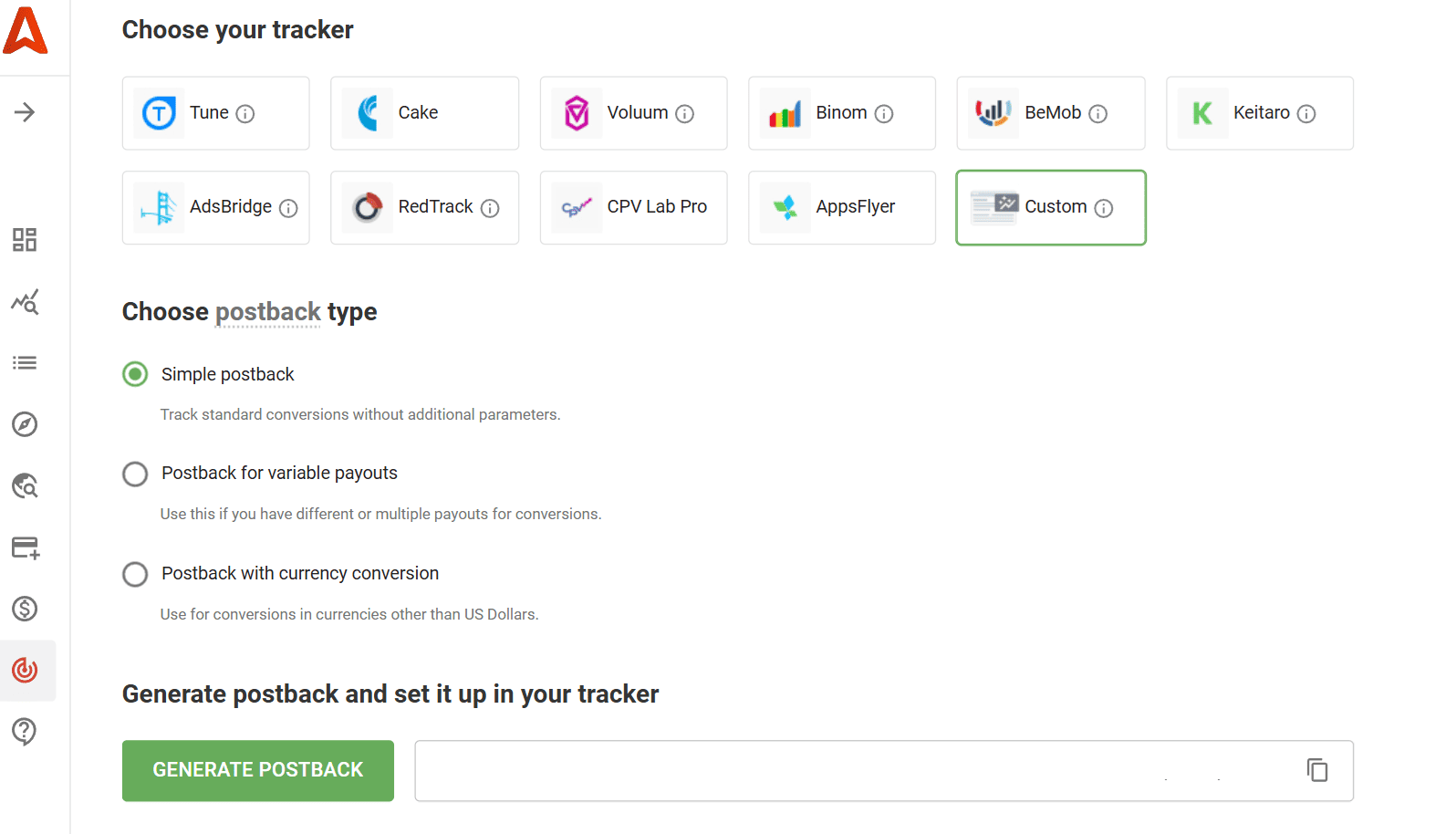
- Copy this postback to your tracker and match the click IDs between the tracker and Adsterra. The clickID in the tracker must match the ##SUB_ID_SHORT(action)## token/macros by Adsterra.
The current setup limits tracking to a single conversion or ACTION type. With CPA pricing, you mainly acquire quick and simple actions, such as app installs or email signups. That’s what Adsterra charges you for. Next, you’ll learn to add more events for monitoring.
2. Add events to track
After generating the main postback URL, include additional events to track beyond the initial conversion. Use specific identifiers in the postback URL: event1 for first-level conversions, event2 for second-level conversions, and event3 for third-level conversions.
Example: installs (action) → trials (event1) → paid subscription (event2).
Example 2: single opt-in (action) → double opt-in (event1)
- Add this expression to the end of the postback URL: &event=event1
Example: http://www.pbterra.com/name/NAMEOFADVERTISER/at?subid_short={token}&event=event1Take this URL and paste it to your tracker near the conversion type you define as event1. This can be a trial, a signup, or a subscription. Don’t change the event name in the postback. This will signal Adsterra you define <this type of conversion> as your event1.
- For tracking second-level conversions, again, add this to the initial postback: &event=event2
Example: http://www.pbterra.com/name/NAMEOFADVERTISER/at?subid_short={token}&event=event2Add this URL near the event you defined as your next-level conversion type in the tracker.
Note: For each event, you need to generate a relevant postback; avoid combining both events into a single URL. You can track up to three conversion events maximum.
- Run a conversion test
It is always recommended to test your setup to confirm that conversions are firing correctly. You can either test the simple postback without events or test each of the URLs you generated separately.
Go to your tracker and copy the attribution/campaign/tracking URL. Ensure you matched the clickID with Adsterra’s ##SUB_ID_SHORT(action)## token as described earlier.
Go back to Adsterra and paste the tracking URL to the Check URL field.
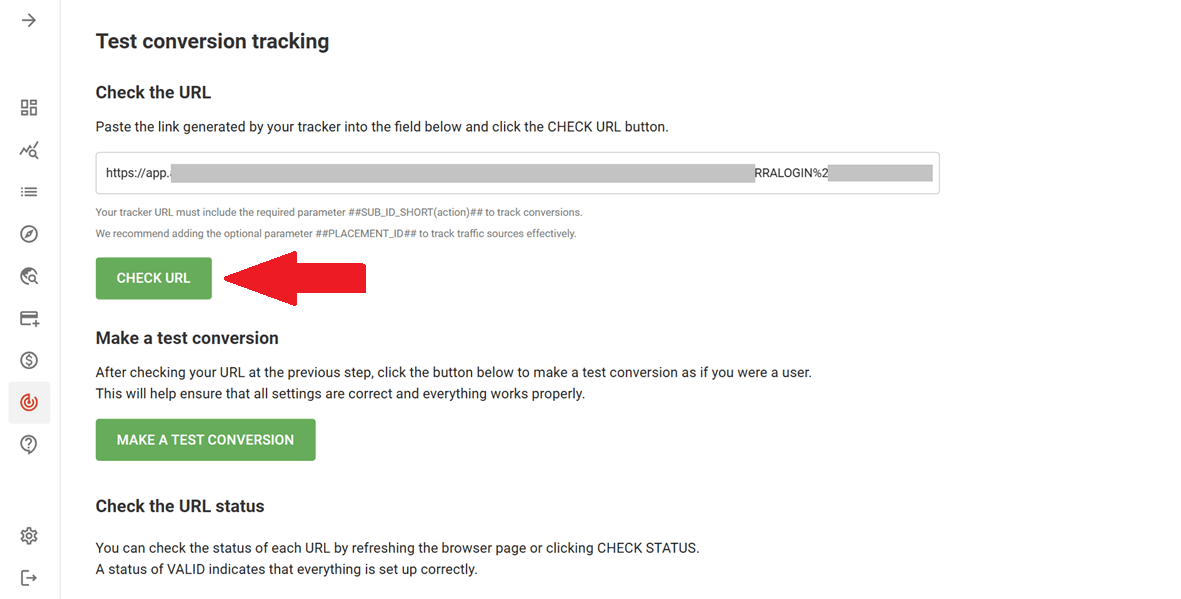
Wait until the status changes to Valid.

Then, click the MAKE TEST CONVERSION BUTTON and do what’s needed to complete the conversion. If you only track one action without additional events, you simply need to test one primary conversion. If you added events, it’s better to perform all of these as if you were a user.
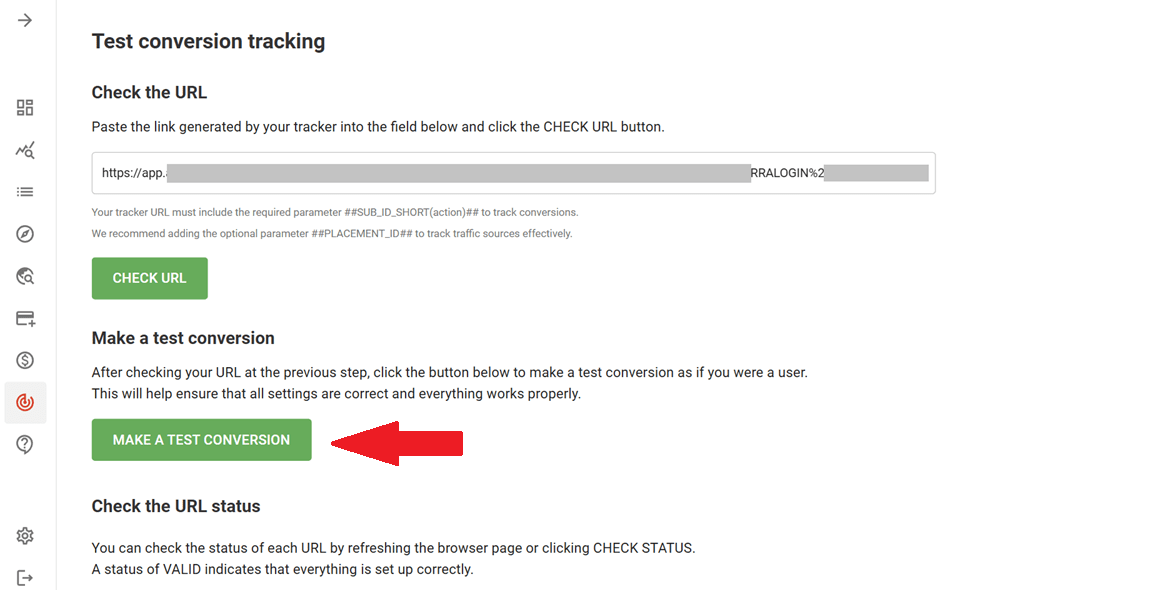
NOTE: For assistance with running your tests, reach out to the Adsterra support team. Simply copy your tracking URLs and contact us via the live chat feature available within your account.
- Set up a campaign with multi-event tracking
Let’s now enable multi-event tracking for your campaigns. Go to Campaigns → Create and add all necessary settings (all placed in the Required Settings section).
In the Campaign URL field, place the tracking URL you got from your tracker. It’s the link to your offer, with all the necessary tokens and parameters.
Next, activate multi-event tracking by ticking “I’ve set up events postback for this campaign”.
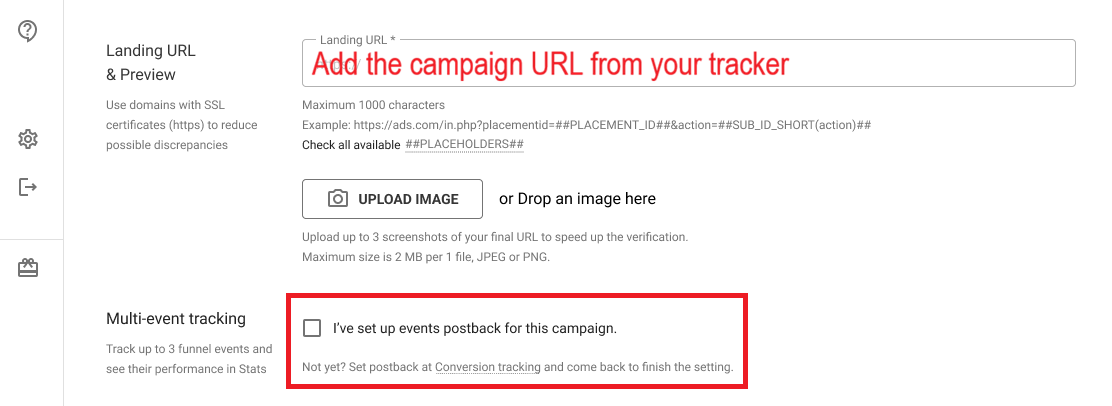
When finished, click the PROCEED TO REVIEW button and check all the settings made. Finally, click SUBMIT. The campaign will start after the verification.
Event-rich campaign analytics in action
Every event is visible and measurable after you start tracking it. Open the Statistics page and turn the Multievents stats toggle on. You’ll see these metrics with values split by events:
- Conversions
- ECPA (Effective Cost Per Action, or total amount spent / total number of conversions)
- I2C (Impressions to Conversions ratio)
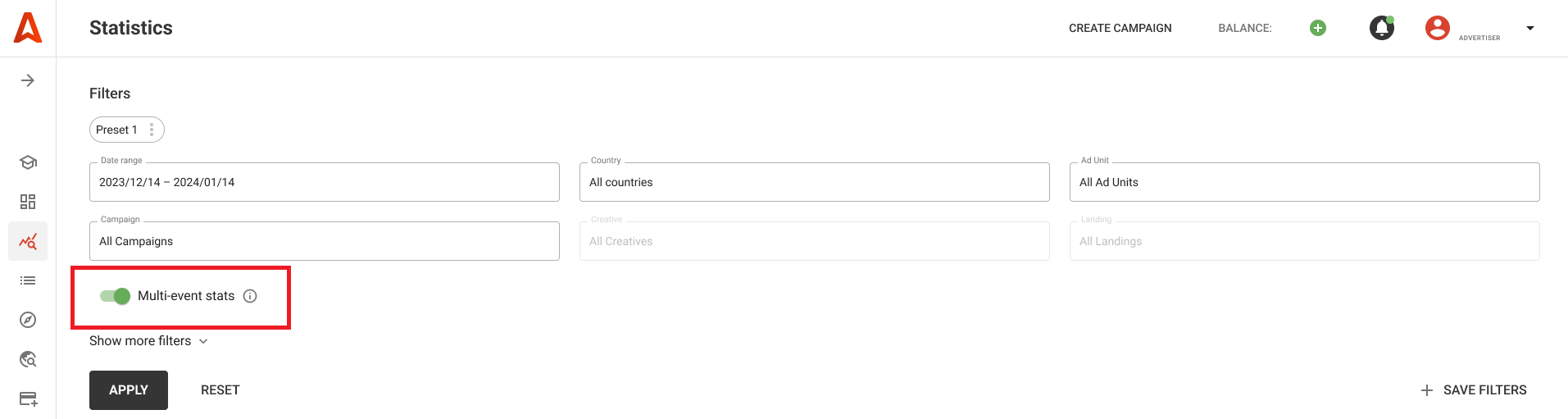
Pro tip: If you are running one or a couple of campaigns with multi-event buyer journeys, create a report preset. Presets hold your current report configuration and “freeze” the statistical view, significantly saving time when you repeatedly need to access these specific campaign metrics.
You will also receive data on the conversion rate from impressions to each critical event (e.g., Event 1, Event 2, Event 3 / Conversion) and the conversions between these events (Event 1 / Event 2 / Event 3, etc.). Too many metrics? Remove unnecessary columns in 2 clicks.
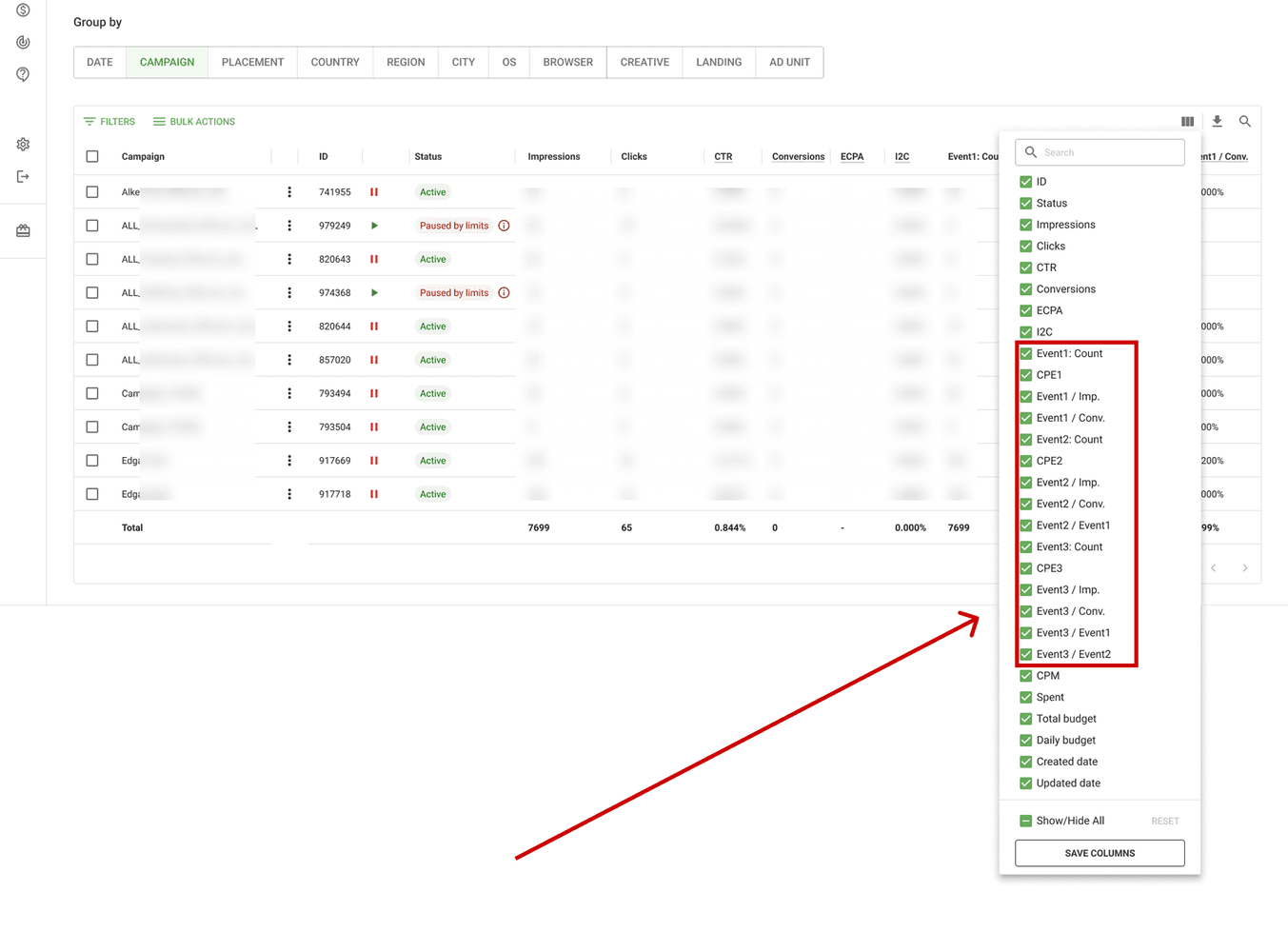
Now, you can optimize traffic at any level to get deeper event-rich insights: campaign, placement, country, region, city, OS, browser, creative, landing, or ad unit. Let’s outline just a few opportunities to maximize your ROI and get the most out of your ad budget.
Budget maximization use cases
- Identify high-spend, low-event-count campaigns and pause or bid those down using the Custom Bid column—the same for placements. Use BULK ACTIONS to pause multiple campaigns or adjust bids for many placements.
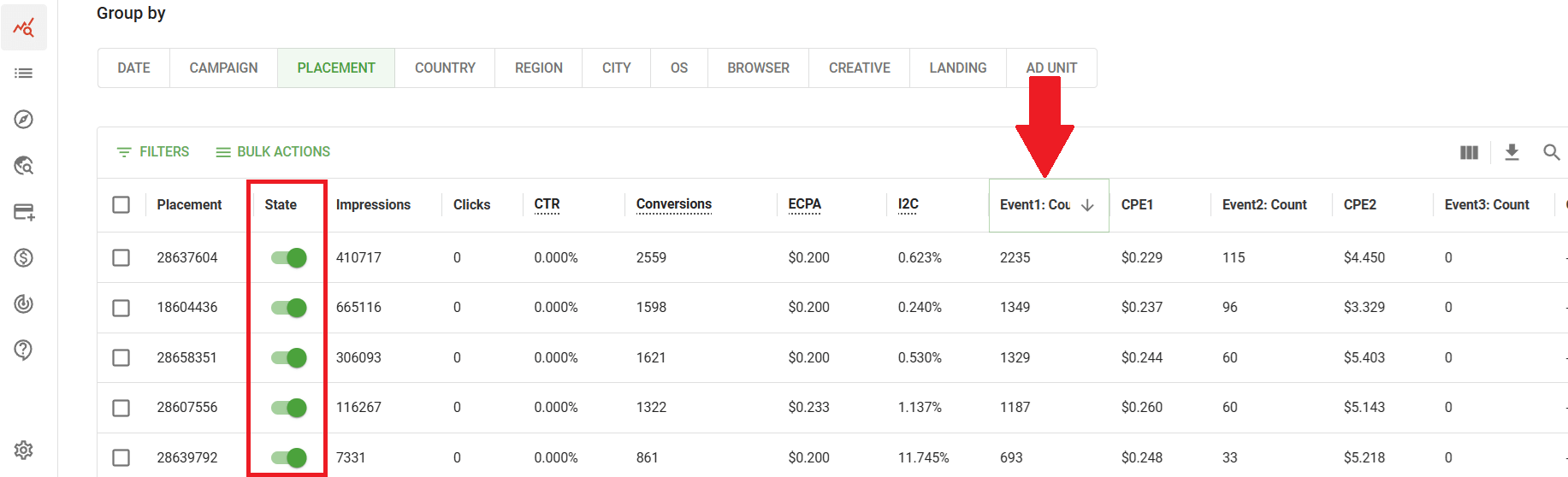
- Scale campaigns where important events occur at healthy rates.
- Use high-deep event rates (e.g., placements reaching Event3) to form whitelists and start campaigns with higher payouts. Select placements and choose BULK ACTIONS → Duplicate campaign with a whitelist.
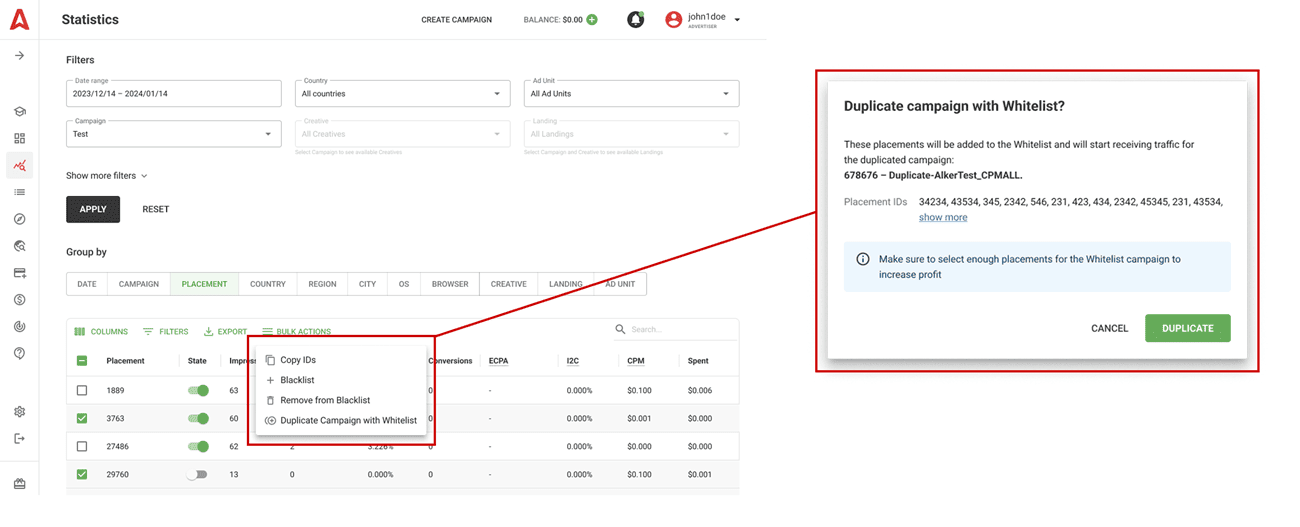
- Unlink placements with low event count or CR: select placements, click BULK ACTIONS, and choose Blacklist.
- Use event steps (Event1, Event2, Event3) to detect where users drop off in the funnel and prioritize landing‑page fixes.
Deeper funnel optimization and cost saving
What if you want to track several events but only pay for a specific one? For instance, you want to track event 1 (app installs) but pay only if event 2 happens (trials). In this case, you need to match paid actions with Adsterra. Please reach out to us from your ad account and describe your campaign goals and events to track. We will provide you with correct postback URLs and ensure all events fire correctly.
Multiple event tracking checklist
Before you set a campaign live, check all these steps as done or ensure you know how to set them up.
- ☑️S2S postbacks enabled
- ☑️ClickID properly mapped
- ☑️Postback URL(s) contains the event(s) needed
- ☑️One postback URL per event
- ☑️You pasted the postback URL with event 1 near the corresponding conversion type
- ☑️Test conversions and events are firing correctly
- ☑️You’ve activated the Multi-events tracking option during the campaign setup
- ☑️Adsterra Statistics table displays events separately
Multi-event tracking FAQ
What is multi-event conversion tracking?
It’s tracking multiple actions in a single campaign. You send separate postbacks for leads, subscriptions, trial starts, etc., letting you see deeper performance about each sales cycle stage.
How is this different from single event tracking?
Single event tracking only logs one outcome / conversion. Multi-event tracking records multiple outcomes so you see the whole funnel and all touchpoints in the customer journey.
Do I need developer help to enable multi-event tracking?
In most trackers, no. You set up extra postback URLs and event tags. In some cases, you may need help to ensure event parameters fire at the right moment. If hesitating, reach out to the support team in the live chat and outline your issue.
Will this double count conversions and double payments?
No, if event names are unique and each represents a distinct action. Double-counting occurs only when the same action is fired twice without separation. Proper naming prevents this.
Do I need to map events across tools?
In most cases, you don’t. You only need to add the event parameter to the postback URL and paste it to the corresponding field in your tracker. For example, the postback URL with ‘event 1″ is placed next to the ‘trial’. However, some trackers, such as AppsFlyer, require event mapping.
Can I track events when running CPM ads?
Yes, you can set up conversion tracking, including multi-event options, for CPM and CPC campaigns.
Final thoughts
Multi-event conversion tracking records all meaningful user actions in one campaign. It gives deeper funnel insight, cleaner attribution, and more data for smarter budgeting. And it’s all set up for you on Adsterra. Enable S2S postbacks, define events, and jump beyond traffic acquisition with event-rich performance campaigns.