S2S conversion tracking is the most accurate means to capture conversions in your advertising campaigns, ensuring compliance with the evolving privacy regulations. If you’re an advertiser or an affiliate marketing pro, this guide is your go-to tool for learning S2S conversion tracking from scratch. You’ll walk all the necessary stages:
- Create a default postback URL and set it up in your tracker
- Map parameters between Adsterra and your tracking platform
- Test your offer link with all parameters.
What is S2S tracking?
S2S (server-to-server tracking) is a secure method of recording conversion data by passing it directly between two servers. Data transmission is cookiless, meaning it bypasses browser restrictions and you don’t lose valuable events.
Types of server-side tracking
- Single-conversion tracking records a single user action, such as an app install. It’s enough for many affiliate campaigns and allows you to include additional parameters such as payout variable, ad placement, creative, OS, etc.
- Multi-event tracking allows for more accurate attribution of user actions. You can monitor various events throughout the customer journey and receive enriched reports on how users use your product. For example, enhanced conversions include app installs, trials, and paid subscriptions. All of these are crucial in-app events, and advertisers need them to improve the sales funnel and customize bidding strategies.
How does S2S tracking work?
Server-to-server (S2S) tracking enables servers from businesses and ad platforms to exchange conversion data directly. It uses a unique click ID upon ad interaction, stores it server-side, and sends it back to the ad platform when a conversion occurs.
What happens during S2S postback tracking?
When a user clicks an advertisement, the ad network assigns a unique ID (the click ID) to this click and passes it to the advertiser’s campaign URL (your landing page URL). The advertiser stores this ID on their server. When a conversion happens, the advertiser’s server sends a “postback” (a server-to-server HTTP request) containing the click ID back to the ad network to confirm the conversion has fired.
Key components
- Offer Link: The campaign URL with special parameters that leads users to your landing page (or the advertiser’s site). It contains a unique token (unique ID) captured when a user clicks the ad. To capture this token, you need to append the Click ID parameter.
- Click ID (ClickID): A unique, alphanumeric identifier for every click. The ID value must be passed from the tracker to the affiliate network/ad network and back.
- Postback URL (S2S): A server-side URL that notifies Adsterra’s server when a customer converts. It sends back conversion data, such as the click ID, directly to the ad network for proper reporting.
Benefits of S2S conversion tracking for affiliates and advertisers
Server-to-server tracking is a smarter, more reliable way to attribute events than pixels. It doesn’t depend on browser session, it’s free to use, and ensures privacy compliance. The main benefits are:
- Security. You can use HTTPS encryption for your postback URLs. S2S also prevents cookie stuffing. Data is only possible via the ClickID, a unique set of characters (the ID value).
- Data accuracy. Since requests are exchanged between servers, browsers are excluded from the process of capturing customers’ clicks. This means you won’t lose data if users delete cookies or ad blockers deny data collection.
- Mobile conversions precision. Cookies are subject to restrictions on many mobile platforms. The S2S method is immune to such limits, which makes it an irreplaceable part of your marketing since mobile traffic has occupied a vast part of ad campaigns.
- Resiliency against OS updates. S2S sends data while staying compliant with the evolving privacy restrictions, like Apple’s iOS 14+ updates.
How to set up S2S conversion tracking with Adsterra
The first stage is a postback URL setup on the Adsterra self-serve platform for advertisers. Log in and click the hamburger menu on the left and then click Conversion tracking.
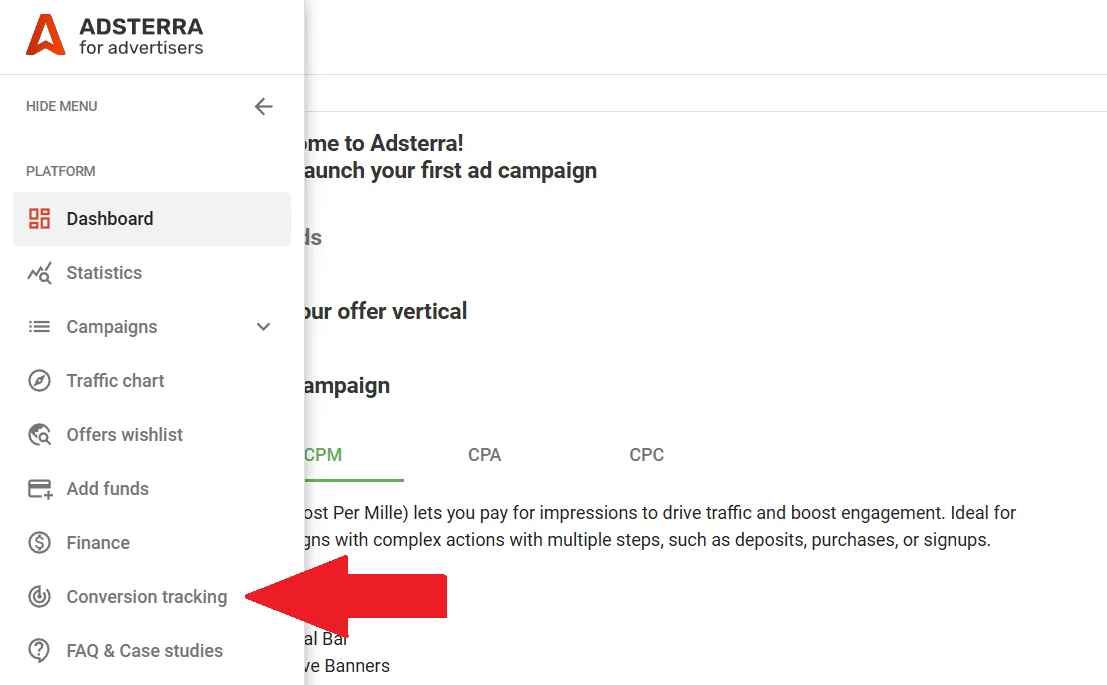
You’re now on the postback setup page. Let’s break down the flow into simpler steps.
1. Select your tracker
Adsterra holds several built-in integrations with the most robust trackers. If you see the one you use, please select it. If you’re using another platform, click Custom.
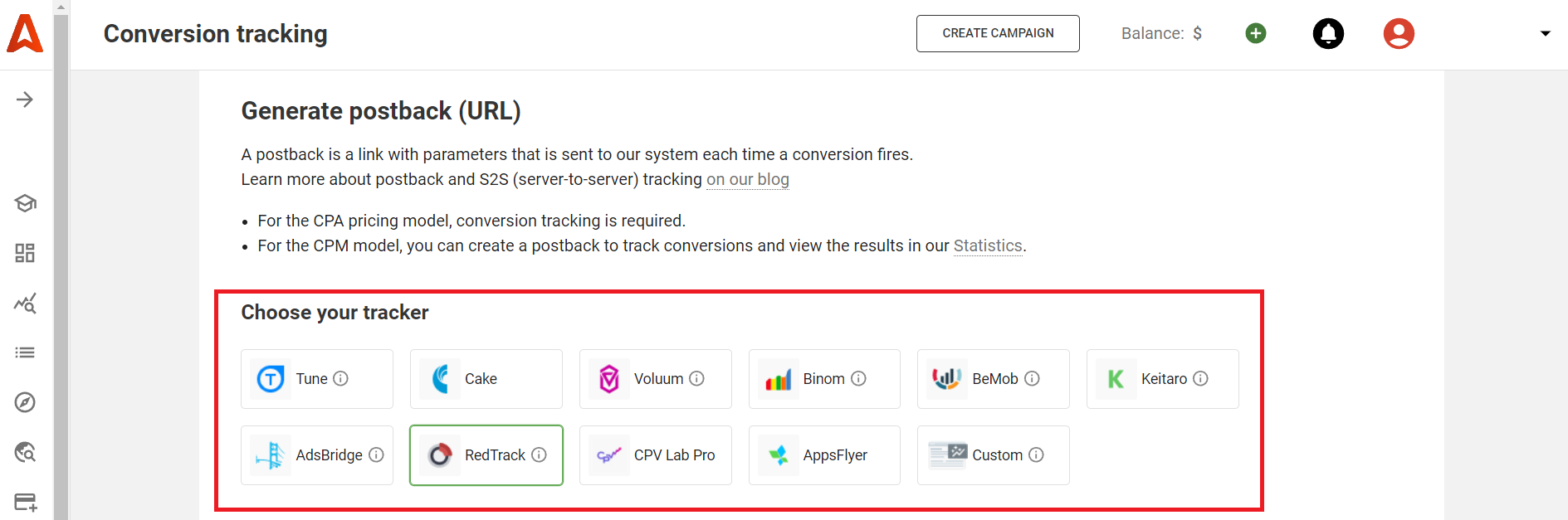
2. Choose the postback URL type
- Simple postbacks send the conversion event to your tracker without additional parameters.
- Postbacks with a Payout variable add various payouts for conversion.
- Postbacks with currency conversion are used to deal with non-USD payouts to convert currency.

Parameters inside the postback URL
Let’s now inspect a postback URL typical structure. We deliberately took a Custom tracker to start from scratch:
http://www.pbterra.com/name/username/at?subid_short={clickid}- Instead of a username, you see your Adsterra login.
- subid_short is a token with the {clickid} variable that needs to be matched with its analog on your tracker.
- {clickid} is a variable or a dynamic set of characters that Adsterra creates. We generate a unique {clickid} for every user who clicks Adsterra ads. The unique set of characters will then be sent through the offer URL. After a user completes the conversion, the {clickid} will be returned through the Postback URL. The {clickid} must be replaced by the corresponding parameter from your tracker.
- For the built-in integrations (e.g., Cake, Keitaro, Binom), you see the {clickid} already replaced by tokens from these platforms.
- Postback URLs can be used with HTTPS secure protocol if needed.
For the built-in integrations (e.g., Cake, Keitaro, Binom), you see the clickid already replaced by tokens from these platforms.
Example for Binom: http://www.pbterra.com/name/username/at?subid_short={externalid}Here you have the login username and the {externalid} token taken from Binom, which matches the Adsterra’s subid_short token.
Examples of custom postback URLs depending on the postback type
Simple postback URL
http://www.pbterra.com/name/username/at?subid_short={clickid}
Simple postback URL with payout variable (for USD payouts)
http://www.pbterra.com/name/username/at?subid_short={clickid}&atpay={payout}* PAYOUT is the conversion cost or the price you pay for every user action on a publisher’s site or traffic source.
Complex postback URL with currency conversion
http://www.pbterra.com/code/EUR/username/at?subid_short={clickid}&atpay={payout}
* Use this type if you pay in a currency besides US dollars, you will need to add a currency conversion variable. For example, if you pay in euros, the URL will be: http://www.pbterra.com/code/EUR/username/at?subid_short={clickid}&atpay={payout}
3. Generate a postback link
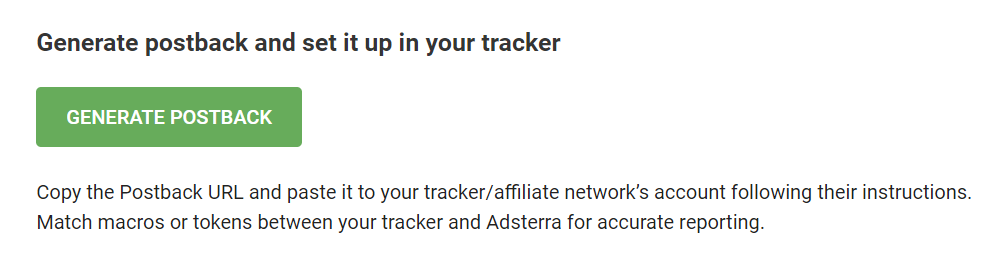
After choosing the tracker from the list (or picking Custom,) click the GENERATE POSTBACK button. You will need a URL generated, so please copy it to the clipboard. You will then specify this URL on the tracker’s side.
4. Paste the Asterra postback URL to your tracker
After you have generated and copied the Postback URL, please open your tracker/affiliate network’s account and paste the postback from Adsterra as required by their instructions. Add your Adsterra username to the link.
In this example taken from the BeMob tracker, we have to replace the universal placeholder NAMEOFADVERTISER with an actual advertiser’s username.
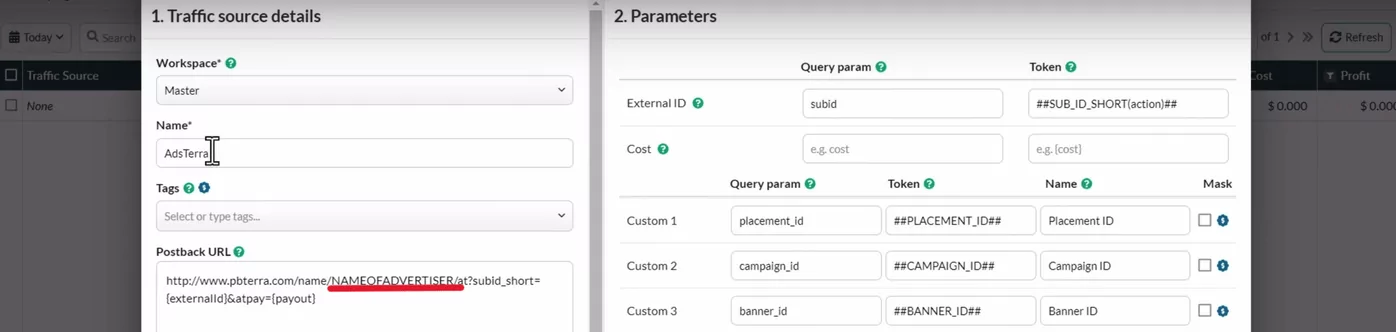
Note: if you want to record several events, you will first need to generate postbacks for each of these in Adsterra.
5. Match tokens (macros) data to enable S2S tracking
That’s the most important part of the Adsterra S2S tracking setup. You need to match macros or tokens between your tracker and Adsterra. This will enable accurate reporting between the two servers.
Look for the {clickid} analog on your tracker or affiliate network. It may be sub1/externalid/clickid/cid/ref_id or any other identifier.
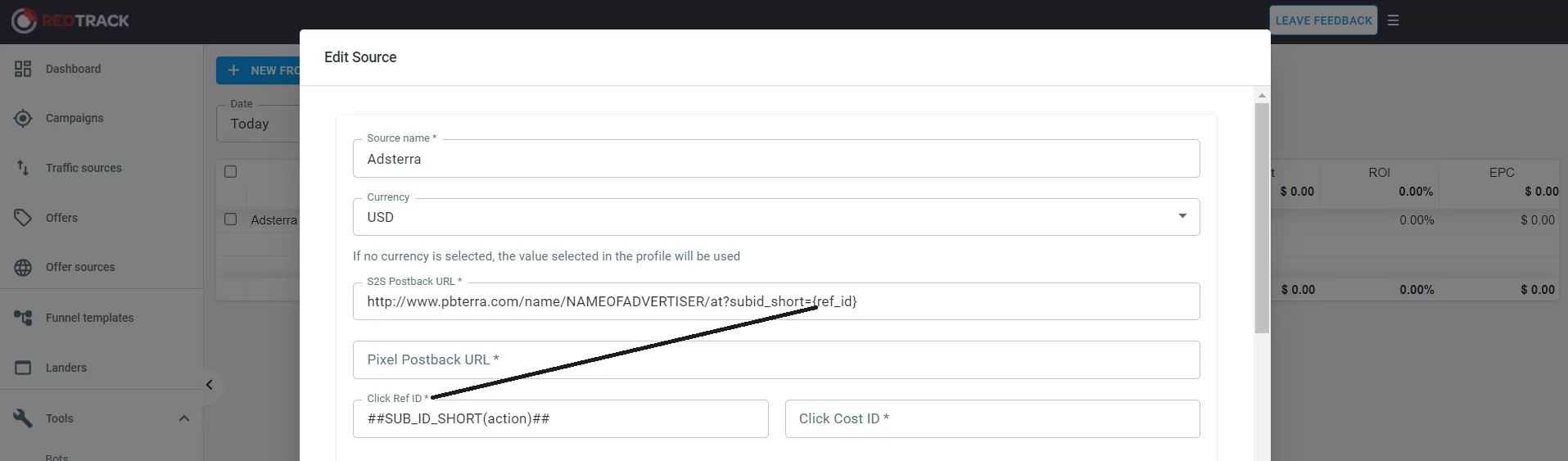
Paste the ##SUB_ID_SHORT(action)## near the {clickid} field if your tracker has not already provided this option.
See how it works with RedTrack. Here, clickid stands for ref_id, so we placed the ##SUB_ID_SHORT(action)## right in this field.
Another example is taken from BeMob. The tracker has already added ##SUB_ID_SHORT(action)## near its External ID parameter.
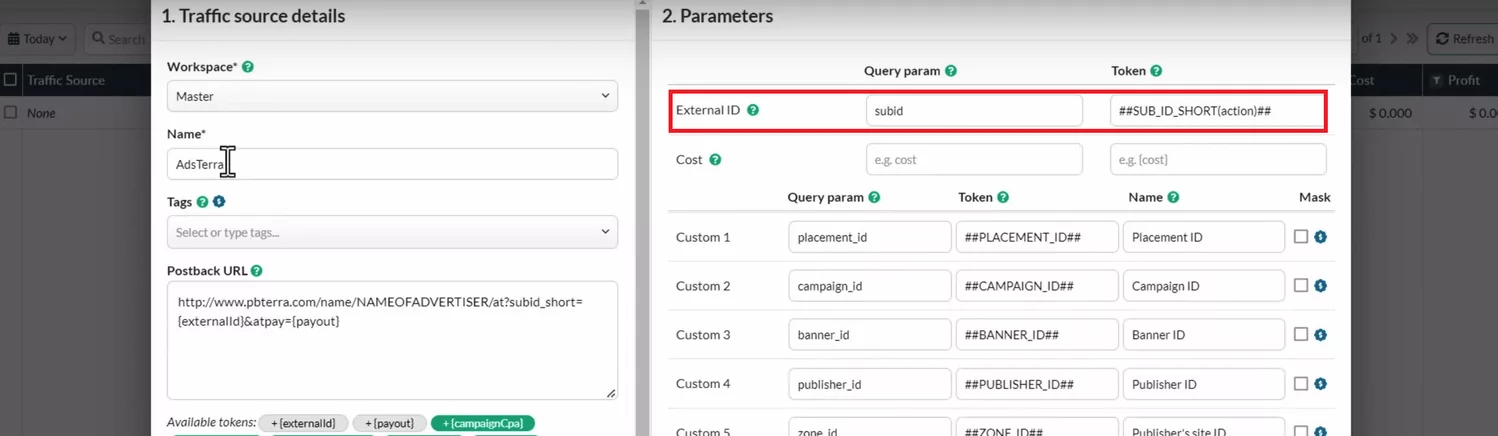
We also recommend adding the ##PLACEMENT_ID## placeholder to pull stats of ad placements’ performance and collect enriched ad metrics. See all Adsterra parameters you can monitor.
6. Take an offer to advertise and form the campaign URL
You will now need to form the campaign URL; it’s a link to your landing page or an offer you pick from your affiliate network. We recommend picking offers with fast and simple conversions because you must complete this conversion to ensure the integration works.
Fast and simple conversions include opt-ins, installs, downloads, and signups.
Paste the offer link to the tracker. Ensure you’ve included Adsterra’s obligatory token ##SUB_ID_SHORT(action)## to the offer’s URL, replacing the corresponding variable.
7. Check the offer URL
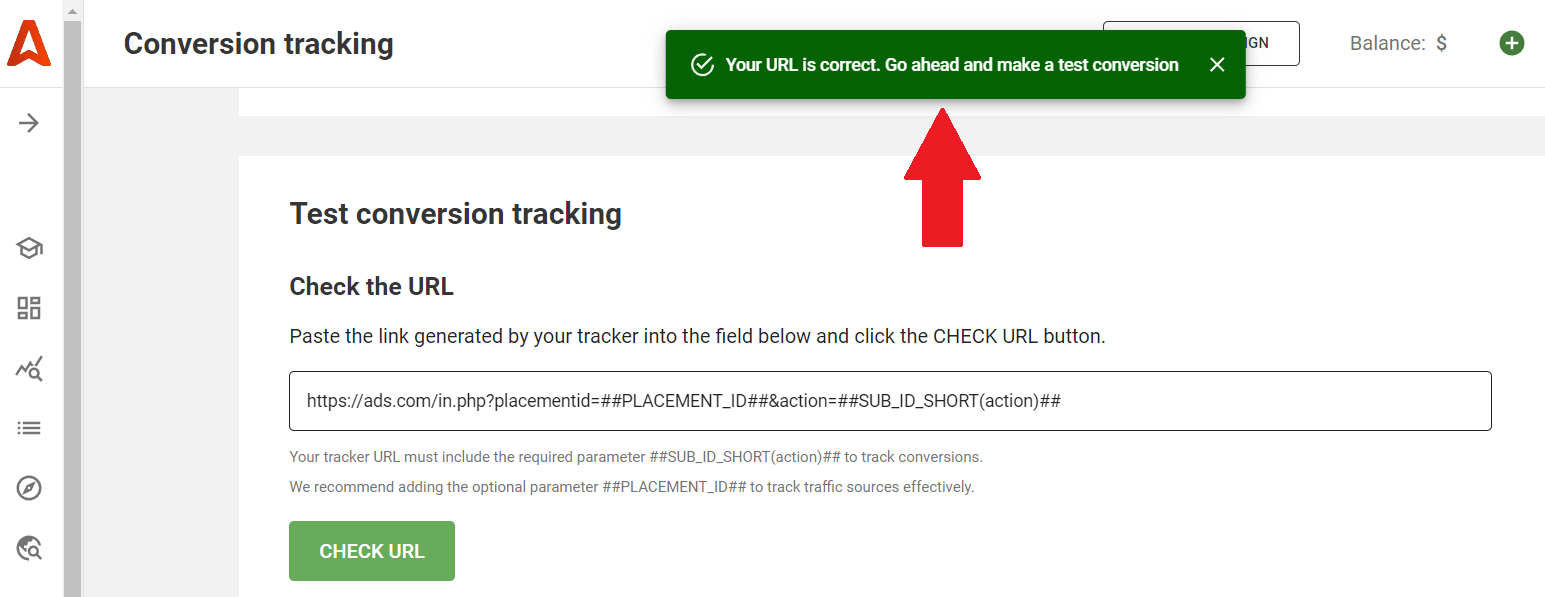
Go back to Adsterra -> Conversion tracking and paste the URL from the previous step to the appropriate field. Click the button to validate the link.
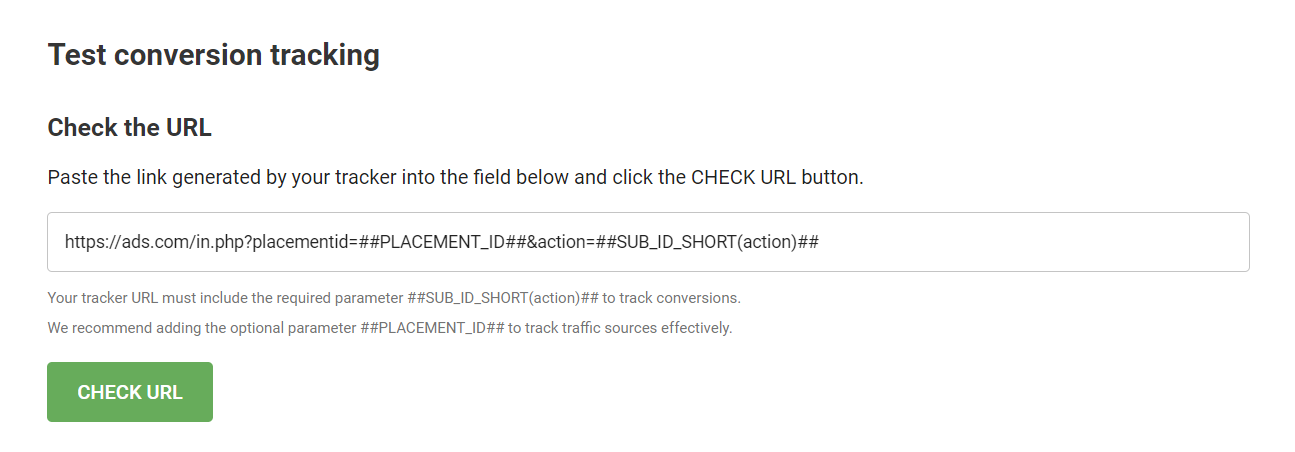
If the link is OK, you’ll receive a system message “Your URL is correct. Go ahead and make a test conversion.”
8. Make a test conversion
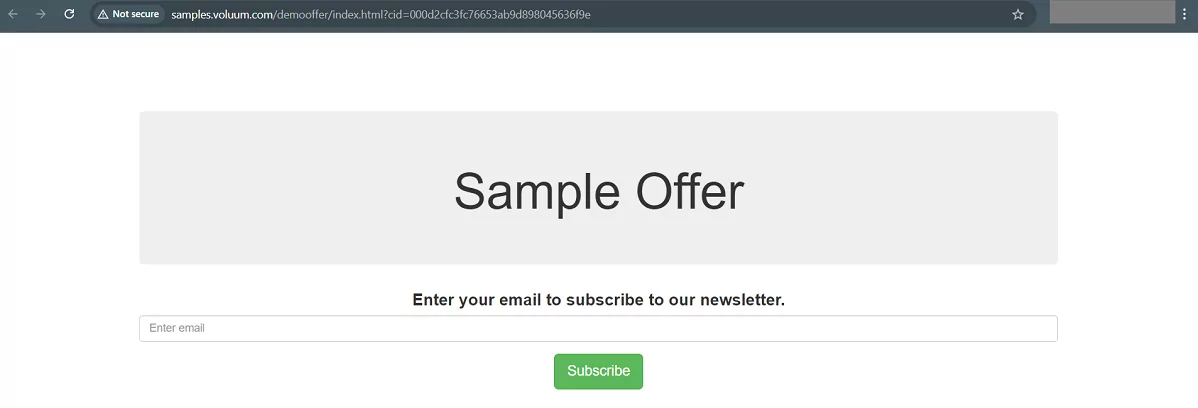
After you check the offer URL for proper token placement, scroll down and click the MAKE A TEST CONVERSION button. You will be redirected to your offer’s page. Please complete the conversion as if you were a user. In multi-event campaigns, please complete all actions you’re going to record.
The offer URL’s status will remain Pending until you complete the conversion. Refresh the page or click CHECK STATUS to ensure the offer URL’s status has changed to VALID.
You can update the status state by refreshing the browser page or by clicking Check status next to each URL.
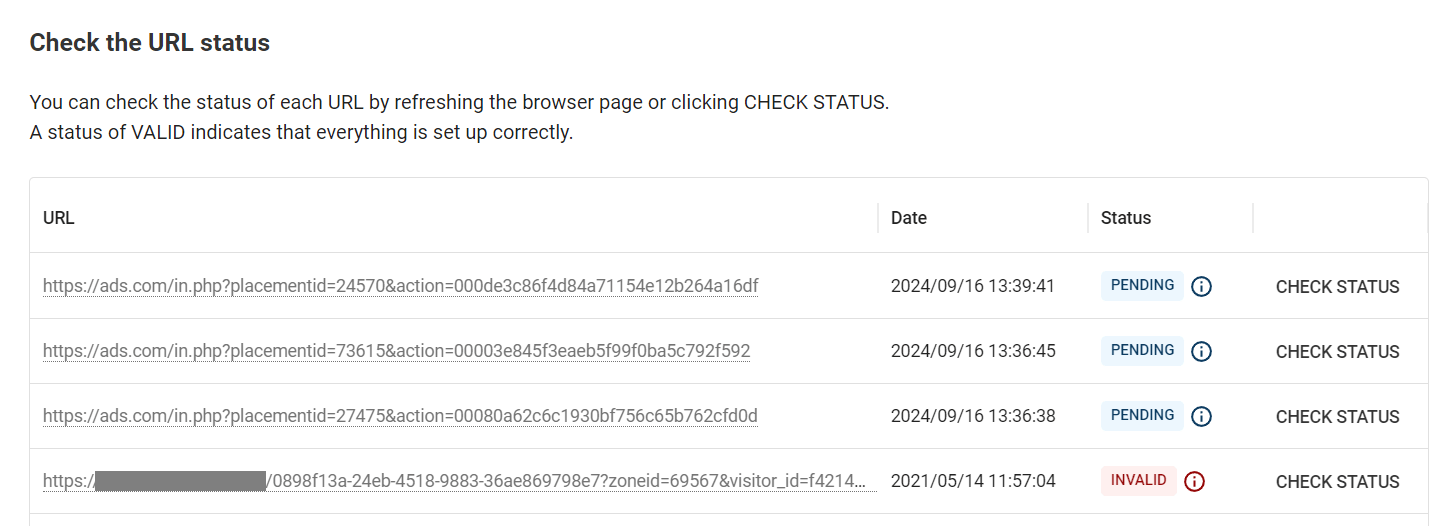
See Adsterra’s tips for checking URL statuses:
- VALID. You have successfully integrated Adsterra and your tracker or affiliate network, and now you will get all conversions controlled.
- INVALID. If you see this status, please return to your tracker and check if you placed the ##SUB_ID_SHORT(action)## properly. On your Adsterra account, you will also see an alarming clue if some obligatory tokens are missing.
- PENDING status means you will need to complete the conversions and wait about 5 to 10 minutes till it posts back. The status will change to VALID if everything is done correctly.
Adsterra’s integration support:
To simplify this process and enhance youe performance, Adsterra has developed lightweight integration with the most popular third-party tracking platforms. Supported integrations typically include documentation for configuring parameters within platforms such as:
Accurate tracking leads to wise spending and even more profitable advertising. Ready to start?
Questions we get asked about S2S:
What is S2S tracking?
Server-to-server (S2S) tracking offers a method for transmitting conversion data directly between your server and an ad platform’s server, excluding the user’s browser. This method is also called “cookieless” because it doesn’t rely on third-party cookies. The S2S approach replaces the reliance on tracking pixels within a browser by having your website’s backend securely send conversion events via server calls like HTTPS, often utilizing a postback URL.
Is S2S tracking more accurate than client-side?
Yes, absolutely. The tracking request is executed only on the server. That’s why this method is immune to ad-blockers and more accurate compared to pixel tracking. Events are recorded directly in the server logs or via APIs, ensuring that conversions are not missed. S2S relies on first-party data, making it more resilient in a cookieless world when client-side methods fail.
What is the difference between S2S and pixel tracking?
A marketing pixel is a 1×1 px digital image integrated into the website’s content. It’s unreliable since browsers can block personal data storage in cookies, and conversions won’t be attributed. Ad blockers and privacy settings can hide nearly half of conversions from tracking pixels. S2S tracking is essential for affiliate campaigns as it provides server-side tagging advantages. Conversions and transactions are tracked server-side, which increases accuracy by up to 40%.
Why adopt server to server tracking?
Server-to-server tracking can improve reporting accuracy and increase security compared to traditional pixel tracking. It’s helpful for affiliate marketers, direct advertisers, and app developers who need to validate data with higher precision. Implementing server-to-server tracking also helps businesses comply with privacy regulations by controlling data transmission.
What are the benefits of S2S tracking?
Implementation of S2S tracking allows businesses to have direct control over how customer data flows to advertising platforms and analytics tools. You can filter or anonymize sensitive data before it leaves your server, ensuring compliance with GDPR and CCPA. With server-to-server tracking, businesses can keep user data within required geographical limitations for compliance.
Does S2S prvide advanced analytics?
Server-to-server (S2S) tracking offers in-depth analytics by pulling granular conversion data directly from your server. This includes sale value, device, browser, and referral source. This detail allows for comprehensive reports that pinpoint the most valuable channels, creatives, and placements. You can also segment your audience, track multi-event customer journeys, and measure the true ROI of your marketing efforts.