In affiliate marketing, Postback URLs and Backlinks are often considered advanced tools. We at Adsterra strongly object to this point of view. Prompt and informative tracking is something that should be an initial part of any affiliate marketing activity, whether it is a short-term, one-GEO campaign or a multi-GEO promo strategy.
Both beginner and pro affiliates should have a clear picture of measuring their efforts’ efficiency and assessing traffic sources, when working with affiliate programs. An excellent topic for a tutorial, isn’t it? This time we are going to puzzle out some common difficulties related to understanding how Postback URLs’ and Backlinks work. A firm step towards data driven decisions.
The A to Z Postback URL setup
A practical guide on how to set up a postback URL and connect Adsterra, a postback URL tracking system, and an affiliate network.
What is a Postback URL in affiliate marketing?
Postback URLs are URLs through which the affiliate network or affiliate program passes conversion data to the tracker, and it, in turn, sends it to the traffic source.
Through URL Postback parameters, the affiliate network informs the affiliate marketer about the completed conversion. In turn, a tracker, by activating the URL Postback of the traffic source, reports about this event.
Postback URLs allow tracking servers to communicate directly with each other and transfer information from server to server. That’s why Postback is also called S2S Postback.
Generally, you can track conversion data in two ways:
- using Postback URLs;
- using pixel tracking.
Most affiliate or CPA networks use Postbacks to produce reports when a conversion occurs. Traffic sources are usually also technically capable of receiving conversions via Postback URLs. The only exceptions are Google and Facebook, which track conversions using their conversion pixels. Trackers typically allow you to use both ways.
How Postback URL tracking work?
Once laid out, the Postback topic becomes transparent. Let’s see what happens under the hood of how postback URL works.
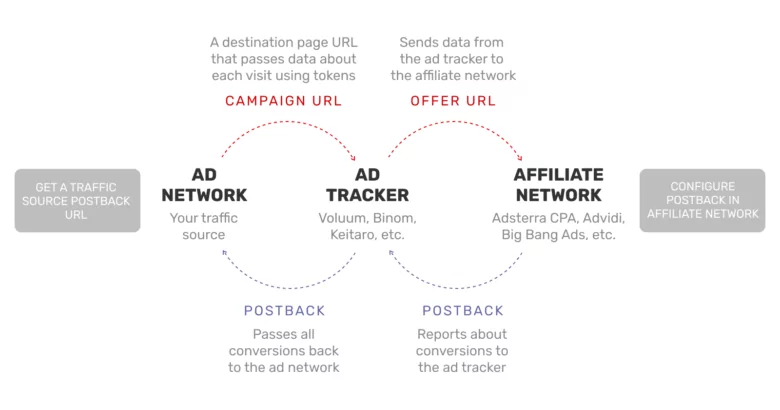
You can see from the infographics below that there are two reverse data transfers. The affiliate network sends conversion data back to the ad tracker and the tracker back to the traffic source.
- A user clicks on an ad in a traffic source.
- The ad network sends information to the tracker using tokens regarding each specific click.
- The user is redirected to the landing page via the tracker by clicking the ad.
- The tracker transmits information to the affiliate network using tokens about each specific redirect to the offer.
- The user performs the target user action.
- The affiliate network activates the Postback URL and sends the conversion data back to the tracker for further tracking by the affiliate marketer.
- The tracker program automatically starts the Postback URL of the traffic source.
You can see from the infographics below that there are two reverse data transfers. The affiliate network sends conversion data back to the tracker and the ad tracker back to the traffic source.
Essential components: click IDs, parameters, and conversion data
Conversion tracking explained
When a user clicks on an ad, the traffic source (like Adsterra ad network) generates its click ID value. The traffic source then sends this click ID to the ad tracker. The tracker generates a unique identifier based on the information received from the traffic source and assigns it to each click of that visitor. Next, through the tracking link, the tracker substituting the click ID value transmits the unique identifier of the click to the affiliate network.
If a conversion takes place, the affiliate network activates the Postback URL for the tracker, which will indicate the click ID of this click.
In the postback URL, the affiliate network passes the unique click ID back confirming that a particular visitor initiated the conversion. In other words, the tracker only accepts the Postback URL from the affiliate network, which contains its click ID value.
When the tracker receives a Postback URL from an affiliate platform with its click ID, it will activate the traffic source Postback URL and send it back with the click ID value. The postback URL of the traffic source must contain precisely the click ID value that was passed on to the tracker via the campaign URL.
You can get additional parameters in the Postback as well: the payment amount, the transition time, the order number, and so on. The information will depend on what macros (or tokens) you select.
Postback URL examples used in affiliate marketing
Let’s inspect an example of a Postback URL and see which parameters it operates.
Understanding postback URL parameters and their usage.
https://domain.com/postback?subid={sub2}&payout={money}¤cy={currency} - “domain.com” is the URL of the offer that an affiliate marketer enters.
- “?” is the symbol that separates the main body of the link from the tracking parameters.
- “&” is the symbol that separates different tracking parameters.
- subid (the click’s unique code), payout, currency — these are tracking parameters that transfer values. They are unique for each tracker.
- {sub2}, {money}, {currency} — these are the affiliate network’s tokens that will be replaced with values when the link is activated. They are unique for each affiliate network.
As soon as the user performs the target action, the affiliate network platform will activate this URL, and the tokens will be replaced with specific information.
The activated Postback will look like this:
https://domain.com/postback?subid=1111111&payout=1¤cy=usd
To summarize, the tracker and traffic source only provide templates.
To get a ready-made Postback URL, you need to match the tokens of target platforms, for example, an affiliate network and a tracker. In the tracker, the unique click code is subid.
On the affiliate network, the value of the unique click is transmitted by the {sub2} token, which means that in the postback link, you need to write subid = {sub2}.
https://domain.com/postback?subid=REPLACE&payout=REPLACE¤cy=REPLACE
What macros (tokens) you can track with Adsterra
It would be best to keep in mind that “##” is part of the macros. It’s what makes the macros dynamic. So don’t miss it when you are adding macros to your tracking system.
Here is the list of the most used tokens in Adsterra
##PLACEMENT_ID## — ID of the actual source.
##CAMPAIGN_ID## — ID of your advertising campaign at Adsterra’s platform.
##SUB_ID_SHORT(action)## – click ID. This one is a must-have when you are launching a performance-based campaign.
##USER_OS## — Operation System on the user’s device.
##USER_CARRIER## — ISP.
##REMOTE_LANGUAGE## — User’s browser language.
##BANNER_ID## — ID of Banner/Creative. This one is handy when you run an advertising campaign with Native Banners or Social bar ad units. With the macro added to the link, you can check performance for all of your creatives on the campaign.
##REMOTE_COUNTRY## — Full name of Country.
Pricing tokens are used for passing your costs to your tracking system
##COST_CPM## — for CPM based campaigns.
##COST_CPA## — for performance-based campaigns.
##COST_CPC## — for CPC based campaigns.
Tokens for advanced analytics
##BROWSER_NAME## — User’s browser.
##COUNTRY_CODE## — 2symbols Country Code (ISO 3166-1 alpha-2).
##COUNTRY_CODE_A3## — 3symbols Country Code ( ISO 3166-1 alpha-3 ).
##REMOTE_IP## — User’s IP.
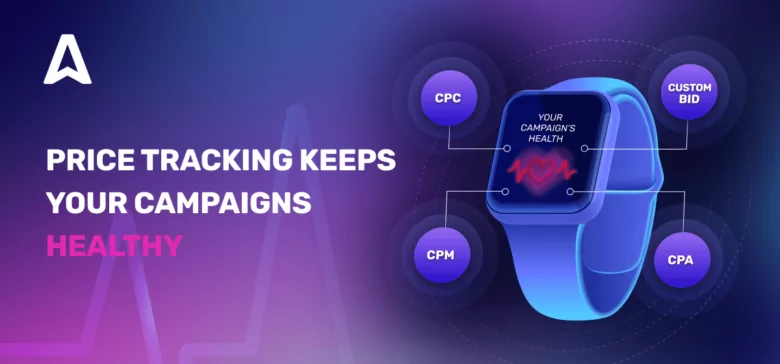
Track each CPM, CPC, or CPA bid and make split-second decisions. Learn how you can use pricing tokens from Adsterra ad network.
Why Postback URLs tracking is important in affiliate marketing
All platforms involved in conversion tracking keep track of incoming user clicks.
- Traffic sources get paid for the clicks.
- Marketers, without counting all clicks, will not be able to cross-check with the affiliate network the exact number of conversions, and as a result, may not get their due payment.
- Affiliate networks must understand how much money to ask from the advertiser, how much to pay the affiliate marketer, and what commission to withhold. That’s why all platforms give each user click a unique identifier. In other words, each click has its unique conversion value.
If you want a quick brush-up on setting up a CPA campaign, here is a helping hand, even two: a guide on Adsterra Self-Serve Platform (SSP) and Campaign Setup Guide to Get Top Traffic Faster.
Multi-event tracking system
Conversion events and multiple event tracking go hand in hand. Tracking conversions alongside other events is a great idea, as it allows you to monitor user behavior and targeted user actions throughout the funnel. This tracking method provides you with deeper funnel insights and more accurate budget spend decisions.
With multi-event tracking, all the conversion events of user behavior are taken into account within a single campaign: click, install, trial start, subscribe, etc. Meanwhile, traditional tracking methods often pass conversion data for only one event, that is, a conversion.
How to earn more with a Backlink URL?
A backlink is also an essential tool based on the Smartlink algorithm that automatically selects the most suitable offer for the user who came through the link.
Thanks to Backlinks, no traffic that doesn’t correspond to the tested offer by any parameter is lost. Your traffic doesn’t go back to the traffic source back but instead distributes between the best-matching offers.
And you don’t necessarily need to handpick these offers or use multiple links. Everything can be done within a working advertising campaign by creating just one Backlink. Using Backlink allows you to get maximum income and significantly save precious time.
1. How do Backlinks work?
Within a campaign, some traffic may not suit the offer: wrong GEO, wrong operator, wrong device type, any limits set by the advertiser.
Backlink allows you to find a place for these, at first glance, useless visitors. It will automatically determine where the user came from, which device, which operator he has, what type of connection and direct them to a reasonable offer.
The Backlink system suggests offers based on the audience behavior, directing users to the best-selling landing pages. As a result, the best offer will be found for absolutely all types of traffic.
2. How to use Backlinks effectively?
It is most efficient to use Backlink for residual traffic. The best choice is to create a stream in the tracker where users who do not meet the criteria of the main offer will be sent.
You can, of course, use Backlink as your primary monetization tool. But then you need to consider that the offers often change, have different payouts, and may not precisely correspond to the target audience of the tested offer. The Backlink doesn’t allow you to select offers or determine which one is the one that converts best.
In this case, you can consult your Adsterra Account Manager or online support about what results in more conversions and create a particular advertising campaign for that offer.
If you want to use a Backlink in your affiliate marketing campaigns with a CPA Network, sign up with any service offering a Backlink URL and insert it into your Adsterra offer settings. All stats and payouts earned from the Backlink are found on your dashboard of the service you use.
The A to Z Postback URL setup
Learn how to connect ad networks, affiliate networks, and tracking systems in our guide (with screenshots.)
Final thoughts
Conversion tracking with a marketer’s postback URLs and no-traffic-loss solutions, like Backlinks, are essential tools in affiliate marketing for data driven decisions.
They will significantly help you preserve your budget and simplify the process of optimizing and scaling your advertising campaign. With Adsterra ad network, you can flawlessly set up an integration with the top tracking platform on the market: Voluum, BeMob, Binom, Cake, Keitaro, HasOffers, and other advertiser’s tracking system. And our AI-powered Smartlink tool will keep you safe from wasting money if the traffic you bought didn’t match the offer.
More data, less money for tests, more opportunities to get better payouts. Fly high with Adsterra ad network!
FAQ About Postback URLs
Why is postback tracking useful?
Postback tracking is useful in digital marketing because it lets advertisers to track conversion metrics directly between an ad network and a server, without relying on a user’s browser. Tracking platform provides accurate, real-time data, even when cookies are blocked.
How do I create a tracking URL?
A conversion tracking URL is created when you add special parameters to a destination link. This way, you can measure user actions. It can be a basic URL with attached tracking tags, such as source, campaign, or medium, using query parameters. Alongside, analytics tools or ad platforms generate these automatically, allowing marketers to monitor clicks, traffic sources, postback requests, and conversion events.
What is the difference between API and postback?
An API and a postback url are both reporting conversions between systems, including conversion events, postback requests, query string parameters, transaction id, etc. In the digital marketing industry, there are a few names for tracking conversions. Postback is the buzzword, but there is also conversion API with Facebook, postback url with Adsterra ad network, or Google Analytics postback url, alongside names like cookieless tracking, S2S tracking, tracking pixels, etc., and a global postback url, specifically triggering a global reach.
Which ad networks provide postback URL integration?
Adsterra is one of the ad networks that provides postback URL integration. It is among the best platforms that support postback urls for tracking conversions for affiliate marketers and a recommended platform for robust postback tracking.