With its 3+ billion active users, Facebook offers a powerful platform to cash in on your content! It’s the primary way to generate revenues for creators, entrepreneurs, and publishers. How can you make money through Facebook? It usually comes to affiliate deals, Facebook Live and selling via a marketplace, and we’ll discuss the workable strategies to generate revenues below.
And a secret sauce? Sure! You can earn extra money by adding monetization tools from third-party ad networks. These methods are especially crucial for bloggers who are not eligible to use Meta Business Suite and Facebook native tools: users from Pakistan, Nepal, Zimbabwe, and other countries.
By the end of this article, you’ll get the key scenarios with clear steps and real-life cases on how to make money on Facebook.
How Facebook Content Monetization works in 2026
So, what does “monetized” mean on Facebook? Facebook Content Monetization lets eligible creators monetize their original Reels, long-form videos, Stories, photos, and text posts. In 2024, Facebook rolled out its updated Content Monetization platform and invited over 1 million creators to get early access. It works as a combination of several different monetization options that were previously separate.
Publishers are able to check their earnings, content performance, and monetization eligibility through their Professional Dashboard or Meta Business Suite. The income is based on the performance of the content, qualified views, audience interaction, and other factors and not on a pay-per-view basis. As of 2026, access to Facebook content monetization program is invitation only.
Best ways to earn money on Facebook and what each one pays
There are quite a few ways of making money using Facebook: from native programs participation to sponsorships and external website monetization.

The table below is a concise overview of what is required of the creators, who pays in each case, how the money is paid, and which way suits which audience. We put together details on how much Facebook pays for views, Stars and text posts, details about making money with Facebook Reels, videos, Live, Stories, and brand deals, affiliate links, and sales on Facebook. Requirements and availability vary by country and account.
| The Way | Who pays you | Entry requirement | How you get paid | Best for |
|---|---|---|---|---|
| Facebook Content Monetization | Meta | Invite only, eligible Page or professional profile, policy compliance | Earnings based on qualified views and content performance, no fixed rate | Reels creators, bloggers, video publishers |
| Facebook Stars | Fans, through Meta | Generally 500 followers for 30 days, eligible account, country | $0.01 per Star received, 1,000 Stars = $10 | Livestreamers, gaming creators, engaged communities |
| Facebook Subscriptions | Subscribers | Audience and engagement thresholds, eligible Page | Recurring monthly subscription fees | Creators with loyal followers |
| Brand deals, sponsored posts | Advertisers, brands | Relevant audience, engagement, compliance, paid partnership label | Negotiated fees, campaign payments | Influencers, niche pages, established publishers |
| Affiliate marketing | Affiliate networks, affiliate programs | Approval, relevant content, compliant promotions | Commission on qualifying sales or leads | Reviewers, bloggers, niche communities, content publishers |
| Facebook Shops | Customers | Eligible business, supported country, commerce-policy compliance | Product sales, revenue minus costs | Ecommerce businesses, product creators |
| Facebook Marketplace | Buyers | Eligible account and compliant product listings | Agreed selling price minus applicable fees and costs | Local sellers, resellers |
| Selling digital products or services | Customers | Product or service, payment or checkout method | Revenue per sale, booking, or subscription | Educators, consultants, digital creators |
| Display advertising | Advertisers via ad networks | Monetized website, Facebook traffic | CPM, eCPM, CPC, etc. | Website publishers, bloggers, news sites |
| Smartlink ads | Advertisers via ad networks | Approved monetization tool, compliant traffic, landing page | Revenue from qualifying ad impressions, clicks, or other payable events | Publishers and affiliate marketers |
Takeaways:
- Facebook’s own tools compensate for content performance and follower support with access by invite and eligibility requirements.
- External monetization can earn money through website visits, ad impressions, affiliate conversions, and sales.
- A mixture of monetization techniques can bring diverse revenues without relying only on being eligible for payment by Meta.
- Always follow your platform policies about placing ads, Smartlinks, affiliate links, and paid content.
Accepting Facebook Stars

Facebook Stars is another way to make money from your viewers’ support. People send you Stars while watching live broadcasts, Reels (in selected markets), or on-demand videos. That’s how it works: viewers send Stars, and Facebook pays you 1 cent for each Star. Thus, a virtual good turns into real money.
Benefits: Stars help maintain close connections with your audience and interact in real time. You will gain even higher popularity when giving shout-outs to the most loyal and frequent Star senders during streams or in the Comments section.
What you need to enable Facebook Stars:
- Age: 18 years or older
- Following: At least 500 followers
- Account age: Minimum 30 days
Generating revenue with Facebook Live
Facebook Live is a great way to maintain high engagement. You can make money through Stars, which viewers will purchase and give away during live streams. Or, you can enable in-stream ads, short commercials that are included before, in the middle, or right after the broadcast. Finally, you can include brand promotions in your broadcasts.

To use Facebook Live to generate revenue, apply these tips:
- Set up your Live equipment: test your camera and mic in advance
- Choose a topic that is in your niche and resonates with your followers’ interests
- Plan your content in advance.
- Interact with your viewers by responding quickly.
- Promote your live broadcasts ahead of time to reach more viewers.
Monetizing Facebook Reels
This method is also based on paid ads and brand promotions, like Facebook Live videos. When you create a piece of content, Facebook can use it to advertise relevant products right on top of your video. These are Overlay ads. You can choose between Banner and Sticker ad types. You can also opt out of Banners via the Meta Business Suite, as they’re added automatically when you participate in the in-stream ad program.
Facebook Subscription
The Paid Subscription feature allows creators to share exclusive events or premium content for a fee. Subscribers can support you by paying a small amount of money to get immediate access to premium options on Facebook.
What you need to start making money on Facebook with subscriptions:
- A Professional Mode for your Facebook account
- At least 10,000 followers.
- 50,000 or more post engagements or 180,000 minutes of watched content in the past 60 days.
- An invitation (the feature is now available after invite only).
Brand deals, affiliate links, and sales on Facebook
Facebook creators can make money independent of Meta’s built-in monetization systems using sponsorships, affiliate marketing, and sales.
- In brand partnerships, you will be promoting brands or products in exchange for a fee.
- Affiliate marketing will earn you money by using affiliate links where your followers purchase products qualifying for the commission. Facebook also has affiliate partnership features for eligible creators.
- Companies can sell their products via Facebook Shops, Marketplace, or even their websites.
- Publishers can use Facebook to promote articles, reviews, and tutorials, leading them to monetized websites. They can earn from display ads and affiliate links placed there.
How to nail brand promotions:
- Build a strong and engaged audience
- Form a list of brands whose products align with your niche
- Reach out to brands; showcase your subscription base’s profile by including the number of followers, its demographics and engagement metrics
- Offer concrete ways to promote this brand’s products
- Negotiate fair commissions for your work
- Start posting branded content, staying honest with your audience about promotions
- Focus on building long-term relationships with brands
- Use Brands Collab Manager. It’s kind of a marketplace that connects brands and creators. You can opt for any type of brand promotion with a simplified interface.
Setting up a Facebook Shop

Facebook shops are a direct way to order and buy goods from a Facebook Page. Buyers can put multiple items in their carts and proceed with the payment with the checkout option. This way of making money is particularly profitable if you operate in Shopify. The two platforms have a direct connection, and sellers can boost sales, enabling seamless transactions. However, Facebook will require stores and sellers to offer the mobile checkout option. Sales will only be available on mobile devices. Shops are mostly used by companies (legal entities). Individuals prefer Facebook Marketplace, which we will observe later.
To boost sales, use the basic principles of an online store: add quality images of your goods, create great descriptions and product catalogs, provide fast and professional customer support, and use promotion banners with discounts and special offers. Remember that having a Business profile is a must for this option, as for many others.
Selling via Facebook Marketplace
The Facebook marketplace is not the same as with shops, though both strategies are aimed at prompting direct orders and sales. If you sell via your shop, you transform your Facebook page into a unique store with your product lists solely.
Facebook Marketplace is a common space for various categories of sellers to offer their products. Like eBay or Etsy, the Facebook marketplace offers opportunities for individual entrepreneurs to make money on their hobbies or side businesses.
| Facebook Shop | Facebook Marketplace |
|---|---|
| 1. You sell via your Facebook page, creating new listings, uploading all products and their descriptions 2. Business profile is needed to enable sales 3. You can enable multiple payment options for customers right on Facebook 4. Shop customization and branding available 5. Direct integrations with Shopify and WooCommerce 6. Inventory management tools for listings and goods | 1. You sell on the Marketplace like many other sellers, uploading products via personal account 2. You use your personal account to start selling. Sales and payments happen outside Facebook 3. Very few customization and branding options for sellers 4. No integrations available 5. No options for managing inventory 6. You can enable sales via the Marketplace without meeting requirements for the number of followers base |
What are the requirements to make money on Facebook for each program?
Apart from having a Facebook Page, you will need to meet several eligibility requirements to get access to monetization features like Stars and In-stream ads. Typically, creators must be at least 18 years old, live in a participating country, abide by Meta’s Community Standards and monetization guidelines, and post original content. The monetization criteria for Facebook vary from one earning program to another.
Certain programs also have follower or engagement requirements, while some are invite-only programs. Let’s sum up requirements for each program in one place.
| Monetization program | Followers needed | More requirements |
|---|---|---|
| Facebook Content Monetization | No minimum | Eligible page or professional profile, original content, policy compliance, invitation from Meta |
| Facebook Stars | 500 followers | Maintain 500 followers for 30 consecutive days, live in an eligible country |
| Facebook Subscriptions | 10,000 followers or 250+ returning viewers | Plus 50,000 post engagements or 180,000 watch minutes within 60 days, eligible page |
| Creator Fast Track | 20,000+ followers on Instagram, TikTok, or YouTube | Established external audience, qualifying video views, program acceptance |
| Facebook Shops | No minimum | Eligible business, supported location, Meta Commerce Policies |
| In-stream ads | 5 active videos with 60,000 views in total over the past two months, at least 5,000 followers | Facebook’s Community Guidelines and Facebook’s Partner Monetization Policy |
To check eligibility for Facebook Content Monetization, go to your Professional Dashboard → Monetization or visit Meta Business Suite. Review available programs, account restrictions, and payout requirements.
Even without being eligible for payouts from Meta, you can earn money from Facebook traffic, using advertising networks like Adsterra. You will require a simple website or a mini page and your genuine traffic.
What gets Facebook creators demonetized?
Facebook creators can lose monetization privileges for violating Meta’s Community Guidelines, Partner Monetization Policies, or Content Monetization Policies. The screen highlights the common reasons stated by Facebook. You can read the named policies in full by the source link below.
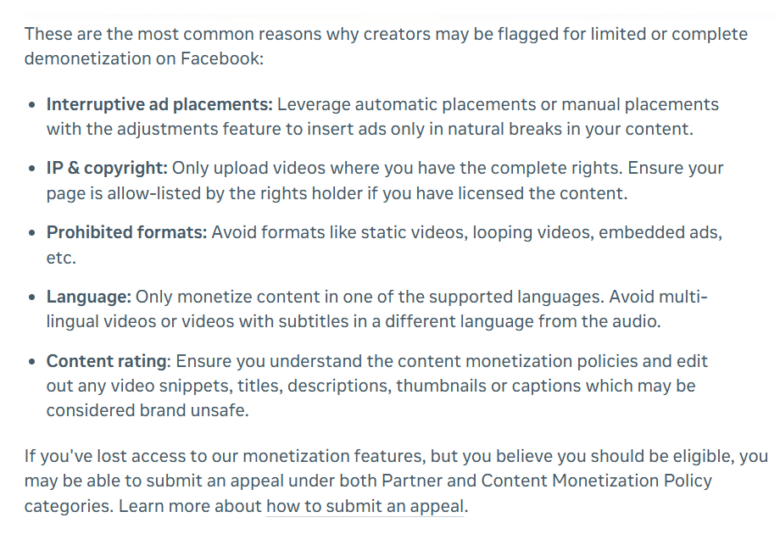
As with other social media networks, it is always advisable to keep from unoriginal content, copyright violations, fake engagement, misleading content, prohibited content, and spam. Demonetization may affect individual posts, specific earning features, or an entire account, depending on violation severity.
How to set up monetization on Facebook step by step
Here are the steps of how to make the initial setups and start making money on Facebook with native tools (then, we proceed with monetization ways that work outside of Facebook):
- Make a Facebook Page and turn on Professional Mode for your profile to get access to programs and track metrics.
- Go to the Professional Dashboard or Meta Business Suite.
- Choose Monetization to see available monetization programs.
- Ensure that you are eligible for the program by meeting policy requirements and country restrictions.
- Apply to monetization programs or express interest or sign up for Facebook Content Monetization.
- Accept monetization terms after you get approved or invited.
- Enter necessary payment and tax details in the system.
- Keep creating unique, engaging content consistently.
- Monitor closely qualified views, earnings, and account status.
- Tune the content strategy with performance data at hand.
How to monetize Facebook traffic with Adsterra step by step?
Now, let’s move on to the precise steps on how to earn money online with Facebook through advertising. The main advantage of the monetization ways we are going to talk about is that they don’t depend on Facebook algorithms. You make money on advertisements that come from other websites, those that are not in the Facebook ecosystem.
Let’s look into a few scenarios and cases one by one.
Scenario 1. Use Smartlink in your social media account

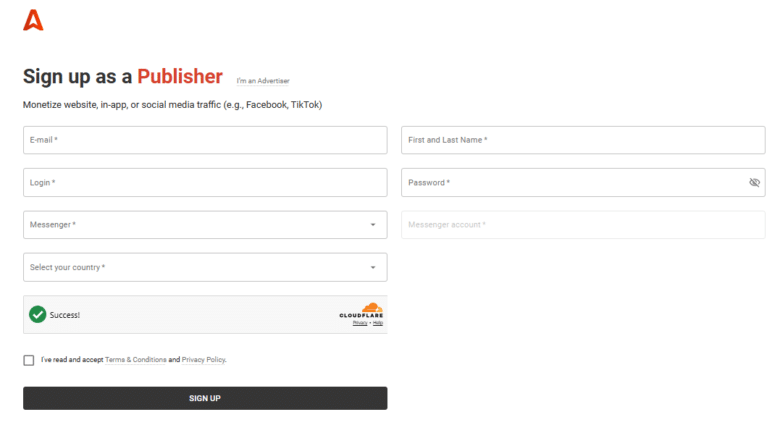
1. Register as a publisher with quick approval
2. Get a Smartlink (Direct Link) url
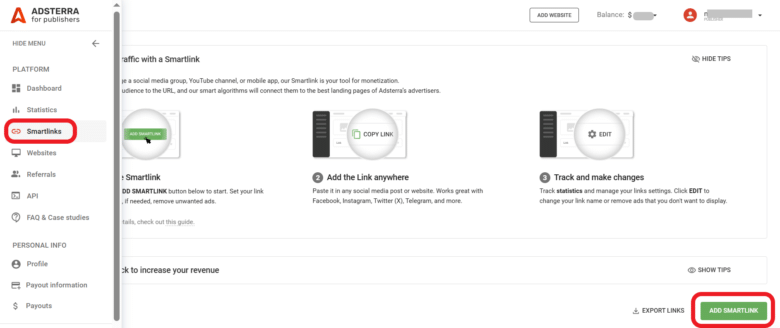
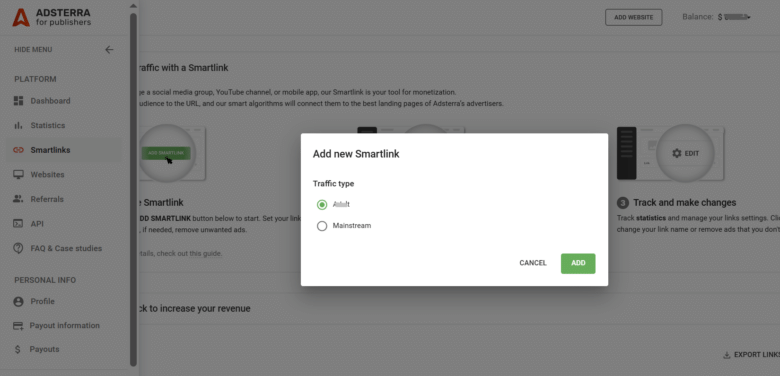
- Tap ADD Smartlink.
- Choose your traffic type: mainstream or non-mainstream to show all ads or not. We usually advise to toggle on all traffic types to increase CPM rates. Then, tap ADD.
3. Copy the script from your account
Take a few minutes until the Smartlink status turns Active, usually about 5 minutes.
Tap COPY to save the code.

4. Add your Smartlink
Copy and paste it where applicable on your social media. This is where the url shortening tool (shortener utility) becomes useful, as it helps shorten the url and ensures better and longer performance. It becomes very handy when you post your content on Facebook, Instagram, Twitter, Telegram, and other platforms. This is one of the ways how to make money on Facebook by posting links.
Since it’s a third-party service, Meta shows low tolerance to such solutions. It’s also recommended to create a simple landing page with all of the side codes and head Facebook users there (see Scenario 2 below).
Scenario 2. Prepare another monetization destination
If you plan to earn money from Facebook traffic through advertising, you can create a mobile-friendly website or landing page with additional engaging or valuable content for followers, and add your Smartlink or more ad formats on it.
Create a minimal landing page without making a website on Google Sites, WordPress, Blogger, or another platform to place ads. This move can save you from bans, as placing side advertisements is strictly regulated by Facebook’s software.
To put it simply, you can send traffic from any social media (incl. Facebook) to a website with Smartlink or more types of ads placed there, and Adsterra pays you whenever users see the ads or click Smartlink.
With Scenario 2, your steps look the same as with Scenario 1. The only difference is that you can use not only Smartlink but other ad formats:
1. Register as a publisher and get quick approval
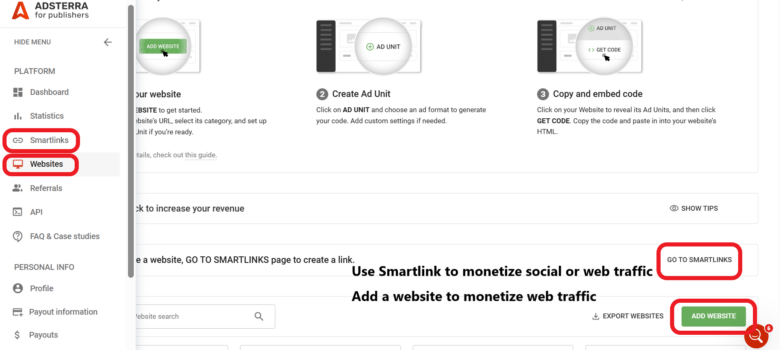
2. Add your website to the dashboard
3. Select your best ads
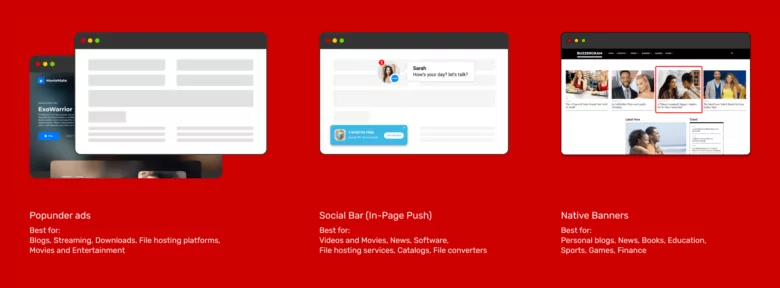
- Popunder ads are ad formats that appear underneath a web page each time someone clicks on a webpage.
- Social Bar or In-Page Push ads with up to 33% higher CTRs than web push ads are intuitive and user-friendly ads which resemble push notifications, iOS & Android widgets, and chat messages.
- Native ads are ads with attractive headlines that match page content and website design.
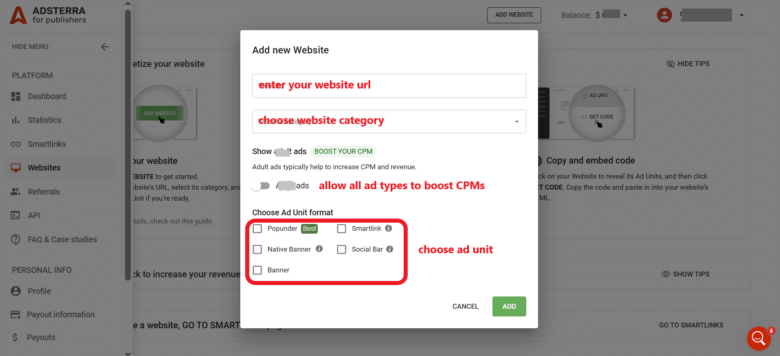
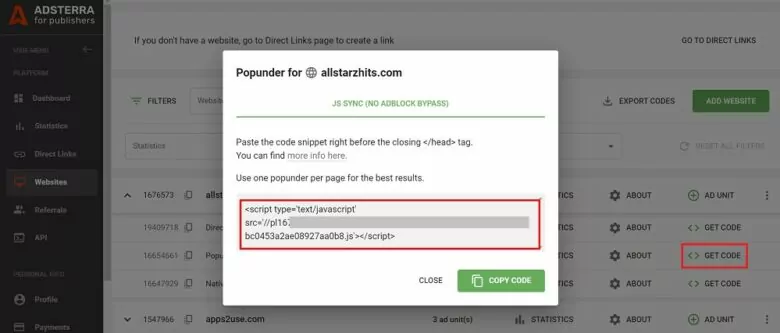
4. Get an ad code or a few ad codes and place them to your web destination page or site
Scenario 3. Use more Facebook traffic
Here, your steps look the same as with Scenarios 1 and 2, however, you diversify your traffic sources.
1. Use Facebook Ads Manager
Paid ads can be used to buy traffic and head it to show ads. Please note: it’s not a direct way of making money on Facebook. You purchase traffic to transform it into sales, clicks, etc. You can earn money showing Smartlink ads or using a landing page with ads.
2. Buy or rent Facebook groups or pages
Buying or renting Facebook groups or pages is another way of how to make money on Facebook. Adsterra’s partner gains $2,000 on Facebook traffic from scratch. He tried a few approaches, including renting more Facebook groups to earn more and keep fans entertained with the latest celebrity news from his website blog.

More real-life examples by publishers who manage traffic on Facebook
The ways to monetize accounts on Facebook are quite similar to monetizing on other social media. You put Smartlink on your social media profile where appropriate. Or you bring traffic from any social media (including Facebook) to a target web page which will contain Smartlinks along with other ads. You may get more information about it and look at the real-life examples provided by Adsterra publishers.
How do people make money on Facebook:
$15K Monthly Mixing Facebook and TikTok Social Traffic, Street-Food Authenticity, and Popunder Ads.
How to Gain $20,000 with Free Facebook Traffic [Organic Reach X Smartlink]
How to Get Paid for Facebook Traffic: Your Path to Extra Ad Revenues
How to earn money on Facebook: FAQ
How do I get paid from Facebook?
Facebook offers software to securely pay you through methods like bank transfers and PayPal. Ensure your account is set up for payouts Go to the Professional dashboard and click the SET UP PAYOUT ACCOUNT button. Facebook will ask you to enter personal info and bank details: name, last name, country, postal code, business account type (e.g., sole proprietor or joint venture), tax ID, VAT registration number (optional), and more.
Next, you will need to choose between the payment options:
– Manually add your bank account
– Add your PayPal account
Meta Pay is a versatile solution that enables transactions inside Facebook, Instagram, and Messenger.
– Meta Pay is available for eligible users (approval usually takes several weeks)
– It supports by-weekly payouts
How many views do you need to get paid by Facebook?
Requirements vary, as well as payouts. They’re based on a monetization strategy. For instance, if you prefer in-stream advertising, your entry threshold will start at 10,000 followers and 60K minutes viewed in the last 60 days (in total).
How to earn money on Facebook $500 every day?
To make $500 per day on Facebook experienced creators utilize both Facebook monetization tools (Stars, in-stream display ads, Bonus program) and side solutions like affiliate deals or Smartlink ads. For instance, creators make money solely by directing Facebook audiences to a side website or landing page with ads on it. A pro blogger, Jeremiah Yahaya, has laid out his methods of getting $1,000 payouts for social traffic. However, making such profits requires skills and persistence.
How much does Facebook pay for 1,000 views?
Facebook doesn’t pay any flat fee based on 1,000 views. Rather, how much you earn will be largely determined by content formats (videos vs. Reels), demographics, content quality (this may not be exclusive content, but still very valuable to users), and engagement (new audience vs returned viewers, loyal subscribers, shares, likes, views, comments).
Does Facebook pay content creators?
Yes, Facebook pays creators through monetization programs like Facebook Content Monetization. Income will be determined based on the performance of the content, engagement from the target audience, and availability of certain features. Creators can also earn through brand partnerships, affiliate marketing, and sponsorship posts.
Can you get money from Facebook page likes?
Facebook does not pay creators money for getting likes on their pages. But an increased number of engaged followers can help the creator in increasing the exposure and monetization of their work. The creator may also get paid via eligible content, subscriptions, sponsorships, affiliate marketing, or ads.
How do I set my Facebook to get paid?
Activate Professional Mode on your Facebook profile or create a Facebook Page. Go into the Professional Dashboard, qualify for monetization and check out the various ways to earn money. Meet Facebook’s requirements for content formats and policies, and then set up the payout account. Alternatively, use ways to make money on Facebook with third-party ads.