This article observes the most common Adsterra minimum payout options for publishers. Many of you know Adsterra as the fastest-paying ad network and an AdSense alternative, but that is not the only advantage you can benefit from. You can also expect an easy start, safe ads, high CPM rates for mobile and desktop traffic, and extra monetization options. Let’s find out how you can start making real profits.
A quick note:
If you’re already running a business as an Adsterra publisher and want to change the preferred payment system, hit the link and read the guide to updating the payment information. If you’re willing to learn about minimum deposits, read this guide for advertisers, media agencies, and affiliates.
TL;DR
- Adsterra supports payments via bank transfers, cards, digital wallets, and transfers in local currencies.
- The minimum payout amount depends on the paysystem.
- The list of transaction systems available will differ depending on the country and currency.
- The smallest amount to withdraw is $5 (for Paxum and WM); if the sum is smaller, please wait till you reach $5.
- All users must fill in the Payment information to start getting paid.
- All payouts are processed automatically, and you always know when the next transaction is.
What is the Adsterra minimum payout?
Let’s kick off with the most asked question:what’s the minimum payout for publishers? Simply put, it’s the smallest amount that is possible to get from your Adsterra account.
HOW IT WORKS:
You’ve added your website to Adsterra, sent ad impressions, and gained your first $2. This time, you can’t get your earnings, but when you hit $5, you will receive your first payout if the payment system supports this minimum amount.
This minimum amount will not always be $5; it’s defined by a payment system. Let’s go over this topic right now.
Where can you check the minimum payout?
Adsterra publishers have access to payment options right in their accounts after registration. On the vertical menu, find and click the Payout Information page (in English).
The list of payment systems available varies depending on your account type (self-serve or managed) and the country you selected when registered. For example, if you’ve selected Indonesia, you can use Local Bank transfers (in IDR). If you haven’t chosen a country, you will need to do this before moving further.

Next, scroll through all the methods, and you will see the minimum limit for each. Minimum thresholds are defined by the paysystem you choose. For Paxum, the minimum is $5, while for others like PayPal, it will be $25, for others, $100, and so on. Each method includes fees, so make sure to check these, as well. Visit our Help Center to explore all options for receiving and tracking payouts.
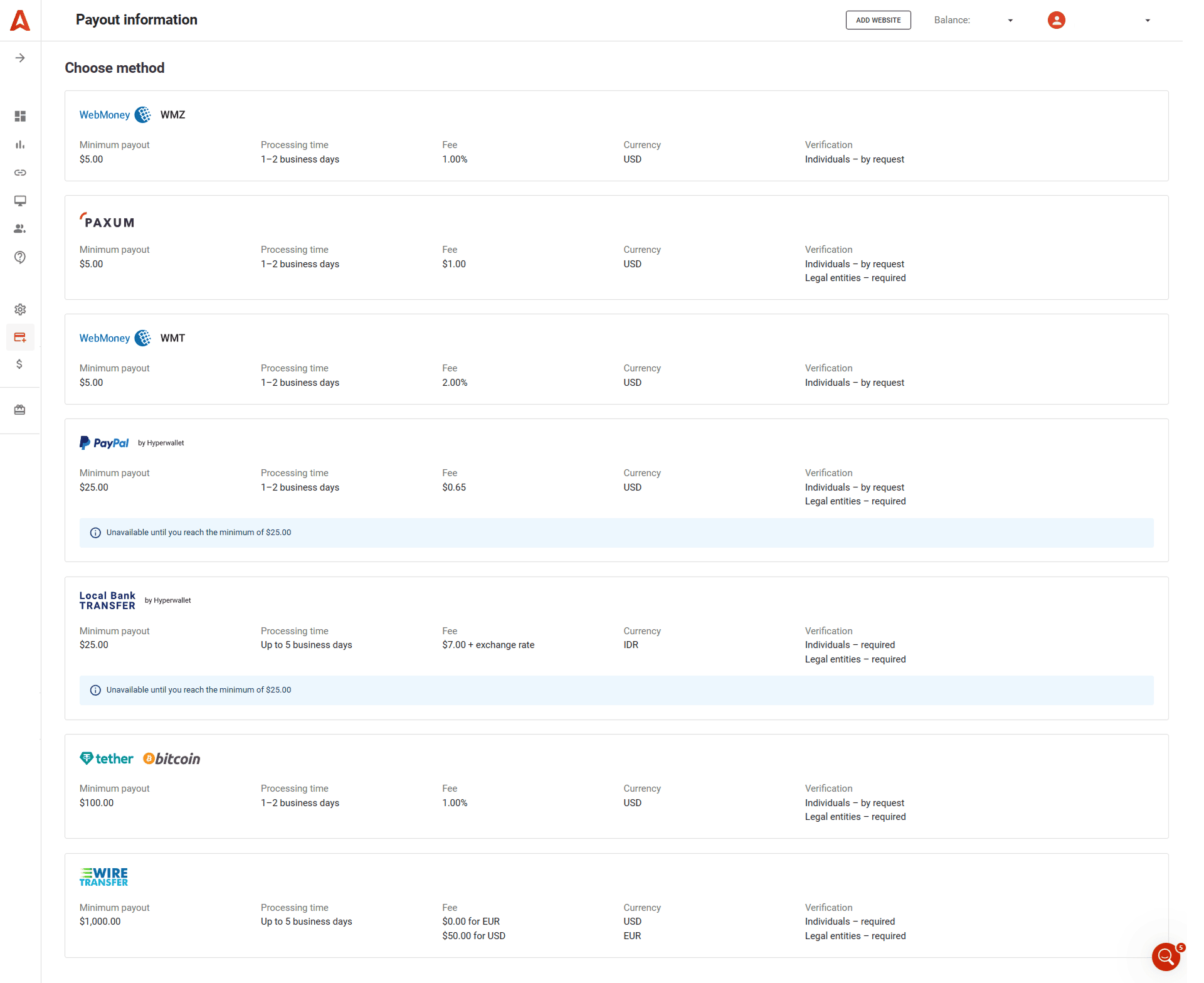
To start receiving payouts, choose one of the systems and complete the form correctly, as it will then be used for transfers. We’re going to scan through the options available in the next chapter.
Adsterra offers publishers the most required paysystems, including bank cards and digital currencies. And we’re about to add more in the future. Register today and check all monetization opportunities!
How do I get my first payment from Adsterra?
After you select the preferred payment system, you need to enter all required details. Let’s check the most common examples.
Get money via Paxum
Select your account type: Individual or Legal entity. The following fields will depend on this choice. Next, you enter the exact information you have on the Paxum platform. Here’s an example:
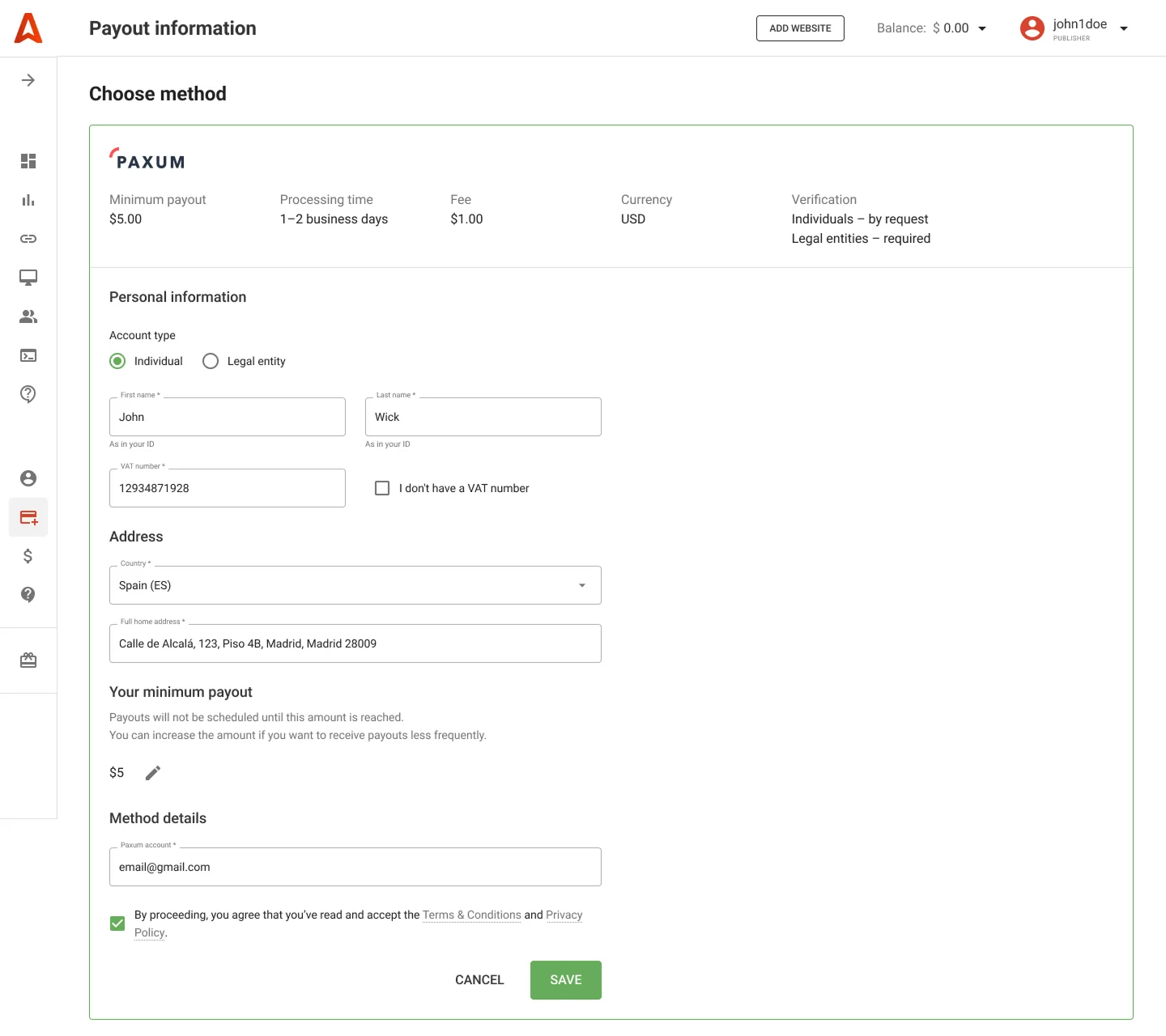
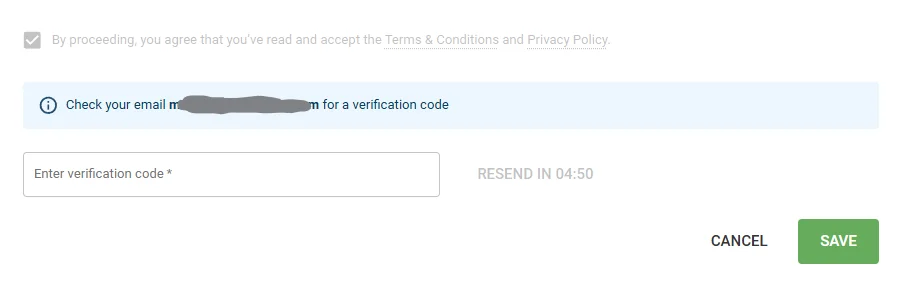
You can even change the minimum $5 payout to a higher amount. When finished, click the Save button. Next, check your inbox (the email you entered during registration) and find the verification code. Enter the code, and your payout info will be saved.
What do I need to get my first payout?
Get money via Local Bank Transfers
Local Bank Transfers are a great choice if you want to receive Adsterra earnings in your local currency. This method is available for 40 countries. Let’s check how to set it up.
One important thing: until your balance reaches $25, this method will be inactive. You’ll be able to fill in the information after earning $25.
You first enter your personal information, like in the example below:
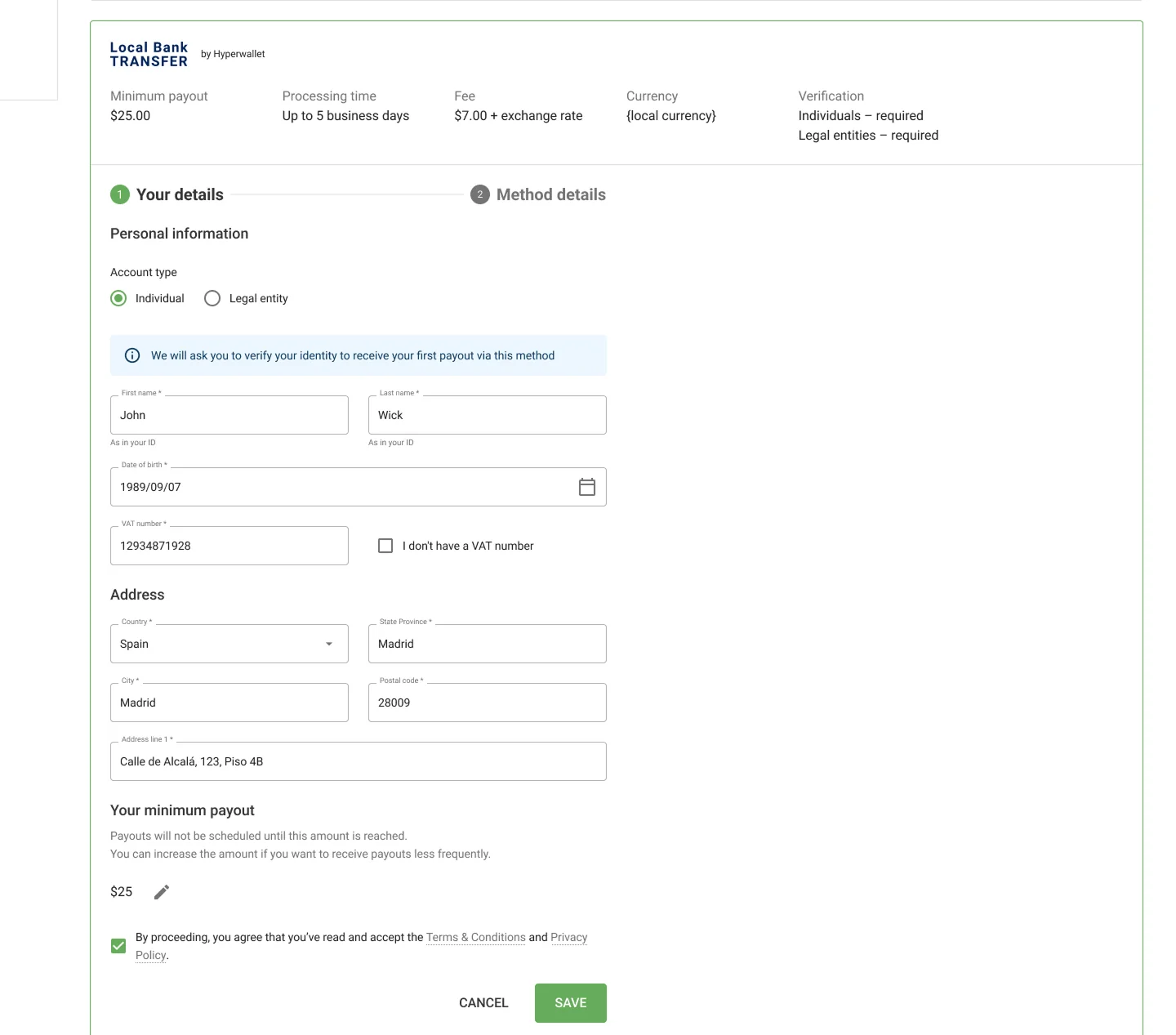
Click SAVE and enter the verification code we’ll send to your email.
Next, enter the method’s details (bank name and account number / IBAN) and click SUBMIT.
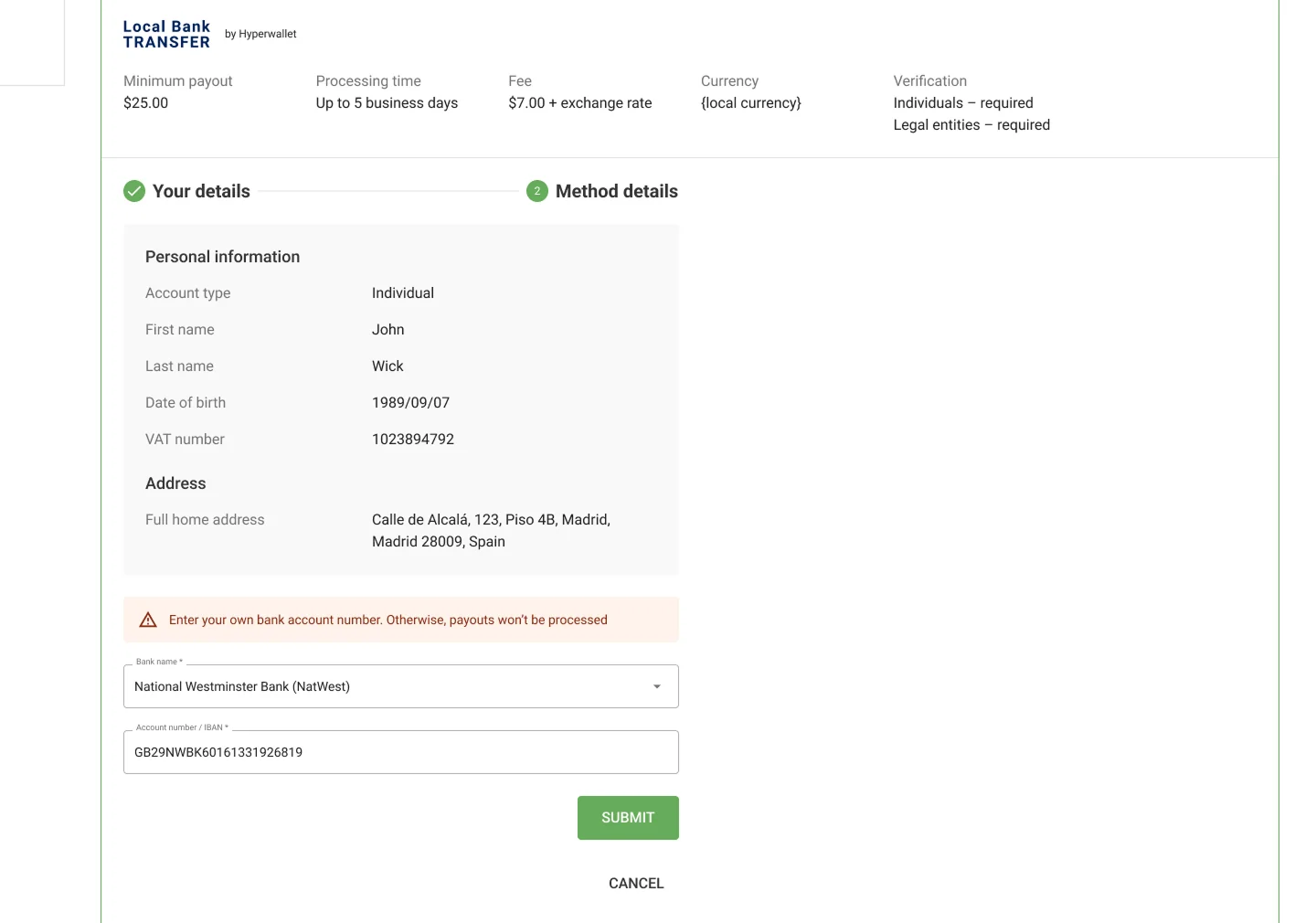
The last step is to provide the Adsterra network with identification documents or go through the KYC/KYB procedure. We’ll cover this topic later on.
Summing up this part, the list of payment options strictly relies on your country of residence and the currency you pick to receive payouts. Next, we’ll outline what exactly you should provide to get payouts.
What do I need to get my first payout?
Ensure you have completed the Payout Information. Otherwise, we won’t be able to send you earnings. The required information must match the exact data you entered in your payment system. Please double-check the form for mistakes.
Required details for different payment methods
Our advice is to log in to scan through the following content on the go. Hit the link to the Payment Information page once again. Let’s continue with the required details (all forms are in English):
PayPal (by Hyperwallet platform)
Please note: the form is partly blocked / inactive until you hit $25.
- Account type (individual or legal entity)
- For Individual type: first name and last name as in your ID, date of birth (yyyy-mm-dd), address line, city, state/province with 2-letter code, postal/zip code
- For legal entities: company name, address line, city, state/province with 2-letter code, postal/zip code, certificate of incorporation
- Your PP registration email
Visit this page with a step-by-step guide to adding PayPal.
WM transfers
- Account type (individual or legal entity)
- For individual type: first name and last name as in your ID, date of birth (yyyy-mm-dd), address line, city, state/province with 2-letter code, postal/zip code
- For legal entities: company name, address line, city, state/province with 2-letter code, postal/zip code, certificate of incorporation
- Your WMZ/WMT account
- VAT (only if applicable for your country)
Paxum
- Account type (individual or legal entity)
- For individual type: first name and last name as in your ID, full home address
- For legal entities: company name, full address, certificate of incorporation
- Your Paxum email
- VAT (only if applicable for your country)
Wire transfer
- Account type (individual or legal entity)
- For individual type: first name and last name as in your ID, full home address, KYC documents
- For legal entities: company name, certificate of incorporation
- Account number / IBAN
- SWIFT
- Bank name
- Bank address
- Intermediary bank name, address, and SWIFT (if applicable)
- ABA/Routing number (if applicable)
Please note that individuals can only continue using this payment system if they provide identification documents (KYC) and legal entities pass the KYB procedure.
INXY payments (digital wallets)
- Account type (individual or legal entity)
- Wallet number
- VAT (if applicable)
- For individual accounts specifically: first name and last name as in your ID, full home address
- For legal entities specifically: company name, full address, certificate of incorporation
Payouts in local currencies
Please note: the form is partly blocked / inactive until you reach $25.
- Account (individual or legal entity)
- For individual accounts specifically: first name and last name as in your ID, date of birth (yyyy-mm-dd), address line, city, state/province with 2-letter code, postal/zip code, identification documents
- For legal entities specifically: company name, address line, city, state/province with 2-letter code, postal/zip code, certificate of incorporation
See all local currencies accepted in our guide to enabling Local Bank Transfers. Please note that you will need to go through the KYC / KYB procedures.
Where can I check the payout date?
Payout period
Publishers get paid twice a month automatically in 2-day periods. You don’t need to create a request manually. Payment periods are 1–2 and 16–17 of each month, from 9.00 AM to 6.00 PM GMT. When these dates fall on holidays or weekends, payments move to the nearest business day.
Defining the period of the next payment
Adsterra offers you a clue to the next payment time. Navigate the Payouts page and check the amount ready for payout and amounts with pending confirmation.
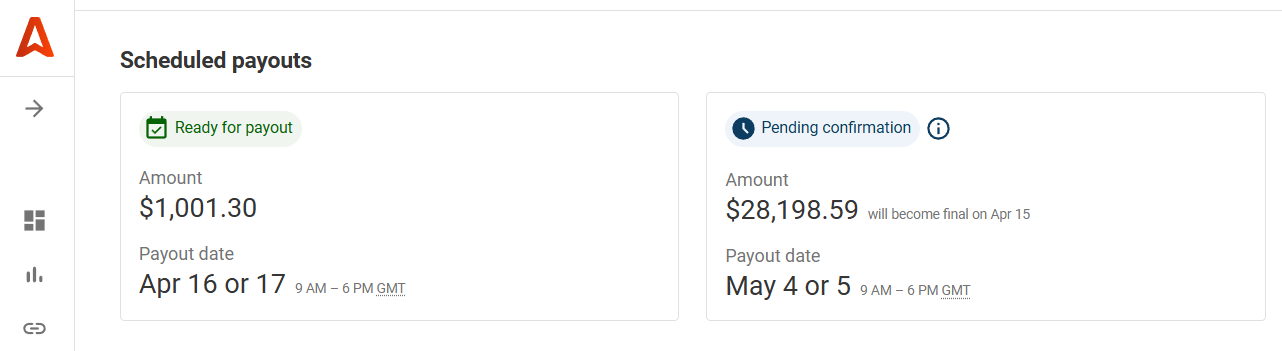
You can define the day yourself. First, find the day when you reached your minimum payout. If it is between the 1st and 15th days of the current month, then the payment period will be from the 1st to the 2nd days of the next month. If you reach the minimum amount after the 16th day of the current month, you will receive your payouts from the 16th to the 17th of the next month.
Where can I check Adsterra payouts and my real earnings?
Publishers’ balance
Your current revenues are always available at a click, whichever space you visit on the Adsterra platform. Hover the Balance and see how much you’ve earned. This line also displays how much you’ve been paid and how much you made from your referrals (extra income). Remember to check this guide to learn how much Adsterra pays its partners.

History of transactions
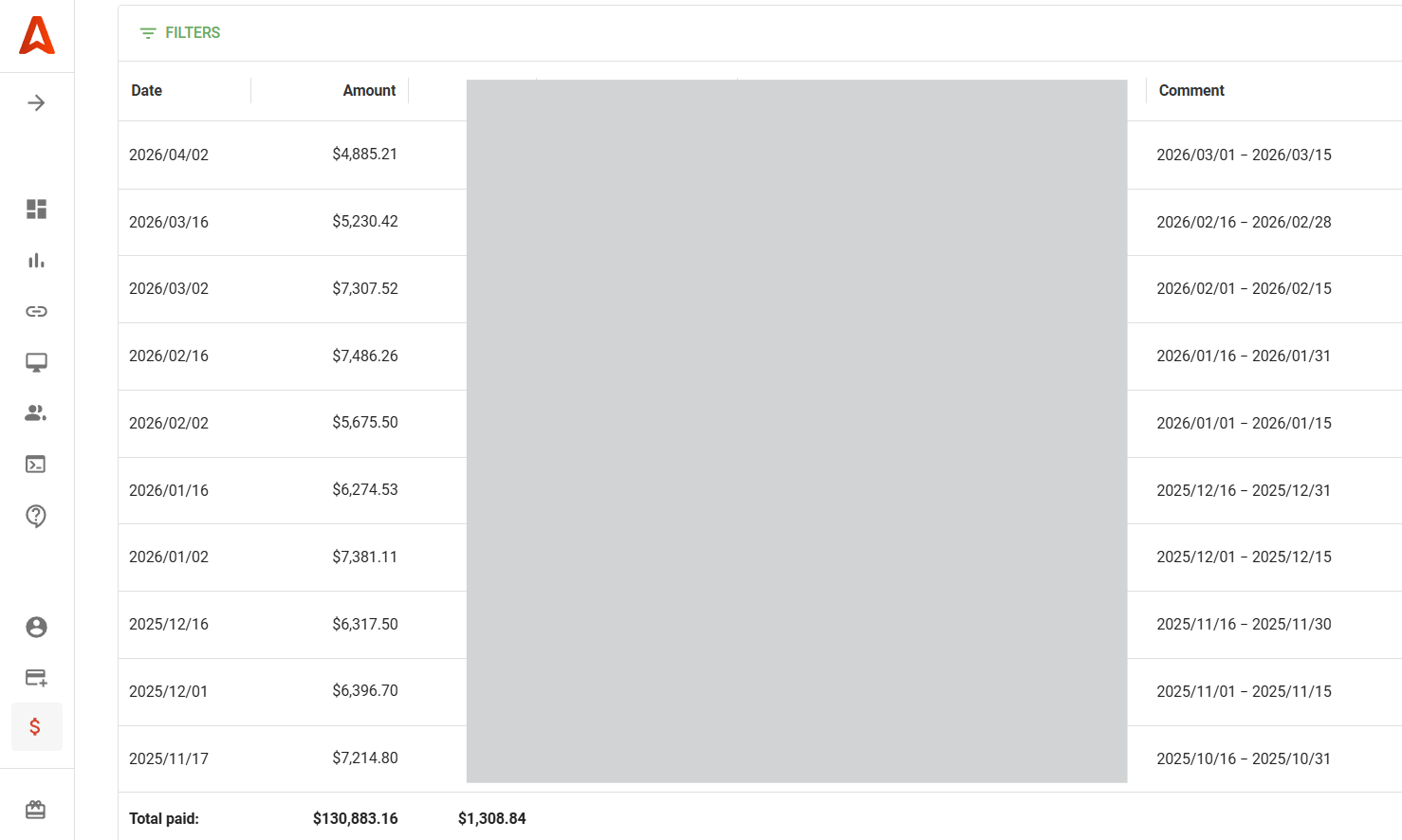
Next, you can explore the history of all transactions in the last 12 months. We generate invoice files (PDF) for every transaction. Open the Payouts page, filter and check the status of transaction fees included, files enclosed, and all extra info that might be helpful. Pick and export files if needed.
Statistics for publishers
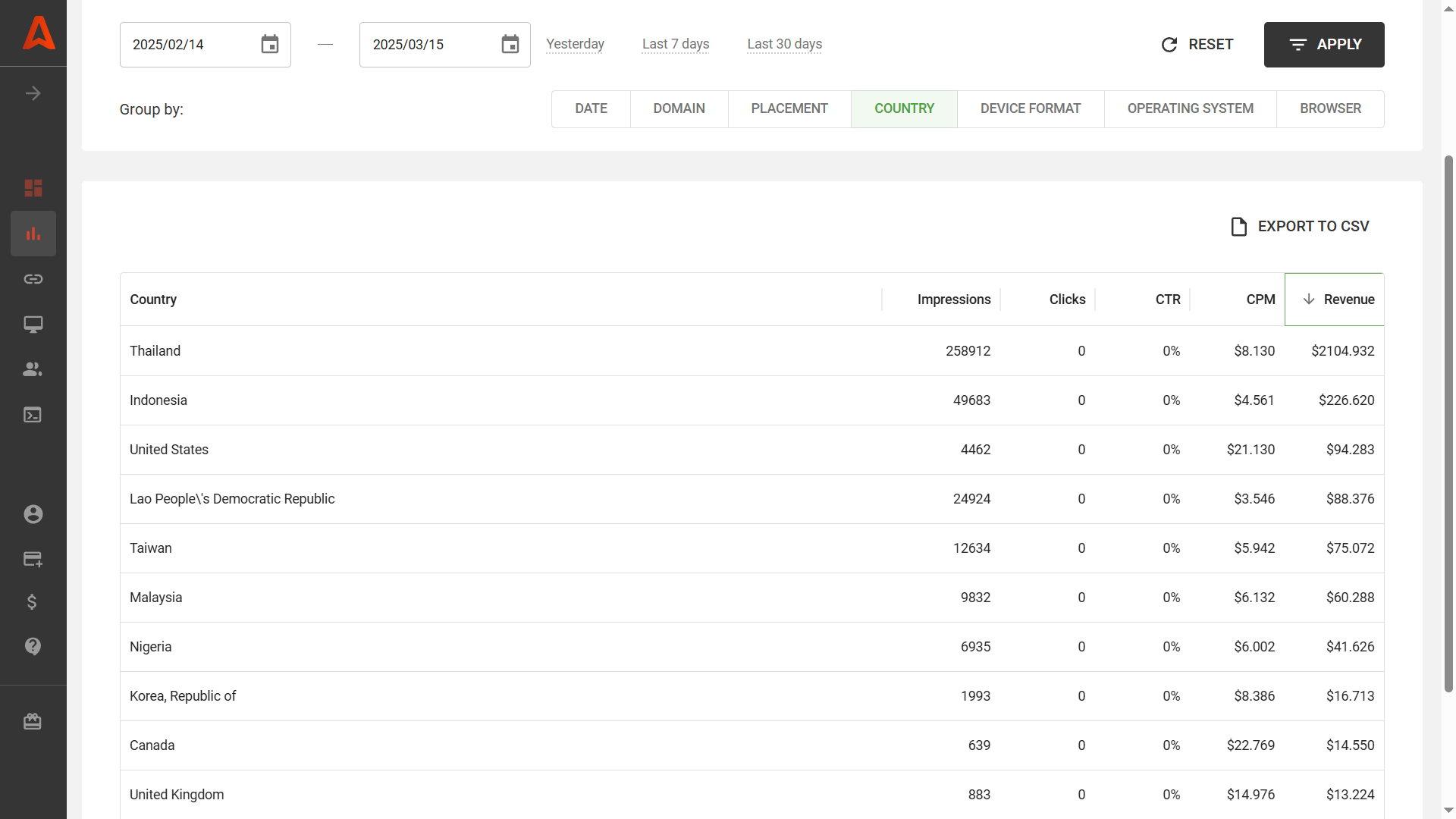
Website owners and partners who drive social traffic can monitor CPMs and revenue for all ad formats in just a few steps. Log in, open the Statistics tab, select custom timeframes and filters (e.g., by domain), and check CPM, CTR, impressions, and revenue. Learn how to track important metrics and with Publisher’s Statistics.
What’s KYC/KYB? A must-have for a trusted ad network
Every credible advertising network will ask you to attach identification documents if you’re paid as an individual, or a certificate of incorporation if you’re a legal entity. These are called KYC (Know Your Customer) and KYB (Know Your Business).
KYC and KYB ensure transparency in communication and transactions. The Adsterra platform supports all necessary procedures and documents to process KYC/KYB :
- After logging in, click the Payouts page from your Adsterra account and click the UPLOAD DOCUMENTS icon.
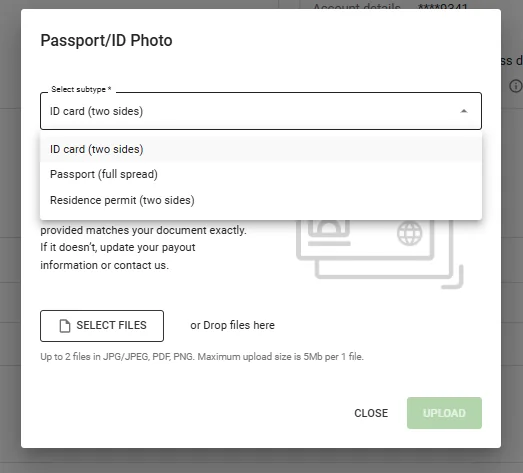
- From the dropdown list, select Passport/ID Photo (or driving license). You will need to upload a photo file (not a scan) of one of the documents that identifies you.

Next, select the document subtype and upload the file. Click UPLOAD and wait for verification (usually, it takes 10 to 30 minutes).
Please note: identification documents can vary depending on the payment system, so take the instructions above as examples.
Final thoughts: Get payouts in the most suitable way
One of the main benefits of using an ad network is timely payouts, but security goes beyond. Adsterra protects both your inventory and earnings with its in-house security system and reliable third-party solutions. The platform combats fraud and malvertising,
That’s one of the major factors in choosing your own network and best monetization platform. We’re constantly developing payment options, adding the most-demanded ones, and offering the best-in-class withdrawal conditions. Sign up or log in and enjoy the safety of automatic payouts!
Adsterra minimum payout FAQs:
What is the minimum withdrawal for Adsterra?
The minimum withdrawal amount for Adsterra publishers is $5, but only for payment systems that support this amount, for example, Paxum. The minimum amount will vary if you pick another payment system, say, PayPal. Bank transfers have a significantly higher minimum payout requirement of $1,000 compared to other payment methods. Also, specific payment methods like Wire Transfers and Local Bank Transfers require KYC (Know Your Customer) verification.
What is Adsterra minimum payout?
The minimum payout is just $5, but it depends on the payment method you prefer. For instance, you will only need to reach $5 to get paid via Paxum, which is quite a feasible amount compared to wire transfers, which have a limit of $1,000.
Which pricing models does Adsterra offer?
Adsterra offers multiple pricing models for advertisers, including Cost-Per-Mille (CPM), Cost-Per-Click (CPC), and Cost-Per-Action (CPA). Advertisers on Adsterra can choose from various ad formats while utilizing the CPM, CPC, and CPA pricing models, allowing for flexibility in campaign strategies. Publishers, in turn, enjoy higher eCPM thanks to CPA-based payments included in their revenue.
What traffic does Adsterra pay for?
Publishers can monetize web, mobile, and social traffic via various ad formats. Adsterra supports multiple ad formats, including display banners, pop-unders, interstitials, and direct links (Smartlinks), allowing users to choose the format that best suits their traffic.
Which ad formats send the highest payouts?
Adsterra’s ad formats are designed to maximize revenue for publishers, offering options such as mobile ads that display while a page loads, ensuring minimal disruption to the user experience. Pop-unders (Popunders) are one of the key ad formats offered by Adsterra, designed to be non-intrusive and customizable by publishers for optimal performance. They send the highest payouts, but are not the only profit-makers. Social Bar is a top addition if you need to diversify income sources, and Smartlink is a primary ad unit for social traffic monetization.
How to withdraw payment from Adsterra?
All payments are processed automatically, and you begin receiving revenues under these conditions:
1. You hit the minimum payout amount set for your paysystem.
2. You filled in the Payout Information form necessary for financial transactions, and it was approved.
It doesn’t mean you won’t have any funds on your balance if you don’t meet these two conditions. However, you will only be able to receive earnings from our network when meeting them.
Why is my payment information blocked?
Payment information gets blocked (temporarily locked) three days before and three days after each payment period. For some publishers who get weekly payouts, the payment fields are blocked every Monday and Tuesday. You can still download files with stats and previous transactions, though.
If you think there’s a mistake in the payment period or the amount transferred, you can message our Support Team in the live chat.
Why is my Adsterra balance blocked?
Payouts can’t be blocked by mistake if you haven’t violated our terms. You may think your earnings are blocked by mistake or for any other reason. But in most cases, this happens because you haven’t hit the minimum amount. As you remember, this amount differs from one paysystem to another, from $5 (Paxum) to $1,000 (wire transfers). Another case is when you see your payment info blocked: this only happens on payment dates to prevent rejected transactions.