Running a WordPress blog means doing real business which is far more than posting a few articles. The right plugins for publishers can strengthen your strategy and build a strong base for display ad revenue. You need usability, SEO, money-making, security, and zero-code plugins that support your workflow. Most WordPress enthusiasts face the same problem: the content is good, but the site starts breaking, ads fail to load, and the SEO turns into a mess. This guide is here to provide a clear scope of necessary plugins and avoid most common site visibility and usability issues.
What this guide is about: Summary
- Publishers need five main plugin types: SEO, security & page speed optimization, engagement, and ad insertion.
- Yoast SEO and Rank Math are the most used SEO plugins for WordPress publishers, helping website owners optimize their writing for search engines and user intent.
- WP Rocket, LiteSpeed Cache, W3 Total Cache, Autoptimize, and Smush help maintain Core Web Vitals.
- Advanced Ads and Ad Inserter manage advertising codes and scripts for beneficial advertising revenue.
- Engagement plugins increase reader retention.
- Security tools protect your site and revenue from DDoS and hijacking.
A clean setup, paired with the right plugins for publishers, leads to a faster, more profitable site with a positive user experience.
After you install the must-have plugins, the next step is choosing a way to monetize your content. Displaying ads is the #1 means of getting passive income. Choose between several ad codes and start your profit journey today.
Why every publisher needs the right plugins
Let’s start with a definition: WordPress plugins serve as extensions to your site’s functionality. They can help you enhance search and AI visibility, add advertising codes or text formatting features, or insert engaging subscription lead forms, for instance.
Not all plugins are created equal. You don’t want to add clutter, but you do want to prevent layout issues and support search engines in crawling your pages. Here’s why you need to be selective when adding yet another plugin.
Another reason for having a proven scope of plugins is making your life and business easier. With the right plugins, you produce posts, upload media, manage blog ecosystem, run paid adverts, and expect everything to work without breaking your business.
If you plan to grow your audience and turn the site into income, you need plugins that can boost SEO, control third-party scripts, and protect your inventory. How to ensure your WordPress plugin meets all the requirements?
Smart strategies for selecting plugins that actually work
Choosing plugins is as important as your site itself. A clean setup starts with three rules: pick tools with active updates, check compatibility with your theme, and avoid overlapping features.
Successful bloggers on AffLift and Reddit often mention a way to test WordPress plugins:
- shortlist plugins;
- test each one on staging;
- and remove anything that adds bloat.
A publisher featured in Adsterra’s case studies explains that it’s crucial to spend time on choosing WordPress plugins as it paves the path to a smooth blog monetization start. Here’s a checklist for selecting the right assets for your site.
Use this checklist when choosing WordPress plugins:
- Updated within the last six months
- Works with the latest WordPress
- Has clear documentation
- Doesn’t replicate functionality you already have
- Doesn’t harm server performance (to be tested on stage version)
- Offers a free version with enough features to test
- Provides support that resolves issues quickly
- Has no vulnerabilities (better to check with pro tools like WordFence)
- Has many reviews with various ratings, and negative feedback refers to non-critical functionality downs.
A stable setup is the first step toward running a real publishing workflow without interruptions.
How to ensure your WordPress plugin doesn’t hamper monetization
Caching/optimization, visual editing, and advertising plugins can sometimes conflict with ad scripts, especially if you’re overusing settings and filters. Be attentive and check the following clues:
- Caching without exclusions can prevent banners from updating and rotating offers, and freeze on one offer.
- JS/CSS minification (Autoptimize, WP Rocket, LiteSpeed Cache) WordPress plugins “glue” scripts together and can prevent them from loading or cause them to appear empty.
- Lazy-load (a3 Lazy Load, Smush, Jetpack) mode, when overused, can prevent ad rotation or simply leave empty iframes.
✅ These issues can be fixed by adjusting your plugin settings. For example, exclude advertising scripts from caching or minification. Just to illustrate: here’s a WP Rocket guide on how to exclude specific scripts from minification:
💡 After changing any caching, minification, or lazy-load options, remember to test your ads on a few sample pages to make sure they’re displayed correctly.
Lightweight advertising scripts are essential for positive user experience and search visibility. Power your site with smart solutions for profit making.
Core plugin categories tailored for publishers
Content creation and management essentials
Publishers need to publish often; even small delays add up. Helpful plugins in this category include editors that support clean formatting, styling, image handling, and writing and posting efficiency. Some writers prefer the Classic Editor.
Classic Editor
A classic visual editing instrument is very stable and predictable. It’s great for starters and even allows for placing ads and getting paid instantly. Example: by inserting a Smartlink code (with an HTML <a> tag), you become a money maker.
One of the main advantages is the minimal learning curve: you write, edit, and publish seamlessly. Cons include: limited formatting options, lack of structure control, and almost no design-rich functionality.
Gutenberg
An alternative to the classic version is Gutenberg, or the block editor. Publishers use it for faster production. Gutenberg is lighter than page builders like Elementor because it doesn’t load content-heavy styling files or external scripts. This helps maintain better pagespeed, especially on mobile.
Elementor
Elementor is a visual builder to design complex pages without code. Publishers use it for landing pages, pillar content, resource pages, homepage templates, and branded visuals. This WordPress plugin offers sections, templates, widgets, icons, and global styling functions. It also supports adding social media profiles for better discoverability.
Elementor is pretty heavy. It utilizes CSS and JS files that can affect Core Web Vitals score and SERPs. Publishers should avoid using Elementor on every post. It’s best reserved for evergreen pages that don’t change often.
TinyMCE
TinyMCE is a WYSIWYG content builder with thousands of installs among webmasters. It extends formatting options, provides custom styling and layout shortcuts. Publishers like it because it produces a clean user experience. Blogs with tutorials or technical guides benefit from this plugin because of its table generator and the ability to create a structured look.
Some additional plugins like ACF (Advanced Custom Fields) can also help you manage custom fields and structure content for better readability.
Good content plugins support real-time updates and also help organize your media library, fix broken URLs inside old articles, and maintain tag consistency. With the right tools, you can work on text and media simultaneously and produce high-quality content faster.
Advertising and content plugins compatibility
Your operations with paid advertising depend on the content plugins. Despite their scalability, you can face errors trying to add Banners or Push codes.
SEO and AI visibility boosters
Organic traffic is still the top source for most publishers, and your plugin choice shapes how search engines read your pages. And more: AI Overviews and ChatGPT also pull information based on SEO principles. SEO plugins like Yoast SEO and AIOSEO improve search and AI visibility by advising on keywords, on-page optimization, content structure, sitemaps, and readability corrections.
Yoast SEO
Yoast SEO is the most popular WordPress plugin for search engine optimization of your site. A classic choice for meta descriptions, XML sitemaps, breadcrumbs, and structured data. You can enrich it with entities (GEO and LLMO optimization) and AI writing options. Many publishers use it to manage redirects and check basic SEO health. Yoast SEO provides on-page hints for keywords and helps make content SEO friendly.
Rank Math
Rank Math takes the lead in the rating of popular seo plugins. It offers advanced features even in the trial version. Its schema builder, redirects, and internal link suggestions are strong. Many call it one of the best WordPress plugins for structured data. The company has added the AI Search Tracker recently.
All In One SEO for WordPress
A long-standing WordPress plugin with rich functionality. AIOSEO is easy to configure and good at technical tasks. It also includes local optimization, AI features (content creation + search optimization), and video SEO modules. A good fit for users who want solid settings with clear reports, along with tech specs like link assistant, schema markups, or WooCommerce optimization.
MonsterInsights
This widely recommended plugin connects Google Analytics to your WordPress dashboard. You see traffic reports without leaving your site. For publishers who track sessions, scroll depth, or outbound links, MonsterInsights keeps the data in one place: heatmaps, advanced analytics, including page insights, and affiliate URL tracking.
Summary
SEO plugins help the site’s visibility, structure, search engine rankings, and content simultaneously. If your articles depend on impressions and stable indexing, they help boost SEO by making your site readable for crawlers. In case you look for advanced AI optimization functions, Clearscope and SurferSEO provide real-time suggestions on AI search visibility to help create content that will be seen and cited in AIO, ChatGPT, Perplexity, etc.
Performance and site speed optimizers
Poor website performance affects ad revenue, user time, and rankings. Publishers with lots of images, long posts, and scripts need caching and compression tools.
Here are the required performance plugins the adsterra team recommends:
WP Rocket
WP Rocket is an efficient caching plugin designed to optimize site performance and speed. The plugin is essential for publishers managing high-traffic websites. Easy setup, strong caching, database cleanup, preload, and file optimization. Many publishers report noticeable page speed gains after switching to this platform. Even a single click can enable caching. WP Rocket supports lazy loading and works well with most layouts. An optimized website serves a better user experience even without sophisticated design tweaks.
Note: Remember to test this or any other plugin on a test website version to ensure all advertising scripts perform well and customize the settings.
LiteSpeed Cache
LiteSpeed is a server-level acceleration WordPress plugin. It includes full-page caching, CSS/JS minification, multiple CDN support, and image conversion (including WebP that converts images automatically). A strong choice for sites with large traffic, LiteSpeed Cache is compatible with Yoast SEO and many other platforms.
W3 Total Cache
W3 Total Cache (W3TC) is a robust, web-host-agnostic Web Performance Optimization (WPO) framework for WordPress. It improves SEO, Core Web Vitals, and user experience by increasing website performance and reducing load times. W3TC achieves this through features like Content Delivery Network (CDN) integration, browser and page caching, and minification of HTML, CSS, and JavaScript.
A flexible plugin for advanced users. Includes caching layers, CDN integration, and browser caching. Some find the settings complex, but its power is undeniable.
Autoptimize
Autoptimize simplifies website optimization by aggregating, minifying, and caching scripts and styles. It moves scripts to the footer, minifies HTML, and can handle critical CSS, ensuring great website performance. You can optimize and lazy-load images (supporting WebP/AVIF), manage Google Fonts, and async non-aggregated JavaScript. This comprehensive approach significantly boosts site performance, even on HTTP/2.
a3 Lazy Load
a3 Lazy Load is a lightweight, free WordPress plugin; an SEO friendly and powerful service for mobile-focused websites. Helps with images and media-heavy posts. a3 Lazy Load is especially useful for mobile readers. It handles images outside the media library, older browsers, and extends support to videos and iframes not covered by core. Key features include lazy loading, widgets, horizontal scrolls, videos, and iframes (like embedded maps and social boxes). It also offers support for WebP images, AMP, and Jetpack Accelerator compatibility, along with customizable lazy load effects.
Smush
Smush is an image optimizer plugin that reduces image file sizes, saving quality. It’s trusted by over one million users for boosting websites and improving Google PageSpeed scores. It offers powerful features like lossless and lossy compression, built-in lazy-loading, and automatic resizing. Pro features further enhance performance with WebP/AVIF conversion, CDN compatibility, and background optimization. Smush offloads optimization to its API, ensuring no performance impact on your server.
Jetpack
Jetpack is a versatile WordPress plugin offering security, performance, marketing, and even design functions. Made by WordPress experts, it ensures your website is safer and faster, helping grow your traffic. Key options include 24/7 auto security with backups and malware scans, a robust CDN for peak performance, essential functions like social auto-publishing and search-engine optimization, in-depth site stats, and an AI Assistant for smarter content creation. It also offers easy layout customization and seamless integrations with popular plugins.
These plugins help page speed, lower the load on your server, and make your site feel lighter. They keep your media clean, compress files, and prevent traffic spikes from slowing you down.
Monetization and advertising powerhouses
Display advertising is sensitive to placement, layout, and scripts. Publishers who depend on CPM revenue need plugins that keep monetization assets stable and visible. Required plugins include:
Advanced Ads
A WordPress advertising plugin, Advanced Ads, is aimed at simplifying script management and maximizing revenue. It offers unlimited advertising codes, flexible formats (including AdSense and GAM integration), and powerful targeting options. Main functionality includes A/B testing, click fraud protection, and real-time reporting accessible via the WordPress dashboard or GA4. The plugin emphasizes ease of use with pre-defined placements requiring no coding and a focus on safety and nice UX. It was developed by a team with extensive experience managing high-traffic websites.
Ad Inserter
Ad Inserter is a powerful, flexible WordPress advertising management plugin endorsed by both Google AdSense and Amazon. It complies with all ad types, including Google Ad Manager, Media.net, Infolinks, banner, and other leading display ad networks. It excels at inserting all sorts of scripts like analytics, PHP, and CSS. The Pro version adds geotargeting, A/B testing, statistics, and anti-adblocking features, making it a comprehensive solution for generating income online.
WP Editor
WP Editor is more of a universal package: it modernizes the default editing and posting experience for the entire WordPress admin panel. It integrates CodeMirror for advanced code editing actions like syntax highlighting, line numbers, and fullscreen mode, and FancyBox for image viewing. The plugin uses AJAX for swift and reliable file browsing. While helping with text formatting, the plugin
WPCode
WPCode is presented as the premier Code Snippets Manager for WordPress. It’s popular for having a vast Snippets Library to replace multiple plugins, Smart Conditional Logic for precise code loading, and a Private Cloud Library for easy reuse across sites. It also boasts Advanced Code Revisions, dedicated functions for Marketing Scripts and Conversion Pixels, and built-in safe error handling. WPCode helps reduce bloat and streamline script management.
Other advertising plugins and assets
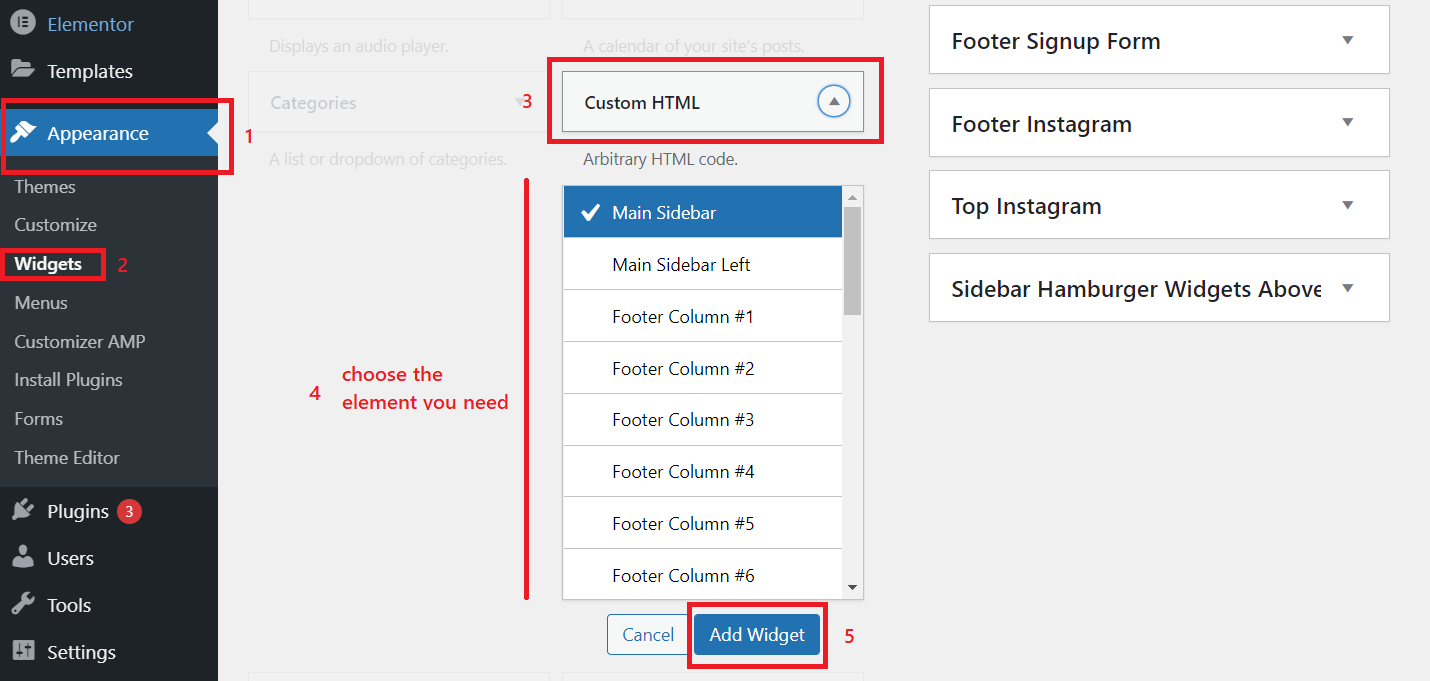
To manage advertising scripts, you can use Classic Editor and Classic Widgets by WordPress. Earlier, we discussed how to insert banners, Social Bar, and Popunder using widgets (custom HTML), so read this guide to WordPress site earning methods.
String Locator
String Locator lets you easily spotlights and edit hardcoded text within WordPress themes, plugins, or core files right in your browser. It performs a consistency check to minimize errors during edits.
All of the mentioned plugins help you manage advertising scripts, create and control placements, inject code, and maintain stable layouts. If your income comes from CPM (one thousand impressions), these tools make all the difference.
Audience engagement and retention builders
Publishers who keep users longer earn more. Engagement plugins include push notifications, newsletter popups, related posts, and reading progress indicators. Such additions encourage users to return, share content, or read more than one blog post (and view more paid advertisements).
| Plugin | What it does |
| PushEngage | PushEngage enables you to send notifications and show multi-channel chat widgets to stay in touch with clients. It helps manage order statuses. |
| PushAlert | The plugin automates browser notifications on new posts and helps retain traffic. PushAlert enables you to set up alert timing and target users based on their behavior. It supports a simple subscription flow without requiring a complicated setup. |
| Perfecty Push Notifications | Self-hosted solution for web push. It’s good for smaller or privacy-focused blogs. The plugin serves stats dashboards and customization options. GDPR-compliance. |
| WpDiscuz, Disqus | WpDiscuz and Disqus are commenting systems that boost community engagement, prompting a feature-rich experience for users on all device types. |
| Social Warfare, Monarch | Social Warfare and Monarch are plugins or content-sharing systems to add fully customizable social sharing buttons, providing transparent usage stats. |
| The Newsletter | The Newsletter is an email-marketing system that helps engage audiences by offering powerful list management and easy email creation. Advantages: privacy checkbox, GDPR settings, advanced targeting, double opt-ins, and more. |
| MemberPress | MemberPress is a membership plugin that helps creators monetize their work through paywalls, gated access, and subscriptions. |
| OptinMonster | OptinMonster is a lead generation plugin that turns website or blog visitors into email subscribers or users via a set of engaging widgets: countdown timers, gamified wheels, floating bars, and more. |
Security and maintenance guardians
A poor-performing or hacked site hurts revenue. Safety plugins watch for broken URLs, DDoS, malware, and spam. Backup options protect posts, media, and advertising scripts. Good software also monitors compatibility and logs changes.
| Plugin | What It Does |
| Wordfence | Full-featured firewall, malware scanner, login protection, two-factor authentication (2FA), real-time alerts. Wordfence Security is the gold standard security plugin for WordPress. |
| UpdraftPlus | UpdraftPlus serves scheduled backups and migrations, easy restore, and off-site storage options (Dropbox, Google Drive, S3, etc.). It’s also very popular and reliable — good insurance in case of hacks, server failures, or bad updates. |
Head-to-head comparisons: Which plugins win
If you look for better optimization, or need a system for producing engaging content, compare and choose the best-matching plugin.
SEO WordPress plugins comparison
| Plugin | Key Features | Pros | Cons | Pricing | Winner |
|---|---|---|---|---|---|
| Yoast SEO | Meta descriptions, redirects, schema, AI meta tags | Easy to use, all basic features; great for beginners | Google can skip its descriptions, using its own in SERPs | Free trial; paid version from $80-100 | Best for newbies |
| Rank Math | Schema, redirects, content analysis, 404 monitor | Strong free version; many vital settings | Can conflict with other plugins with the same functionality | Free + pro version starting from $4.08 | Winner |
| All In One SEO | Sitemaps, rich snippets, on-page analytics, video SEO | Friendly interface, many advanced features like E-E-E-A-T | Compatibility issues, high prices, and lack of suitable monetization options | Free + paid version (from $49.50/year) | For experts |
| MonsterInsights | GA4 integration, affiliate URL tracking, GDPR compliance | Clean dashboard,customizaton options, PPC and e-commerce options | Lacks SEO and GEO analysis; high price. | Free basic version + pro license starting from $99.50/year | For marketers |
Performance WordPress plugins comparison
| Plugin | Key Features | Pros | Cons | Pricing | Winner |
|---|---|---|---|---|---|
| WP Rocket | Page caching, preload cache, CSS/JS minification, delay JavaScript execution, database cleanup, CDN integration | Very easy setup; strong Core Web Vitals improvements; works with most themes; safe for ad-heavy layouts | No free version; some advanced controls require careful testing; | Paid version (from $35.40/year) | Winner |
| LiteSpeed Cache | Server-level caching, image optimization, WebP conversion, critical CSS, QUIC.cloud CDN, lazy-load pack | Extremely fast when paired with LiteSpeed hosting; great for large sites | Requires LiteSpeed server to reach full potential; complex interface; not ideal for beginners. | Free | Best for LS servers |
| W3 Total Cache | Browser, database, and object caching; CDN integration; HTML minification; fragment caching; scalable for high loads | Highly customizable; strong with CDNs; powerful on large sites | Misconfigurations can break layouts; outdated UI; requires technical understanding | Free + paid plan starting from $99/year. Explore our ad formats to find the best option for your campaign. | For experts |
| Autoptimize | CSS/JS optimization | Lightweight | Not a full caching solution; wrong setip can break the site; may require extra add-ons | Free | Best companion |
| a3 Lazy Load | Mobile-optimized lazy loading for images, videos, iframes, widgets, and embeds; WebP & AMP compatibility; custom lazy-load effects | Very lightweight; handles images outside the media library; improves Core Web Vitals | No compression; styling & foptions limited; not a complete optimization suite | No fee | Wins in price, not in services |
| Smush | Lossy image compression, automatic resizing, lazy-load, background optimization, CDN support | Strong bulk compression; improves PageSpeed; easy to use; offloads processing to API; reduces server load | Advanced services require Pro license; AVIF/WebP conversion is charged; can affect upload times | Free + Pro version ($15/year only on sales dates) | #3 winner |
| Jetpack | Regular scans, backups, CDN, azy-load, stats, social tools, design blocks, performance accelerator | All-in-one solution; reliable CDN; boosts both speed and site protection; good for non-technical users; works with other plugins | Heavy if all modules are added; some features locked behind paid plans; not focused solely on speed | No fee for basic features (non-commercial sites) | #2 winner |
Monetization WordPress plugins comparison
| Plugin | Key Features | Pros | Cons | Pricing | Winner |
|---|---|---|---|---|---|
| Advanced Ads | Script rotation, placement rules, device targeting, display scheduling, A/B tests, Google Ad Manager integration | Deep controls | Setup time | Free + paid | Winner |
| Ad Inserter | Paragraph-level insertion, widget and shortcode support, sticky adverts, ad-blockers detection, HTML/JS insertion | Simple and stable | Limited analytics | Free + pro | Best simple tool |
| WPCode | Safe header/footer code injections, conditional logic, code snippets, script management, pixel and tag insertion | Safe injections | Not ad-specific | Free + pro | For developers |
Content WordPress plugins comparison
| Plugin | Key Features | Pros | Cons | Pricing | Best for |
|---|---|---|---|---|---|
| Classic Editor | Posting, minimalistic formatting, adding images and URLs | Easy, reliable, minimalistic and starter-friendly | Older UI, limited formatting | Default, no fee | Blog posting; news |
| Gutenberg | Formatting, Styling, Layout structuring, adding multimedia and links | Fits most sites, ensures high load-speed | Updates may affect all of your posts. Some themes conflict with it. | Default, no fee | For modern sites; for ad layouts |
| Elementor | Rich formatting, branding, page layouts | San be slow; contain JS that can’t be parsed by AI crawlers | Theme-dependent | Free +Paid starting from $4.99 | |
| TinyMCE | Pixel-level control, rich formatting, branding, additional features | 1,000 loads are free, then $79/month or higher | Online businesses, multi-page resources |
Step-by-step WordPress plugin implementation guide
A clean workflow prevents issues and keeps your site ready for steady revenue.
1. Install plugins safely
- Go to your WordPress dashboard
- Open “Plugins” → “Add New”
- Search your WordPress plugin
- Install and activate
- Test on a staging site if possible (use staging WP plugins like InstaWP Connect)
2. Test plugins, ensuring compatibility
- Check your theme’s requirements
- Update your theme and WordPress version before any installs
- Check PHP version
- Disable overlapping functionality
- Monitor server performance
3. Configure SEO plugins
- Add meta descriptions
- Enable schema
- Connect Google Analytics
- Manage redirects and canonical URLs
- Submit sitemaps
4. Configure optimization plugins
- Enable caching
- Turn on the lazy-load mode
- Compress images
- Minify CSS and JS
- Clear cache after changes
5. Configure advertising plugins
- Insert advertising tags with your preferred plugin
- Test positions on desktop and mobile
- Avoid overusing advertising codes and placements
- Use WPCode for custom scripts
- Keep a backup before testing new placements
6. Maintain your workspace neat
- Remove unused plugins
- Update one plugin at a time
- Check advertising scripts after every update
- Scan your site for errors
- Keep daily or weekly backups
Instead of a conclusion:
The digital space has become increasingly important for publishers and reveals more opportunities each year since the rise of the Internet. WordPress is the most flexible and easy-to-manage platform, thanks to its business concepts and thousands of developers behind it: new themes, features, and plugins can help you grow faster. Not all WordPress plugins are created equal, and it’s important to assess their quality before installation.
Publishers who treat their WordPress site as a business need stable, proven tools. With the right publisher plugins, you build a fast, safe, and monetizable site that supports long-term growth. But no extension can deliver you money unless you choose a reliable advertising network. Make your choice today!
FAQ about plugins for publishers
Which types of plugins are recommended for publishers to enhance mobile reading experience?
Mobile readers expect fast loading and clean layouts. Top-ranked WordPress plugins like WP Rocket, a3 Lazy Load, and Smush help improve speed and reduce image weight. Ad Inserter can control ad spacing on smaller screens. Together, they keep your pages readable and stable, which directly supports ad viewability.
Are there plugins that assist publishers in copyright protection?
Yes. Several plugins add content protection such as watermarking, copy-blocking, and monitoring for scraped posts. Some tools also track where your content appears online. While no plugin can give full protection, these tools make content theft harder and help preserve your post structure. Such tools protect your content monetization strategy, but ensure you don’t block the information for readers and AI crawlers.
What if I overload my site with too many plugins?
Too many plugins slow down the site, create compatibility issues, and increase the risk of security problems. The rule is simple: remove anything that repeats functionality or hasn’t been updated in months. Each new plugin should solve one clear problem and not duplicate other plugins.
Are there plugins specifically for niche publishers?
Yes. News publishers often use push notification plugins, related-post tools, and ad managers. Food bloggers use recipe schema plugins. Travel bloggers use map tools. The core setup stays the same, but niche-specific plugin types add features tailored to your content structure and audience.
What are the essential plugins for WordPress publishers?
You mainly need 5 core plugin categories: content management, SEO and speed, security, usability, and monetization.