Advertising is an effective website monetization strategy, but how do you go about it? What type of ads can you place, and how do you source these ads in the first place? This detailed guide tells you what you need to know. Learn how ads work, how to select the right ad network, and the steps to place high-performing ads on your website.
Why put ads on your website?
Ads offer a stable income source for your website. As people visit your website to read content, they can encounter relevant ads, and every click or impression (view) of each ad generates a small fee. The fee adds up when a significant number of visitors interact with ads.
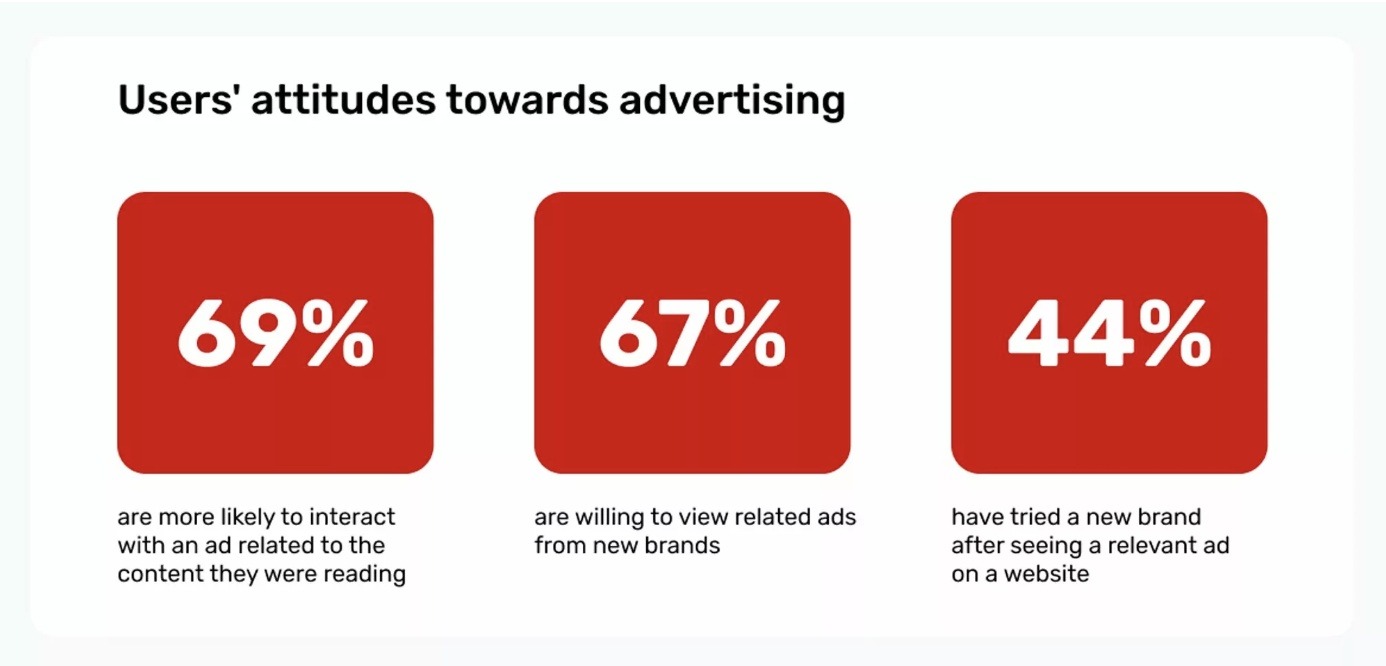
Advertisers are willing to pay top dollar to promote products to a relevant audience, and you can make money by offering this audience. The key is inserting relevant ads that your audience will be interested in and selecting the right ad network that connects you with high-paying advertisers.
What do you need before placing ads?
Traffic
You generally need website traffic to qualify for ad placements. The traffic doesn’t have to be massive, but many networks have minimum requirements (e.g., 1,000 monthly page views). The traffic stats have to be verified before getting access to their network.
However, some ad networks, like Adsterra, have no minimum traffic requirements. This means you can sign up anytime and focus on growing your traffic. As your traffic grows, your ad revenue earnings equally grow.
Content
You need valuable content to draw traffic via search engines, social media, or other mediums. This traffic is what converts into ad clicks and impressions that generate income.
High-quality content should be unique, not very similar to what’s already found elsewhere. Don’t hesitate to tell your own story and add context to information that already exists. The content should be accurate, indicate expertise, and be easy to understand. Clear, engaging content ranks higher on search engines and is often shared on social media, generating more traffic.
Good site design and technical performance
Your website should have a good design and should load quickly, ideally under 2 seconds. Visual and text elements should be neatly arranged and not interfere with each other. Fonts should be legible, and the website should have clear navigation menus. Good site design keeps visitors on your site longer, increasing their likelihood of interacting with ads.
Types of ads to place on your website
You can choose from a variety of ad formats to generate passive income from your website. There’s no single ‘best’ ad format. Rather, it depends on your website content, target audience, and revenue goals. Let’s explore the top formats, their benefits, and which types of websites they’re best used on.
Common ad formats for publishers:
| Format | Benefits | Best For |
|---|---|---|
| Display Ads | Display units are traditional banner ad formats in various sizes (square, rectangle, etc.) and appear in headers, footers, or between text. | News websites and blogs with a classic layout. |
| Popunder | Popunders don’t occupy space on a website page. Instead, they appear when a reader closes the current page, making them less distracting. | Desktop-heavy or multimedia-rich sites. |
| Interstitial/Vignette | Interstitial ads cover the whole screen but are easy for the reader to close (they offer high engagement because they cover the entire screen). | Multipage sites with low bounce rates. |
| In-Page Push | This ad format resembles a push notification that appears while users scroll through a webpage. | Mobile-first websites. |
| Smartlink URL | A simple URL that shows the user multiple advertising offers. | Ideal for monetizing social traffic, as you don’t even need a website to use this format. |
| Native (In-Article & In-Feed) | Designed to mimic your website’s look and feel, such that a viewer may not even notice it’s an ad until they take a closer look. | Content-driven websites that seek non-disruptive ad placement optimization. |
| Video Ads | In-stream or out-stream videos that generally have high engagement rates. | Websites with high video content. |
| Google Auto Ads | A Google AdSense ad setup that automatically places relevant ads on your web pages. The ad is tailored for each visitor, helping maximize engagement. | Publishers who want to automate most of the website advertisement process. |
| Rich Media | Dynamic ad formats like games and animations that provide a thrilling experience and encourage visitors to interact with the ad. However, it can be intrusive if used incorrectly. | Website owners seeking premium ad campaigns. |
| Expandable Ads | A visual ad that starts small and enlarges after the viewer clicks or hovers on it. | Publishers with limited website space. |
| Floating Ads | Visual ads that ‘float’ on the screen for a while before disappearing, generating high visibility without occupying permanent space. | Websites with loyal fanbases. |
| Sticky/Anchor Ads | Ads that remain affixed on the screen even as the user scrolls through content. | Sites whose audience can handle a persistent ad presence. |
| Overlay Ads | Overlay ads cover part of the viewer’s screen, often on websites serving video content. | Video-heavy websites. |
| Intent Links | A Google AdSense format that attaches ad links to relevant pieces of text on your website. | Websites with in-depth articles that readers spend a long time on. |
Adsterra unlocks a broad range of ad formats tailored for different website types.
Choose yours today!
How to choose the right ad network
Focus on these criteria when selecting an ad network:
Ad formats
Which ad formats does the network support? Ideally, choose a network that offers various formats, from which you can pick the best options. For example, Adsterra offers Popunders and Smartlink URL ads to help publishers maximize display advertising revenue with minimal viewer disruption.
Ease of use
Seek ad networks with user-friendly interfaces that you can easily navigate. This way, publisher ad code integration becomes a simple walkthrough, and you’ll focus more on optimizing content to get relevant traffic.
Analytics
The best ad networks offer detailed analytical reports about your ad revenue. You’ll know the exact number of ad clicks and the cost per click (CPC) for your website. You’ll know the number of impressions and the locations whose impressions earn the most revenue. Analytics help you optimize your content and ad formats to get the best results.
Turn pageviews into profit! Opt for Adsterra and manage advertising units with ease, watching your revenues grow!
Approval speed and payment terms
Confirm how fast the network approves websites for ads after submitting the required details. Ideally, it should be within days or hours.
Also, confirm the ad network’s website advertisement payment terms. Most platforms offer net 15 to 30, meaning the amount is credited 15 to 30 days after confirmation.
Here’s a summary of some popular ad networks and their core features:
| Ad Network | Best For | Ad Formats | Approval Speed | Payment Terms |
|---|---|---|---|---|
| Adsterra | Web and social publishers. All-tier traffic monetization with high eCPM | Popunder, In-Page Push, Interstitial, Display Banners, Native Banners, Smartlinks | Fast approval | Net 15 |
| Google AdSense | Tier-1 publishers, large news sites, niche websites like parenting and health | Display units, auto ads, in-article & in-feed, and sticky formats | Can take long (strict review) | Net 30 |
| Media.net | Content-heavy sites, blogs with US/UK traffic | Contextual ads, native ads, display ads | Moderate | Net 30 |
| Ezoic | Websites with 10k+ monthly visits | Display ads, video, header bidding | Moderate | Net 30 |
How to put ads on your website: step-by-step
1. Sign up and get approval
- Select an ad network.
- Sign up with your email address.
- Submit your website for review. The ad network’s team reviews your website’s content, traffic, and technical factors (speed and ease of use) to decide whether to approve it for ads. Approval can take anywhere from several hours to several days, depending on the network. On Adsterra, you can submit a website along with selecting a preferred format.
2. Generate and place ad codes
After approval comes the publisher ad code integration process. It’s easy on Adsterra.
- Log in to your ad network account.
- Enter the Websites page and click ADD WEBSITE.
- Enter your website’s domain name and ad category.
- Select one ad unit (e.g., Popunder or Social Bar) and click ADD.
- On the Websites page, find your domain, then copy and paste the generated code to your web page’s source code.
3. Learn how to post ad codes depending on your website’s content management system (CMS)
Most website content management systems (CMS) make placing ad codes simple. You’ll just copy and paste the code into a provided section, and the ads will immediately display on your site.
- WordPress: Use plugins like Ad Inserter for easy placement, or simply check this tutorial for WordPress monetization.
- Blogger/Blogspot (all pages): From the Layout tab, click Add a Gadget and choose HTML/JavaScript from the list. Paste the script.
- Wix (free version): Click Edit Site -> Embed Code -> Embed HTML. You can check out this complete guide to adding ads to Wix, as instructions vary depending on the format.
The exception is if your site was custom-built. If so, you can place ad codes in template files (header.php, sidebar, or content divs).
4. Optimize ad units
Adjust the ad formats to discover what works best for your site. Try different ad formats and note which generates the highest earnings. You’ll need a bit of trial and error, so exercise some patience as you analyze ad unit performance. In the long run, you’ll tweak ad formats based on your observations.
5. Mobile optimization
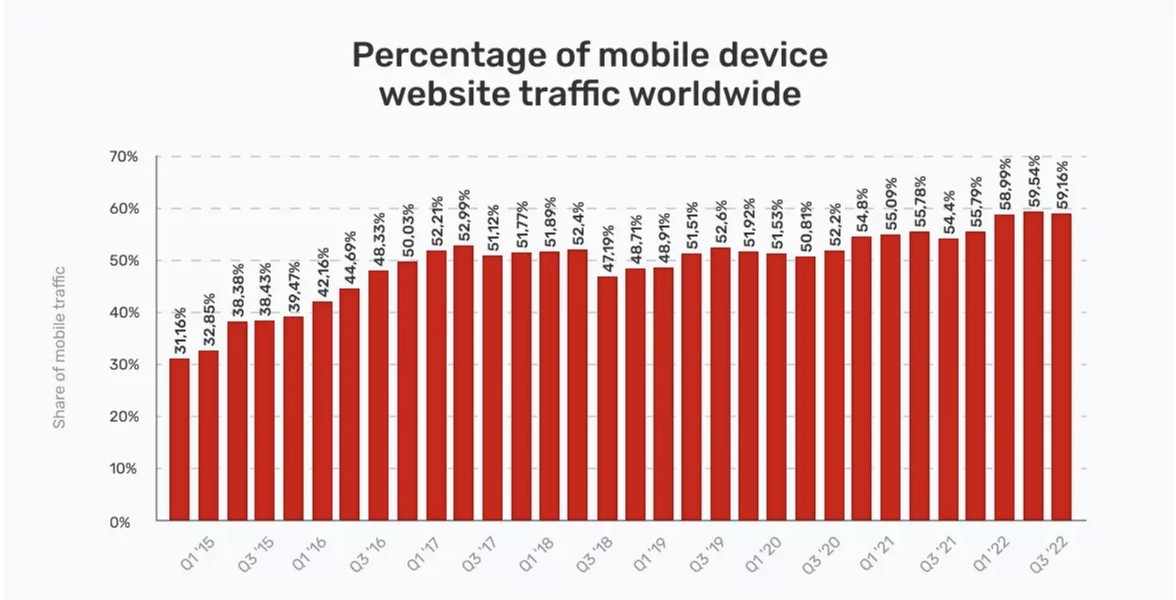
Over 60% of global online traffic comes from mobile devices, so optimizing ads for smartphones helps maximize revenue. Ensure that all ad formats look good on mobile devices, not just on desktops. If not, switch to other formats that best work with smartphone screens. Otherwise, non-mobile-optimized ads can disrupt the user experience, and many mobile visitors will end up closing the web page.
Where to place ads on your website for the best results
The most profitable webpage ad positions include:
- Above the fold or hero section: Banner ad formats or leaderboards near the top of the page generate high visibility and, in turn, clicks.
- In-content: Native Banners can also be placed between paragraphs to provide a natural flow.
- Sidebar position: An ideal option for desktop traffic. You can insert both Banners and Native ads in a sidebar.
- Outside the website: A less disruptive but highly interactive placement that doesn’t require space (only works with Popunder scripts).
- Overlay location: Overlay ads cover the whole web page, making them the most visible. Interstitials play the key role here.
Monetization experts share best practices of combining various formats for higher earnings. Zhaohui Liu came up with an optimal number of ads and managed to hit $9,000 monthly gains with his movie trailers site. His approach involves inserting Popunder + Social Bar + Smartlink to engage as many viewers as possible and comply with UX standards.
How much can you earn from website ads?
Ad revenue earnings vary based on several factors, including:
- Niche. Some content niches earn higher than the norm, such as technology, finance, and business.
- Traffic. Websites with high traffic generally earn more revenue. Better off if your website has an engaged audience, which translates to high click-through rates.
- Audience location. Audiences in high-income countries (e.g., the U.S.A., Switzerland, and Singapore) bring in more revenue than those from lower-income countries.
- Quality. Some ad networks offer higher-quality ads from top-paying brands. This is a major consideration for publishers selecting an ad network.
Best practices for advertising on your website
- Focus on the user experience. Ads make money, but they should be below 30% of the page content to avoid clutter. Focus more on delivering high-quality content, and ad revenue follows.
- Mobile responsiveness. We’ve highlighted that over 60% of traffic comes from mobile devices, so ensure ads are optimized for smaller mobile screens.
- Ad relevance. Display ads that align with your website’s niche and audience intent. For example, clothing ads are a perfect fit for a fashion blog, and gaming accessory ads are ideal for a gaming blog.
- Transparency. Ads should be displayed in obvious places, making it clear to readers that your traffic is monetized with ads. Don’t place ads in deceptive areas, like behind download buttons.
Common mistakes to avoid
Learning how to put ads on your website isn’t complete without knowing the core mistakes to avoid. They include:
- Placing too many ads, which is both visually disruptive and slows down page loading speed.
- Monetizing blog traffic with irrelevant ads, which don’t end up performing well because of limited audience interest.
- Placing several popups on a single page, which is a visual no-no.
- Ignoring mobile optimization when placing ads. We’ve repeatedly emphasized the importance of mobile optimization to your website monetization strategy.
- Neglecting user navigation by allowing ads to overlap buttons, icons, text, and other important visual elements.
A positive user experience ensures visitors don’t leave your website as soon as they enter. Remember, it’s content first before monetization. Pursuing aggressive monetization over high-quality content will deliver subpar results.
Conclusion
Learning how to get ads on your website is the first step. The real work lies in optimizing ad formats to get the highest conversions without disrupting your visitors’ experience.
Regardless of which ad network you choose, creating high-quality content is the key to attracting traffic that’ll be converted into ad revenue. Adsterra offers diverse ad formats to monetize your website while maintaining a coherent visual experience. Choose Adsterra now to convert your traffic into solid revenue.
FAQs about placing ads on your website
Is it free to put ads on your website?
Joining most ad networks as a publisher, including Adsterra and Google AdSense, is free. You don’t pay to add ads to your website. Instead, advertisers pay you when users view or click the ads. You sell traffic and make money from adverts on webpages with full control over performance.
How do I put ads on my website and get paid?
You create an Adsterra or Google AdSense account (or join another ad network), add your site’s URL, generate an ad code, and paste it into your pages. Once approved, you start running ads, and ad revenue accumulates in your dashboard until payout. You won’t need to worry about payments because they’re automated, and you can check the balance in your account.
What type of ads can I place on my website?
Common options include display ads, Popunders, push, native ads, video ads, auto ads, in-feed ads, and in-article ads. The best choice depends on your site content and your audience demographics.
How much is it to put an ad on a website?
It costs nothing: you don’t pay to place ads. Advertisers pay for the chance to reach your audience, and you, as the publisher, collect ad revenue based on impressions or clicks. Your potential earnings depend on traffic, site niche, and how many ads you place.
Is it difficult to sign up with AdSense or Adsterra?
Both of these ad networks offer a quick signup process. However, AdSense publishers may not get their websites verified right away.<br><strong>AdSense signup:</strong> click Get Started on the <a href=”http://adsense.google.com/” target=”_blank” rel=”noreferrer noopener nofollow”>adsense.google.com</a>. Use your Gmail account to link your website and payment services if needed. From the AdSense dashboard, click Add Site, enter your website URL, then select your country for payments, and accept the AdSense Terms and Conditions.<br><strong>Adsterra signup:</strong> fill the form on the Signup page and get your email verified. Open the Websites page and click ADD WEBSITE. Add the URL and the website category. Select the ad unit and click SAVE. Then wait about 10 minutes to get your site checked.
How can I get adverts on my website?
You can make direct deals with advertisers if you have a well-known and traffic-rich website. Alternatively, you can prefer automation of your ad revenues if you join an advertising network, that will connect you with more advertisers and relevant offers. Such platforms are: Adsterra, AdSense, Monetag, RichAds, and others. You will receive payments for the number of impressions, clicks, and conversions. Ad platforms are the best way for publishers who need to streamline their earnings.
How much can I make from putting ads on my website?
Ultimately, there’s no highest limit. Publishers’ case studies reveal it’s possible to <a href=”https://adsterra.com/blog/case-study-earnings-from-movie-websites/” target=”_blank” rel=”noreferrer noopener”>make $14,000 per month on movie websites</a>, or gain $18,000 by sending Quora visitors to a website related to the Relationships niche. Even $50 in 30 days can become a significant supplement to a regular income.