
Hello, I’m Artem, Team Lead in the Publisher Department at Adsterra, bringing to the sphere of traffic monetization seven years of practical experience. And the first problem that I will focus on today is how to create a profitable website and how to earn from ads.
I aim to provide you with a systematic, step-by-step tutorial on launching your successful online business from the ground up. In particular, I’ll tell you how to earn money from a website with Adsterra ads. With dedication to those with limited initial budgets and minimal experience. Nevertheless, I believe it will also prove valuable to intermediate-level publishers.
Let’s dive right in.
Why 90% of websites fail to make money?
A lot of website owners miss out on earning money because they do not have a structured plan in mind of how to make their own website and make money. Next is that there is no regular flow of traffic. Sometimes, publishers get discouraged early on. Other times, they may not consider the needs of their readers. Low-quality content and bad search engine optimization are what make it even easier to fail.
Now, the simple truth! To make a profitable website in 2026, you need to pick a niche, launch a website, and choose a publisher monetization strategy suitable for you and adaptable to your audience. This may include ad placements, affiliate marketing commissions, offering digital products, membership sites, selling products, or collaborating with brands for sponsored content.
Our online business model is straightforward: drive traffic to your website and earn revenue through advertisements.
To earn money online, you need three fundamental components:
- Website
- Traffic
- Ads
Step 1: Pick a profitable niche in 2026
Before learning how to build a profitable website, it’s essential to determine the focus of your own website. The right chosen niche is very important, as well as an excellent website idea to make money.
Let’s explore copyright-safe options that abide by all legal regulations.
On a global scale, websites can be categorized into two main types:
- Tools Websites: Tools websites offer users access to specific functionalities. Some examples:
- URL Shortener
- File Converter
- Credit Calculator
- Currency Converter
- Weather Forecast
- Image Editor
- Story Generator, etc.
- Blogs and Informational Websites: This category primarily involves text-based content and covers a wide array of topics, including:
- News
- Celebrity Gossips
- Tutorials
- Funny Stories and Memes
- Computer Gaming Blog
- Android Application Reviews
- And many others.
If you possess strong writing skills and a passion for sharing your perspective, you can run websites with engaging content. Select a niche that resonates with you and a great website idea to make money and attract customers.
If you want something different, choose from another list:
- DIY crafts website,
- Fitness website,
- Job board for job seekers,
- Personal blog, beauty website, fashion blog,
- Travel blog with travel tips,
- Successful marketplace or dropshipping site,
- Photography website about photography equipment,
- Mental health,
- Online course platform,
- Virtual event platforms, etc.
Please remember, the key is to choose a niche that matches your specific interests and expertise, as this will enable you to produce content that captivates your audience.
Step 2: Build your website
It’s your bonus to understand the basic technicalities of your website before learning how to earn money from advertising and make your site profitable with significant income.
Let’s dive deeper into the different sections that make up a website.
Defining domain name
Once you’ve made your decision about the focus of your new website, it’s time to proceed with purchasing a domain name and setting up hosting.
It would be better if your domain name is relevant to your website niche. Include keywords into your domain name.
There are also free domains that are typically subdomains like yourname.wordpress.com provided by website builders.
You can visit https://www.expireddomains.net/ to find some aged domains with history. Maybe you would be lucky enough to find a diamond. Dropped domain with history, authority, and existing backlinks would speed up ranking and organic traffic flow.
There is an instruction how to use this tool here: https://member.expireddomains.net/article/introduction-to-the-member-area-15109.html
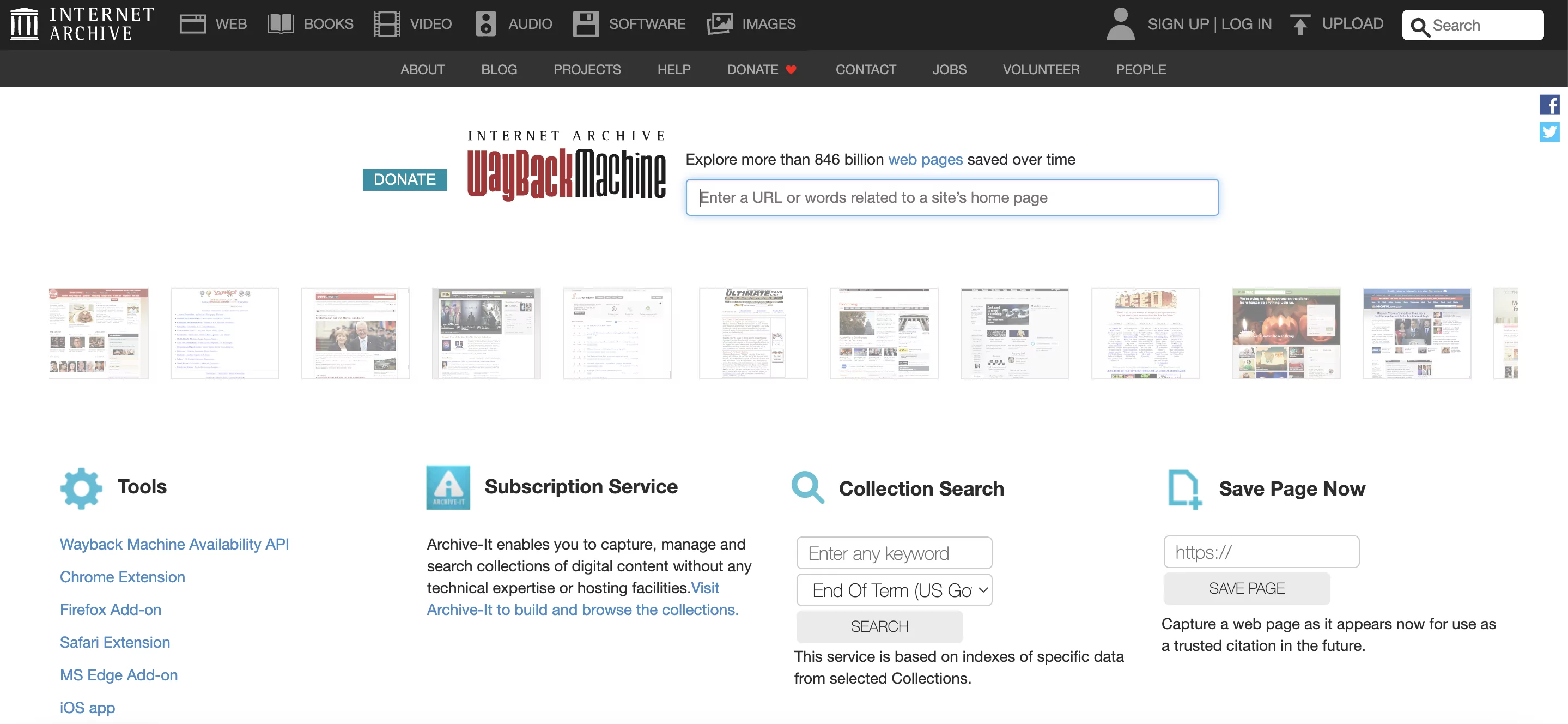
When you find some interesting domain name, check its history. You don’t want to buy a domain name formerly involved into scam activity. Use https://web.archive.org/ to see what this website looked like in the past.
If domain is ok, you can buy it. Or you can create absolutely new domain name without any history.
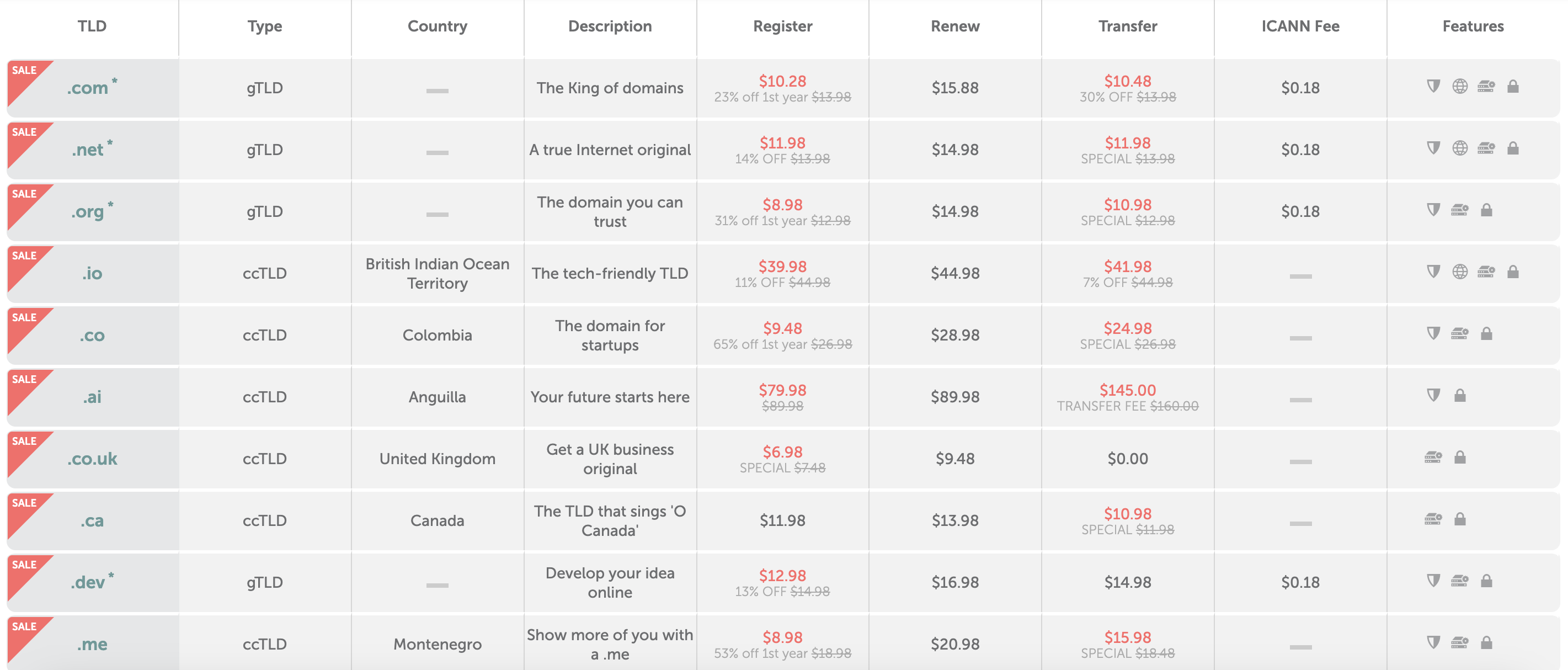
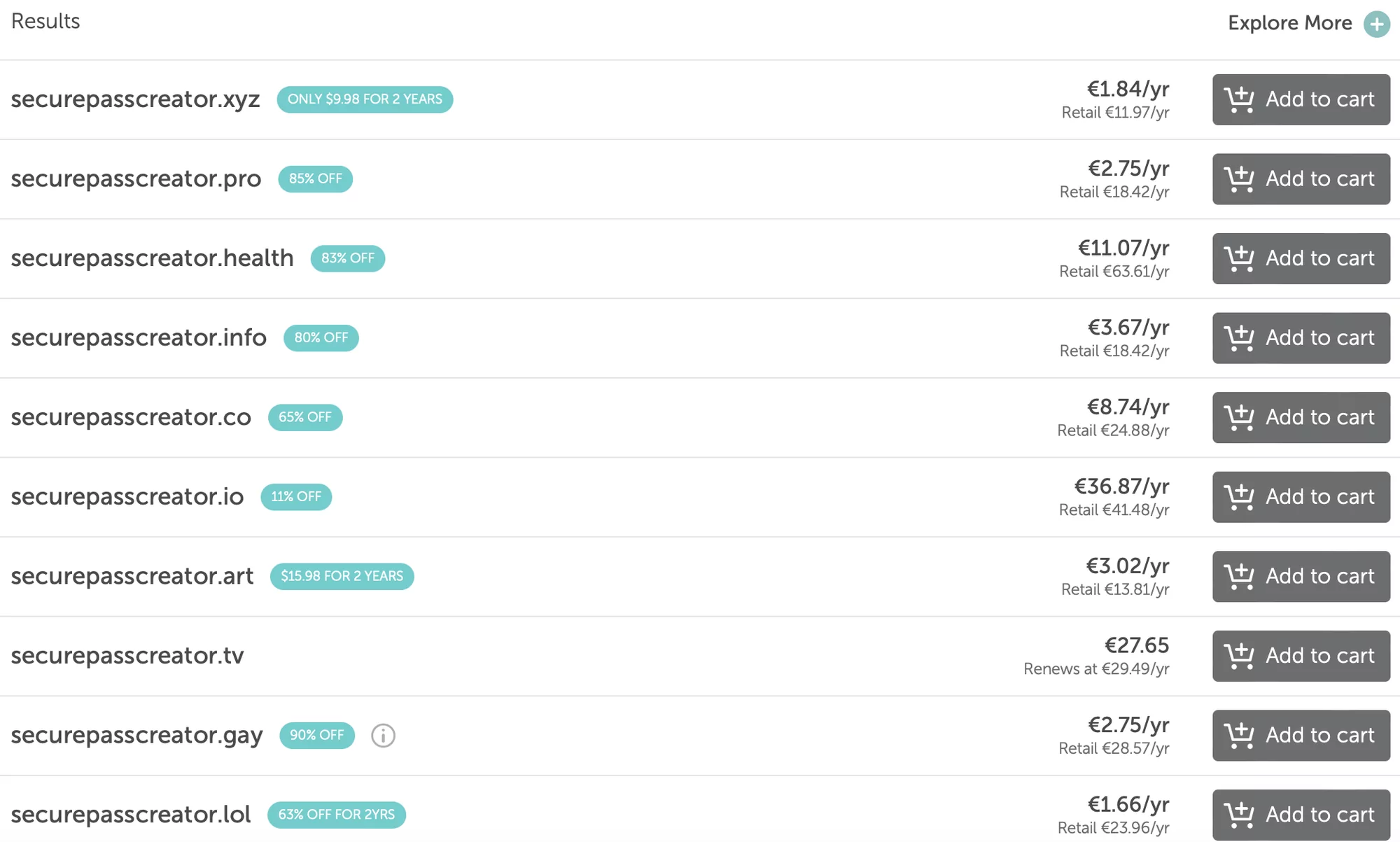
The price depends on many factors, such as TLD (symbols after dot), number of words, premium or not, current discounts, etc. Usually, if it is not a premium domain, the prices are:
Website hosting
Web hosting is like the digital real estate where your website resides. It’s a service that provides the necessary infrastructure for your website to be accessible on the internet.
There are several types of web hosting available, each tailored to different needs and preferences.
If you check any web hosting provider, you would see the following options:
- Wordpress. The prices looks delicious and it seems like a cheap web hosting. But don’t make the wrong decision. If you read the specifications carefully, you would see that there is a serious monthly visitors limit.
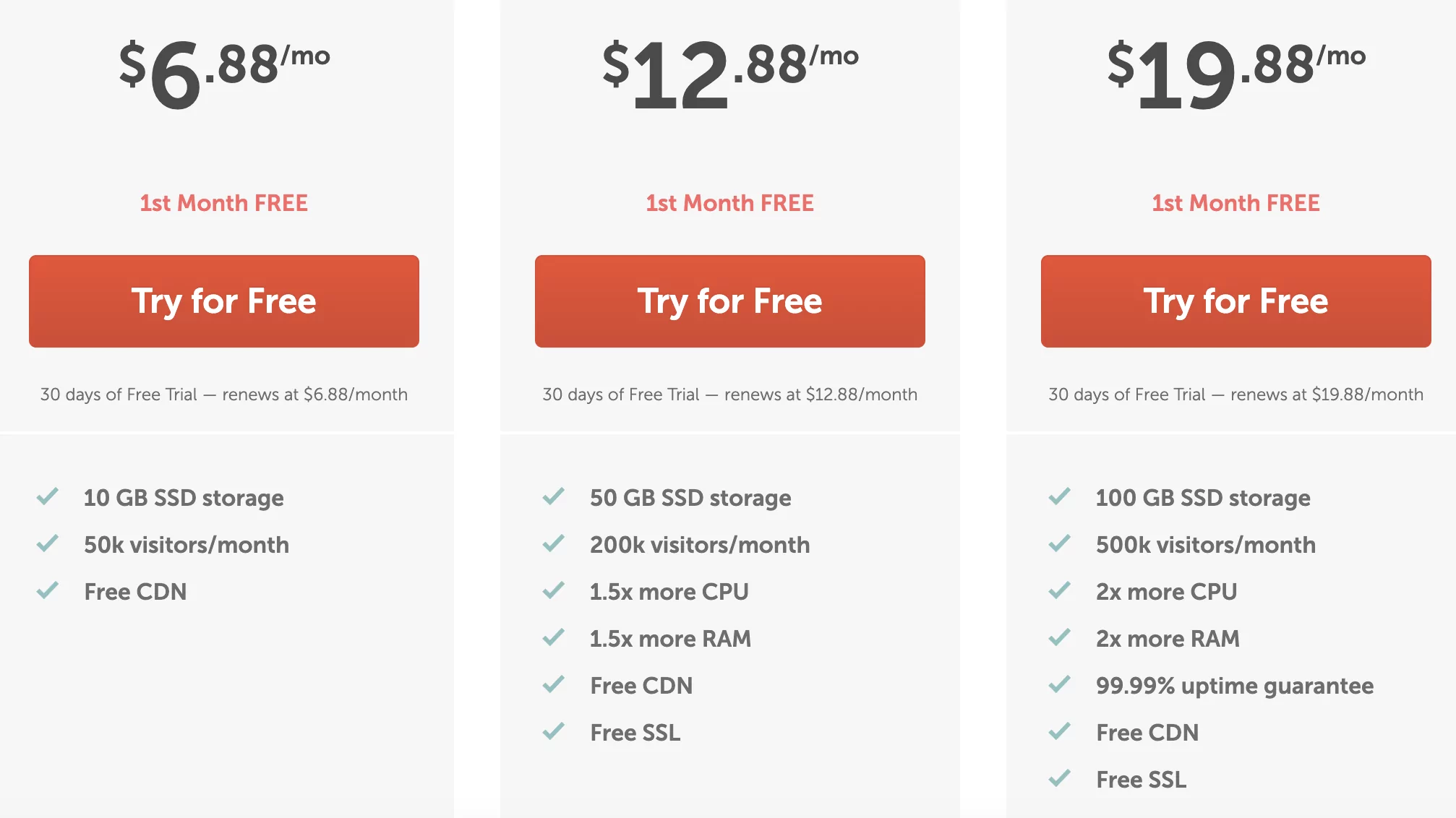
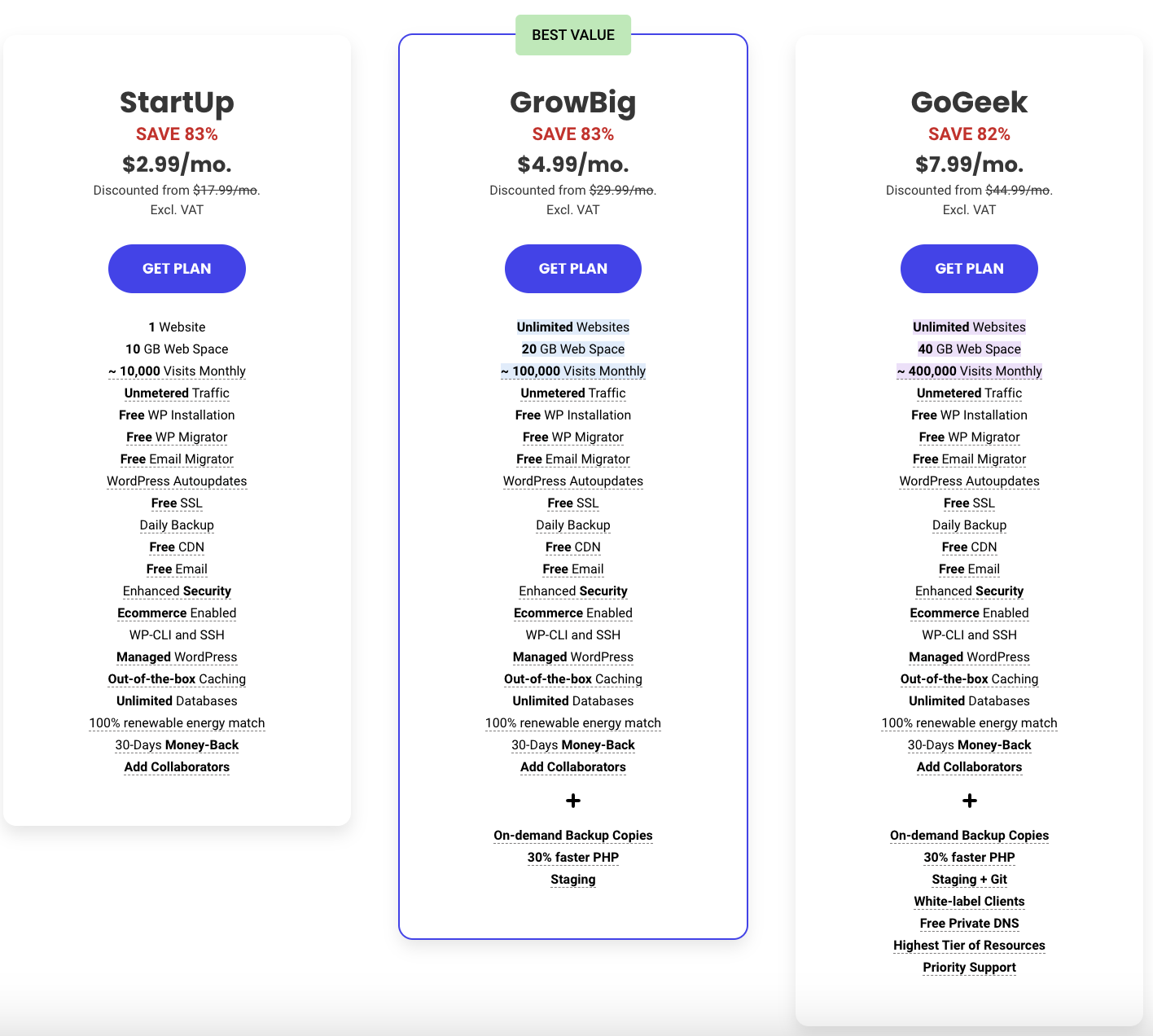
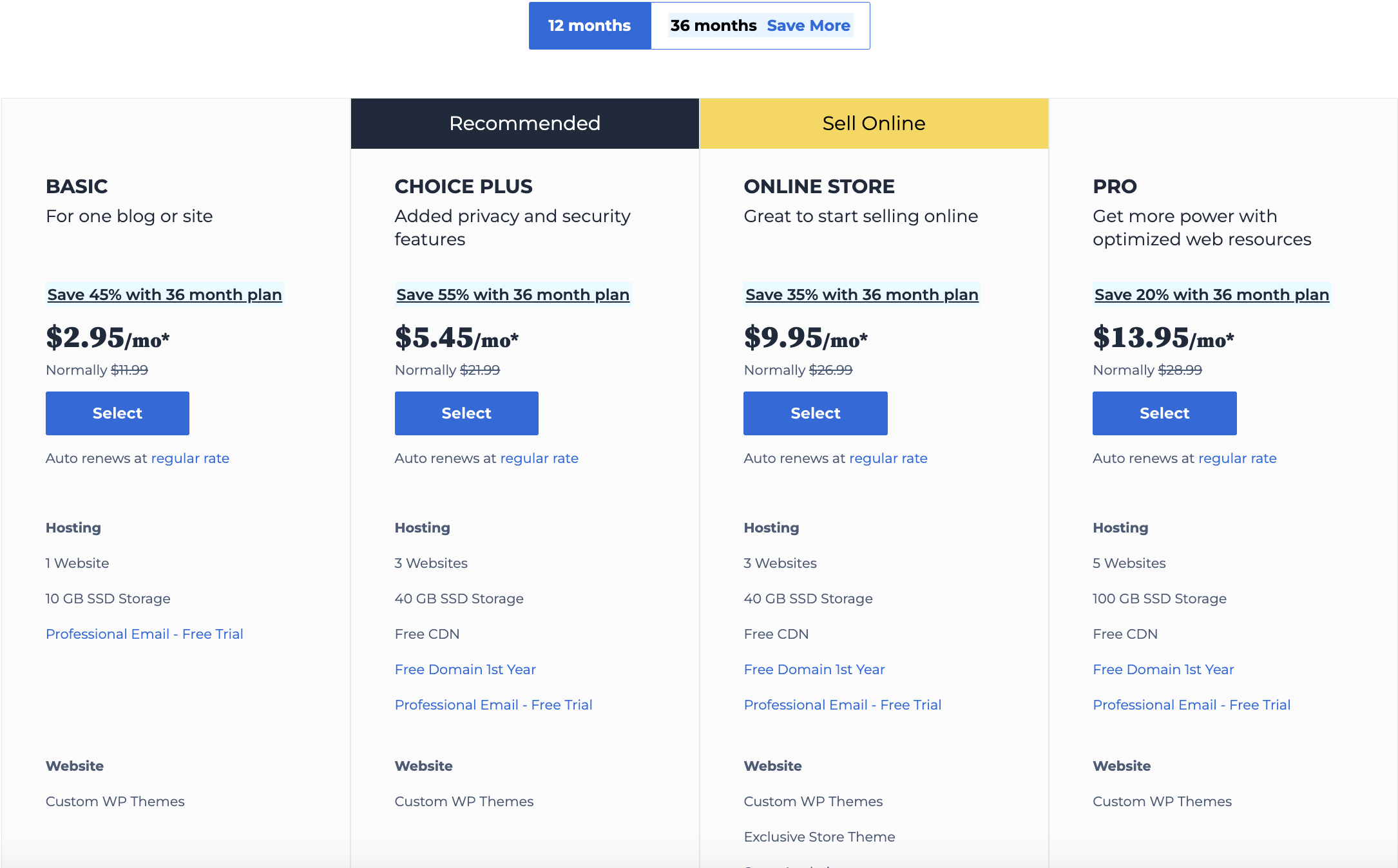
Let’s count together. 10k per month is only 333 users per day. 100k is only 3333 users per day. This is not what we are aiming for. It would be better to think two steps ahead and consider scalability.
If you are planning to drive traffic from Social Media, you might have spikes of traffic due to the virality. You may take a look here:
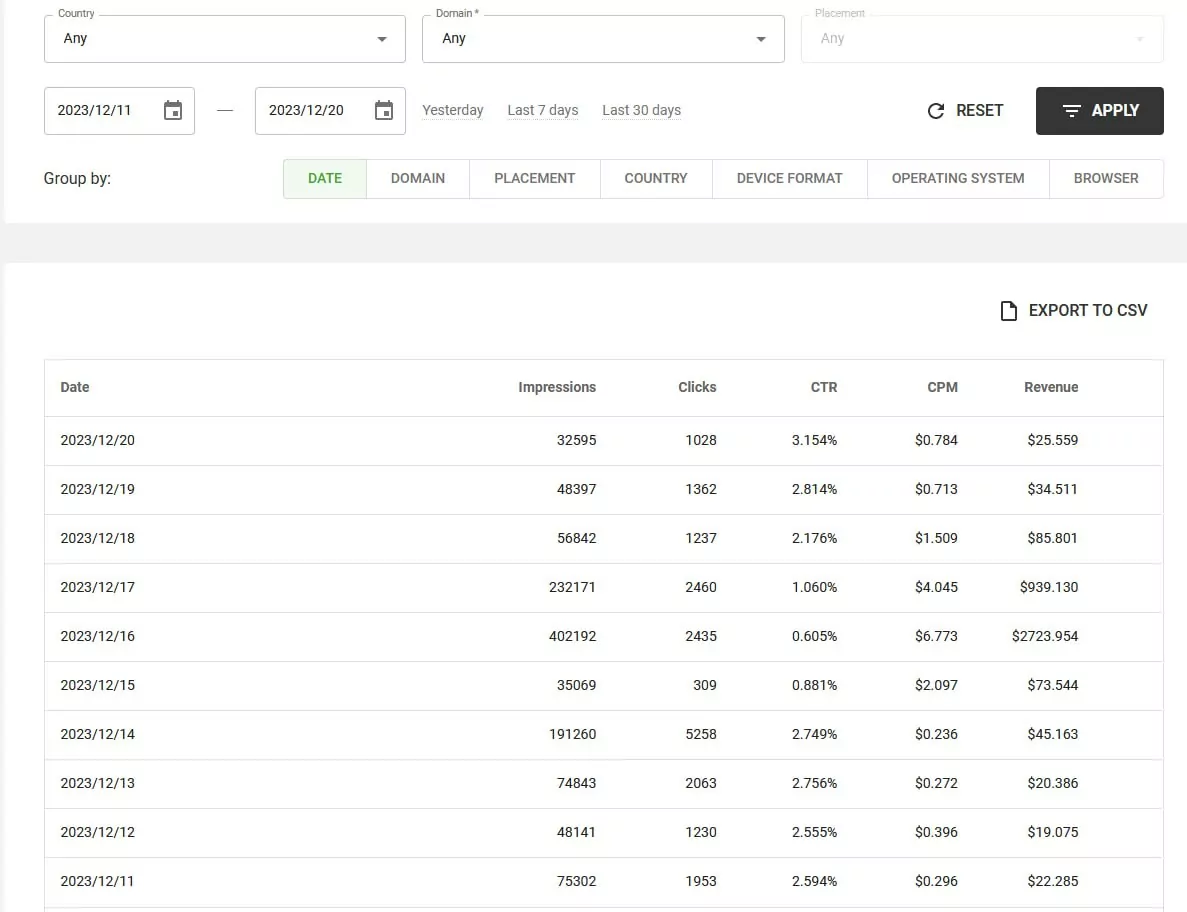
Also, Wordpress Hosting owners share the resources with all other people, and if your neighbor eats all resources, your website becomes slow, and it is not very good for your ranking, site loading, and even ad opening.
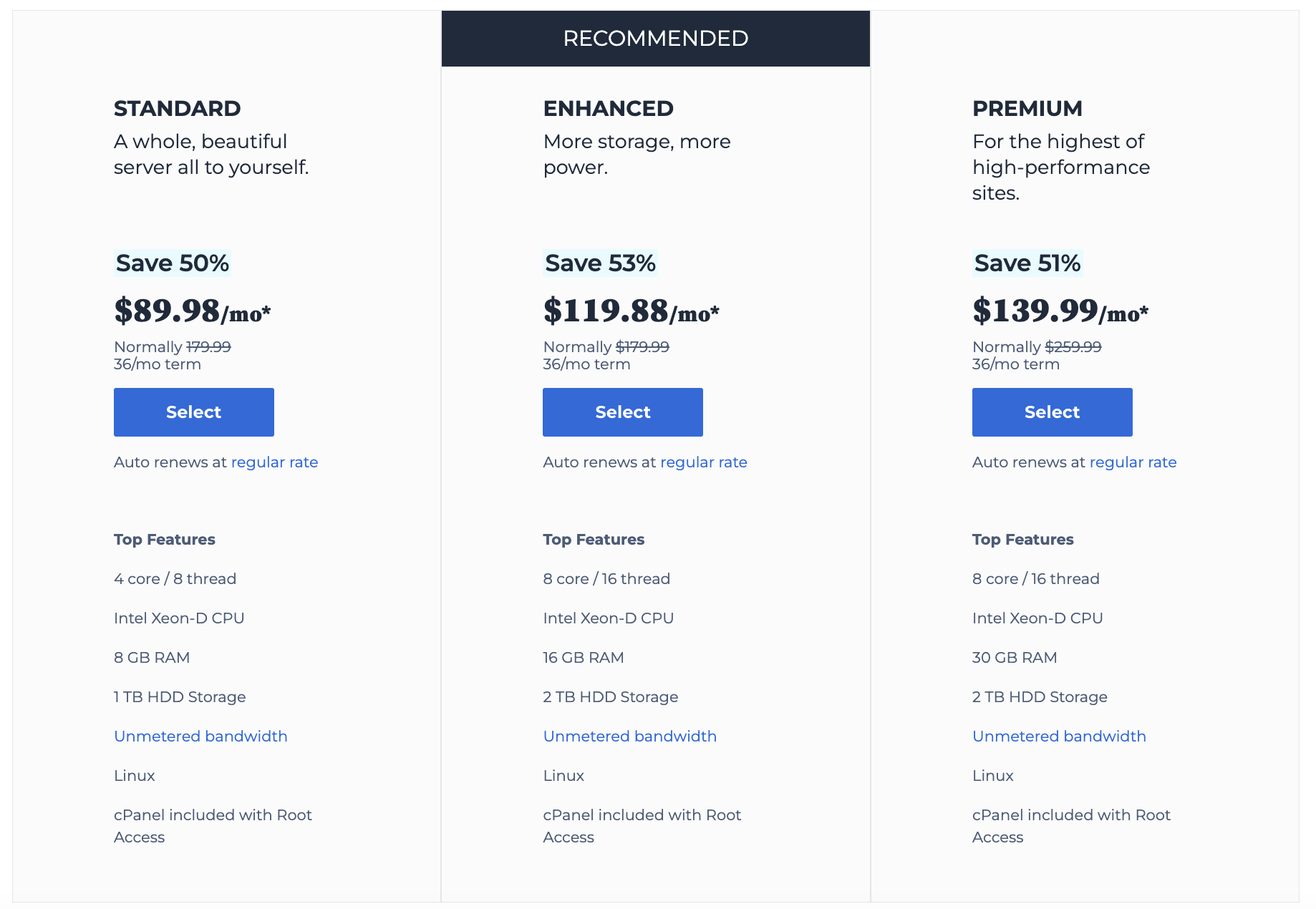
- Dedicated Server. It’s the best option if you already have money. Dedicated Server gives you top tier performance.
But if you are in the beginning of your online journey to make some cash, you should consider another option.
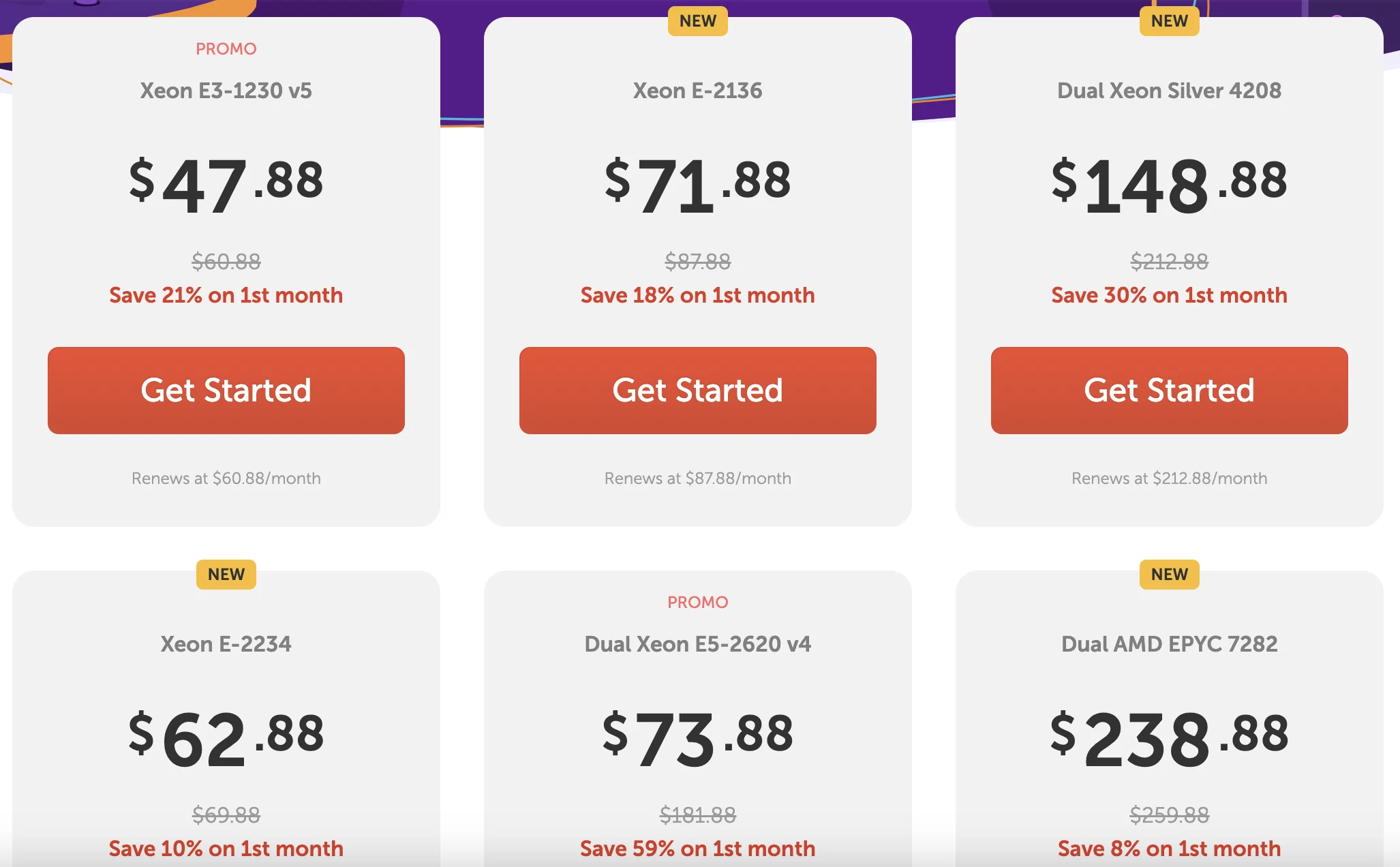
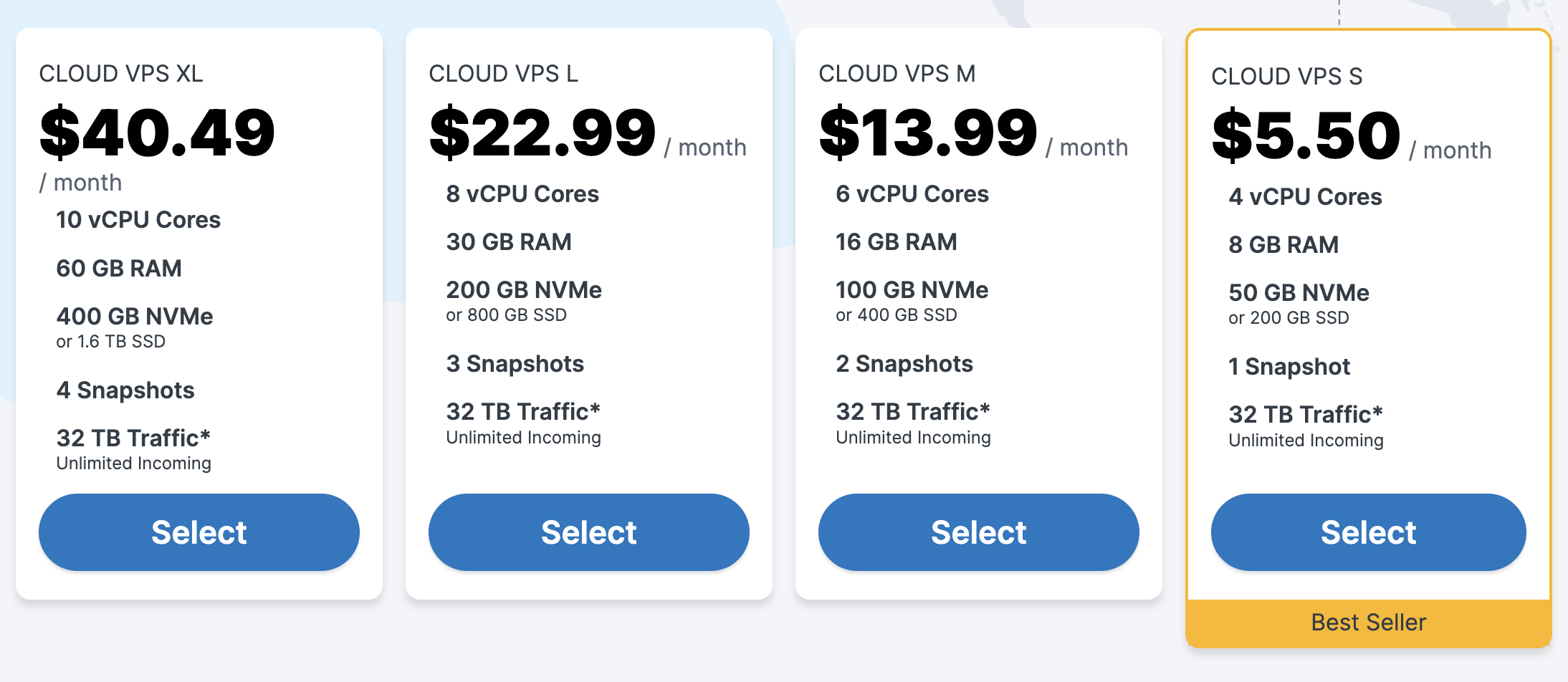
- VPS (Virtual Private Server). It is a golden middle. You don’t have any restrictions in the amount of users per month. You have your own resources. And the price is lower compared to Dedicated Server.
It’s possible to find some options from $5.50 per month.
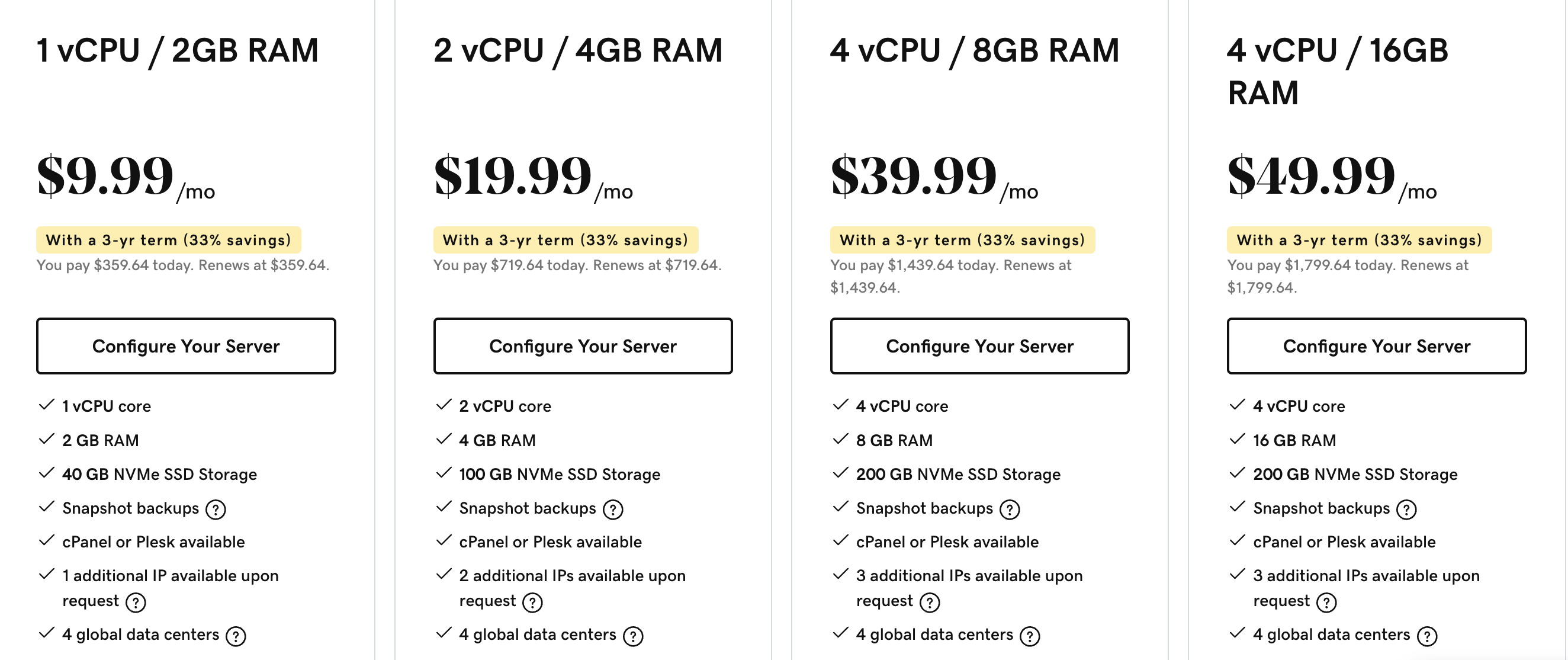
Using VPS server requires some skills.
I recommend to choose a VPS server with pre-installed Linux OS. It would be relatively easy to install SSL and Wordpress using SHH client. What is SSL, SHH, and why do you need it? Read further.
SSL
With SSL in place, your website’s URL begins with “https://” instead of “http://,” indicating a secure connection. This not only provides a sense of safety to your visitors but also boosts your website’s visibility in search results, ultimately attracting more traffic and instilling trust and credibility in your online presence.
Without an SSL certificate, your website may struggle to achieve a good ranking on Google. This is because search engines, including Google, prioritize secure websites in their search results. When users see “Not Secure” warnings next to a web address, they’re less likely to trust and engage with your site.
CMS
CMS stands for “Content Management System”. It is a software application or in other words a blogging platform that allows users to create, manage, and modify digital content, typically for websites and online platforms.
I recommend for all you beginners a Wordpress website builder. It is easy to install and use. You don’t need to be a programmer to work with Wordpress. And there are a lot of video tutorials on Youtube and Blogs all around Google to make a successful website.
How to set up your VPS hosting
First, select your VPS hosting provider.
Secondly, choose your VPS hosting plan according to your budget and estimated traffic volume, and any resources you need.
You need to select Linux Ubuntu 20.04 as an OS for your server.
We can use terminal to install anything you need on your Linux server. But as a beginner, you’d better use a web-based control panel for managing your system.
The most popular control panels are CPanel, Plesk but they are paid. Webmin is free, that is why I will show you what to do if you use Webmin. Webmin allows us to install Virtualmin, which will help us install Wordpress.
LAMP is a bundle of Apache, PHP, MYSQL, and PHPmyAdmin. You just need it, trust me.
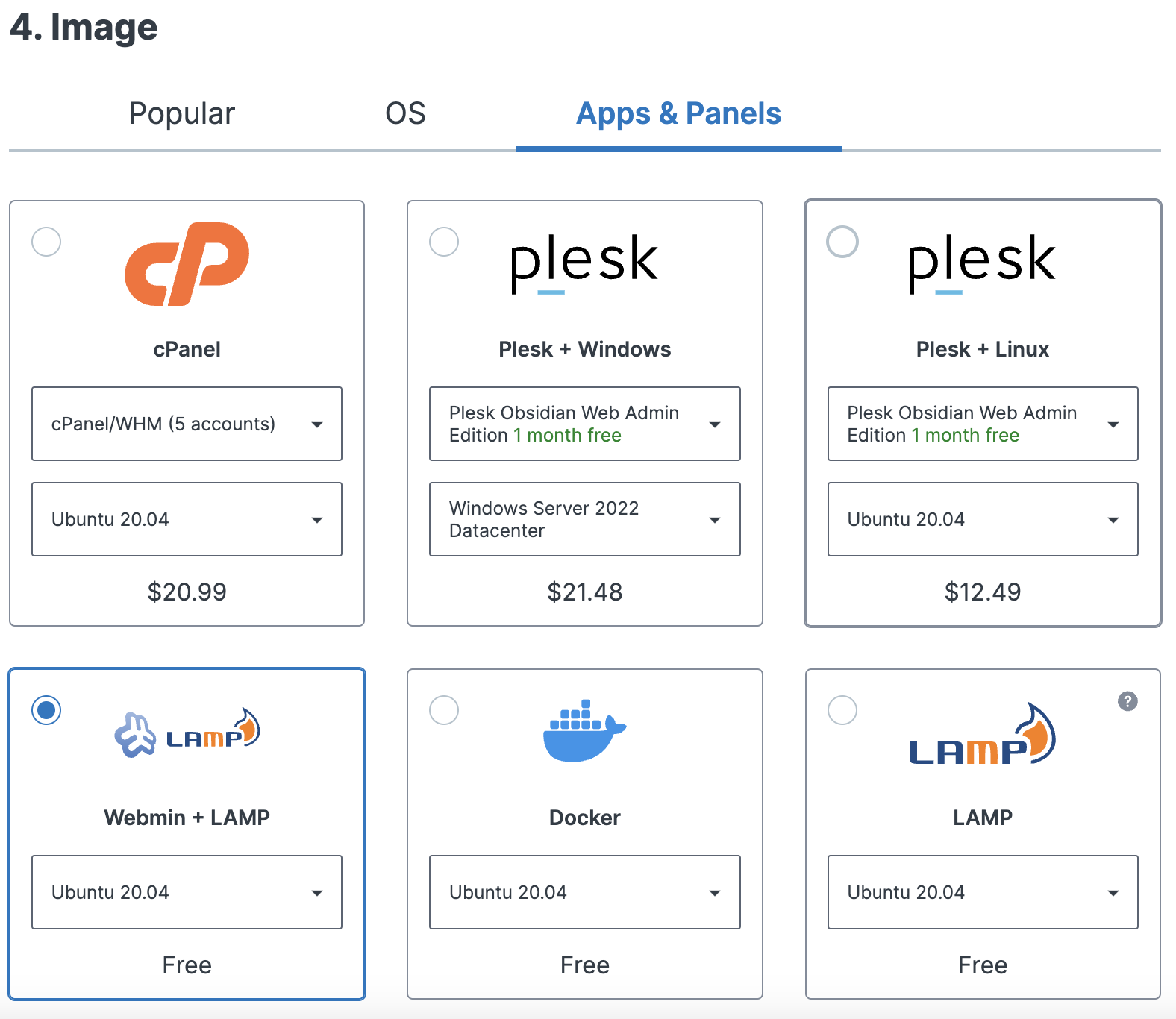
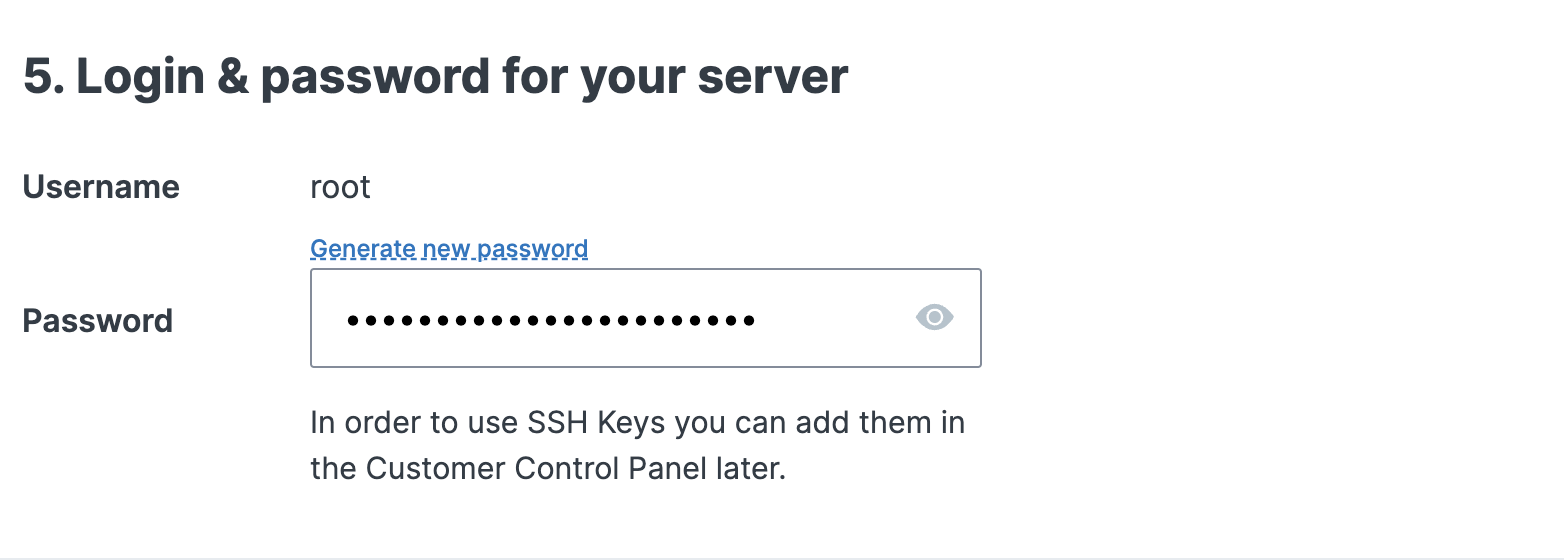
When you proceed further you will create a password, which you will use to aceess your server with SHH tool. We will talk about it later.
When you finished your order you would recieve an email with your credentials.
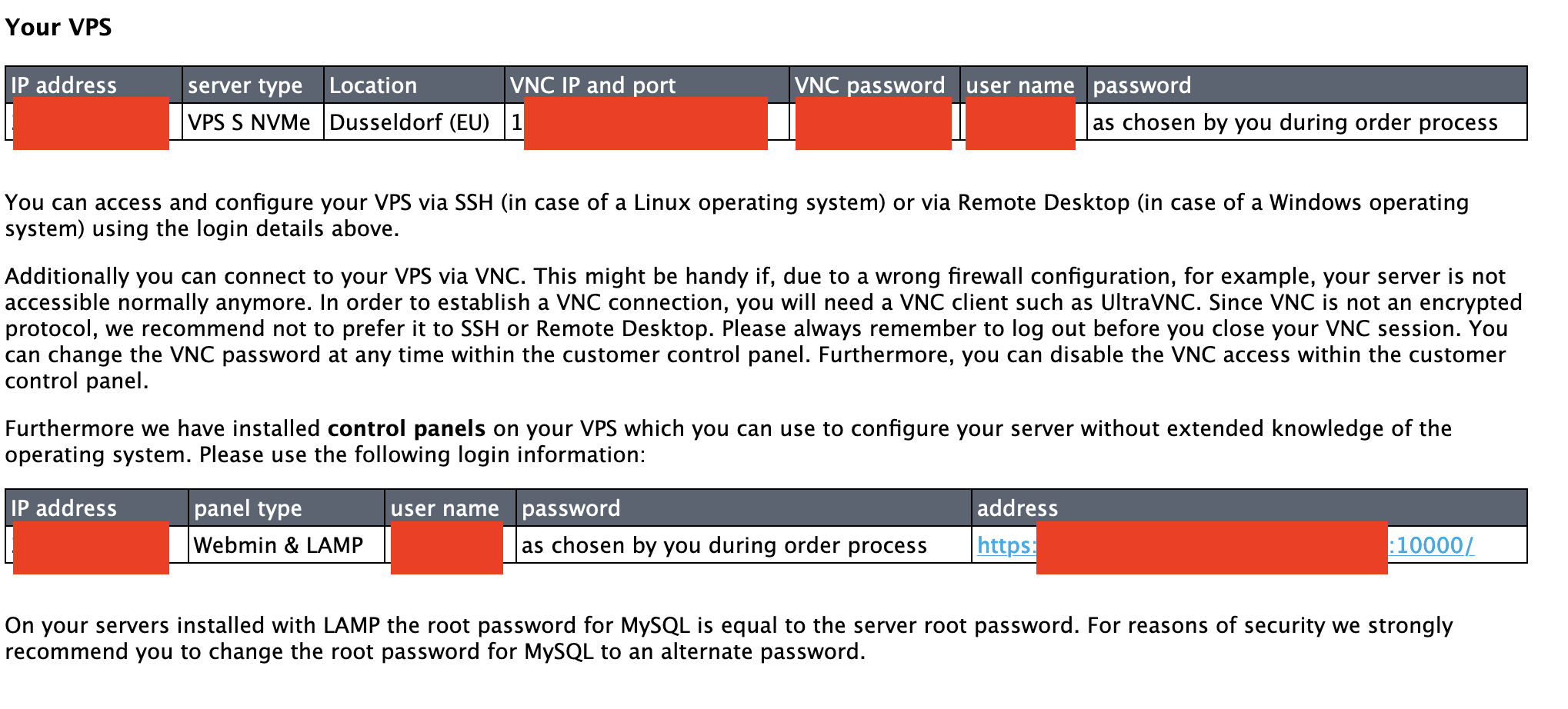
Now you need to connect your domain name and your server. Copy IP address from your letter and save it somewhere near.
Connecting domain name to your server
Log into your domain name register account (Namecheap, Godaddy, or any other).
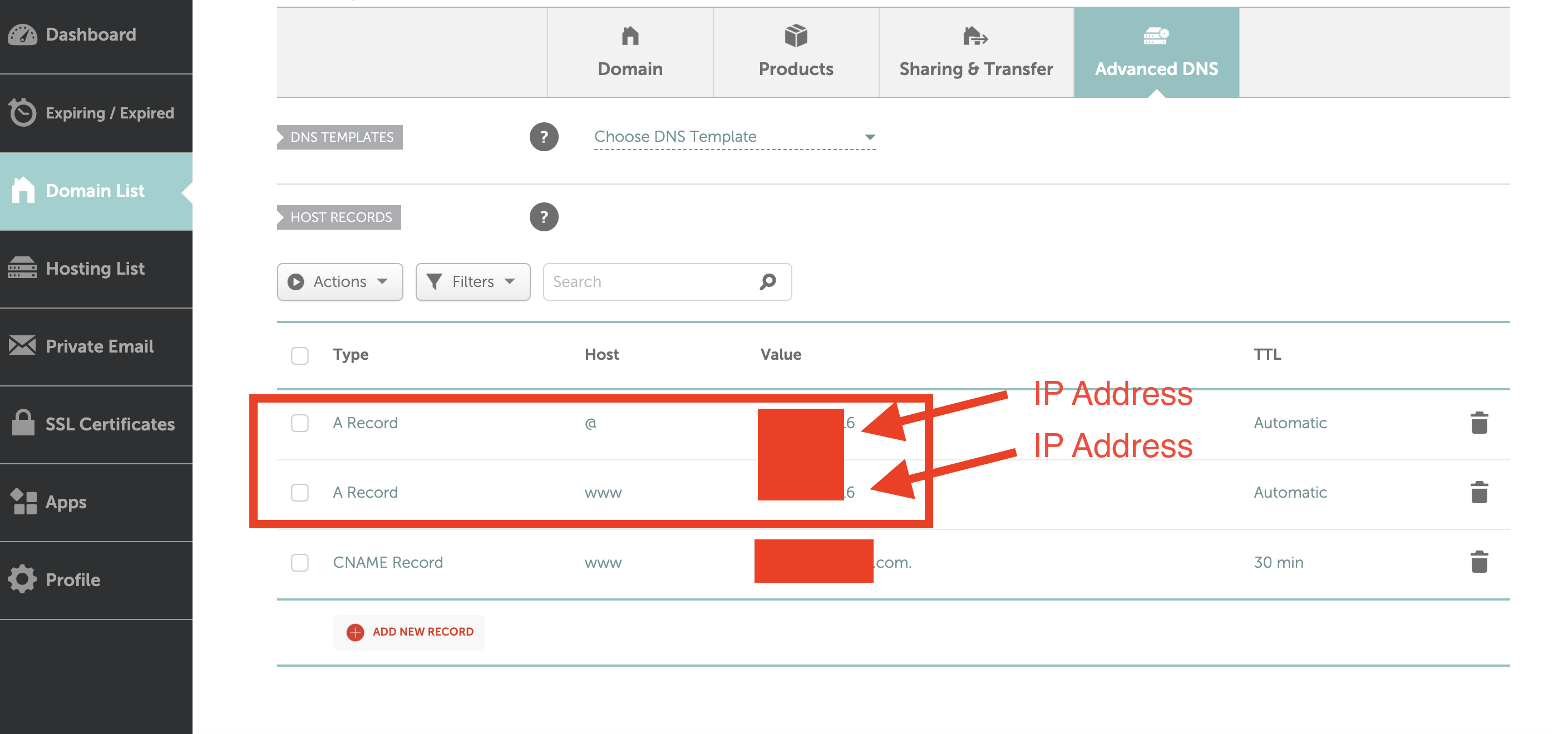
Go to Advanced DNS settings and create two new A Records. One with @ and another with www in the Host column.
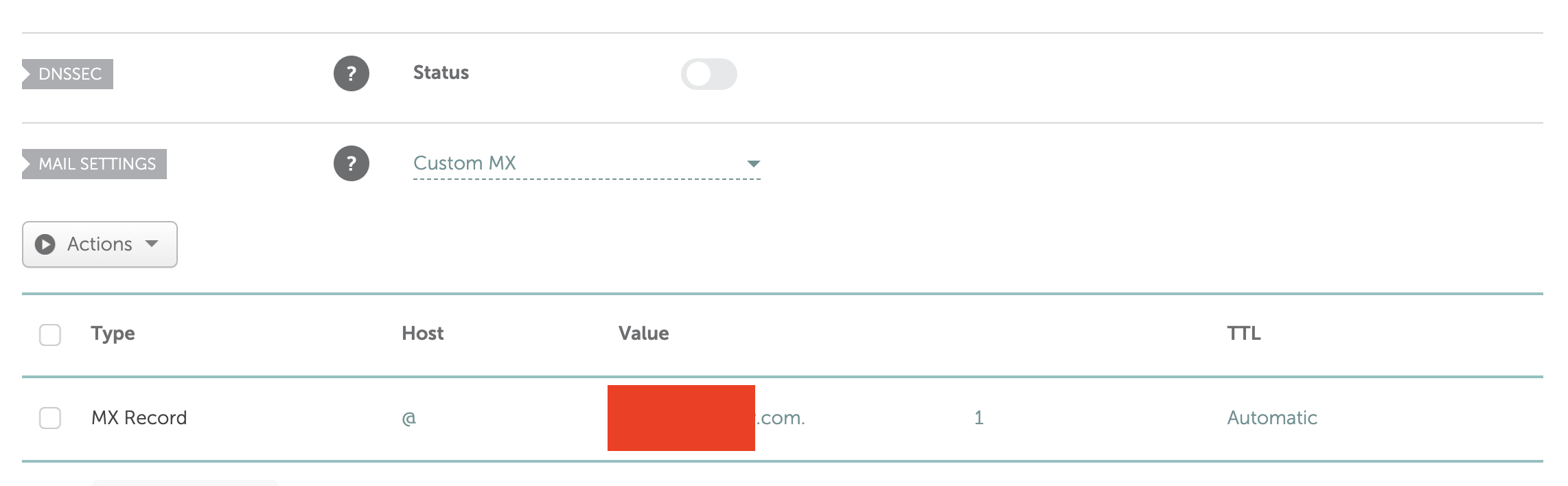
Also create MX Record with @ Host and domain name in the Value column.
Installing Virtualmin
We will install Virtualmin like a pro via console. SSH is a secure network protocol that is commonly used to remotely control servers, network devices, and other devices.
The most popular SSH tools are: PuTTY, SecureCRT, Termius, and others.
Log into your server using SSH tool. You will need an IP address, username from the letter, and Password you created before when made a purchase.
Here is Termius on the picture.
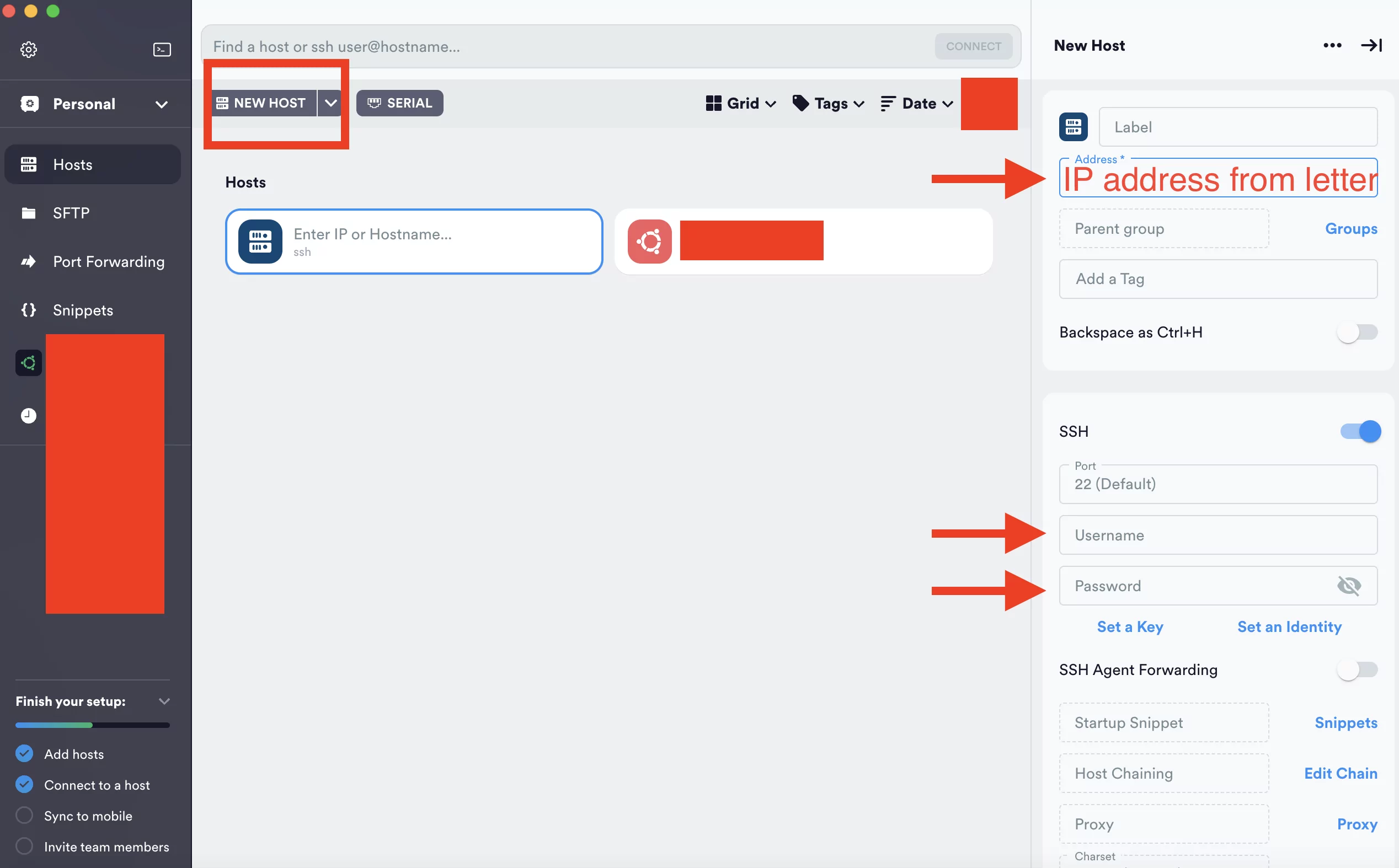
After you connect there would be black screen with some letters inside. This is Command Line Interface. You can enter the commands and magic happens.
Now we need to install SSL certificate and Wordpress. To install Wordpress on Webmin we need to install Virtualmin before. Virtualmin is used for managing websites (think of it as a control panel for managing websites, such as a cPanel alternative), while Webmin is more of a server management tool (used to manage system related services).
Virtualmin is a powerful control panel that can be installed on top of Webmin to manage and simplify the administration of virtual hosts (multiple websites) on a web server. To install Virtualmin on a server with Webmin, follow these steps:
Important: Before you proceed, make sure you have a clean, freshly installed Linux server, and you have root or sudo privileges.
- Update Your Server: Ensure that your server’s package repositories are up to date by running the following command:
sudo apt updateor
sudo yum update - Install Webmin: If you haven’t already installed Webmin, you can do so by following the instructions for your specific Linux distribution. For example, on Ubuntu, you can use the following commands:
sudo sh -c 'echo "deb <http://download.webmin.com/download/repository> sarge contrib" > /etc/apt/sources.list.d/webmin.list' wget -qO - <http://www.webmin.com/jcameron-key.asc> | sudo apt-key add - sudo apt update sudo apt install webmin - Access Webmin: After the installation is complete, you can access Webmin by opening a web browser and navigating to
https://your-server-ip:10000/. Log in using your root or sudo user credentials. - Download the Virtualmin Installation Script: Download the Virtualmin installation script using
wgetorcurl:wget <http://software.virtualmin.com/gpl/scripts/install.sh>or
curl -o install.sh <http://software.virtualmin.com/gpl/scripts/install.sh> - Run the Installation Script: Make the script executable and run it:
chmod +x install.sh
sudo ./install.sh
The installation script will guide you through the installation process and ask you questions about your server’s configuration. Follow the prompts and provide the necessary information.
- Access Virtualmin: Once the installation is complete, you can access Virtualmin by opening a web browser and navigating to
https://your-server-ip:10000/. Log in using your Webmin credentials.
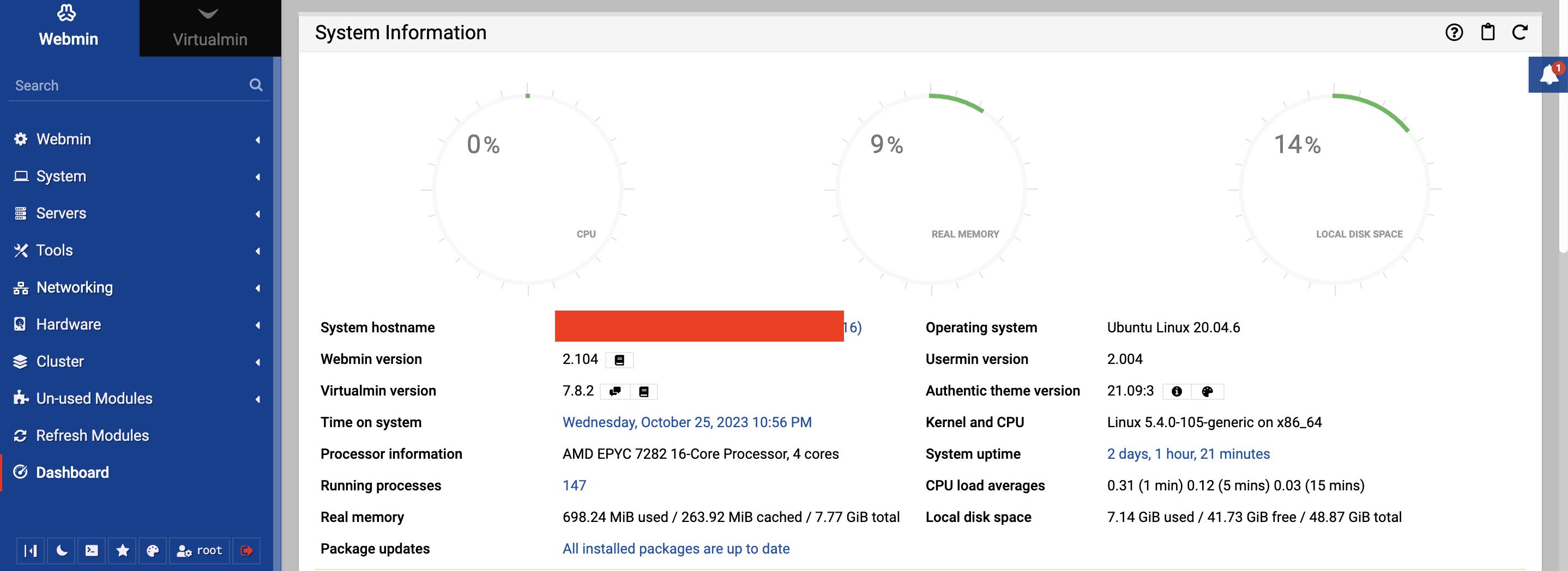
That’s it! You should now have both Webmin and Virtualmin installed on your server, and you can use Virtualmin to manage virtual hosts and websites on your server. Please note that Virtualmin may have additional system requirements and compatibility with specific Linux distributions, so make sure to check the official documentation for any specific guidance related to your environment.
Installing Wordpress and SSL certificate
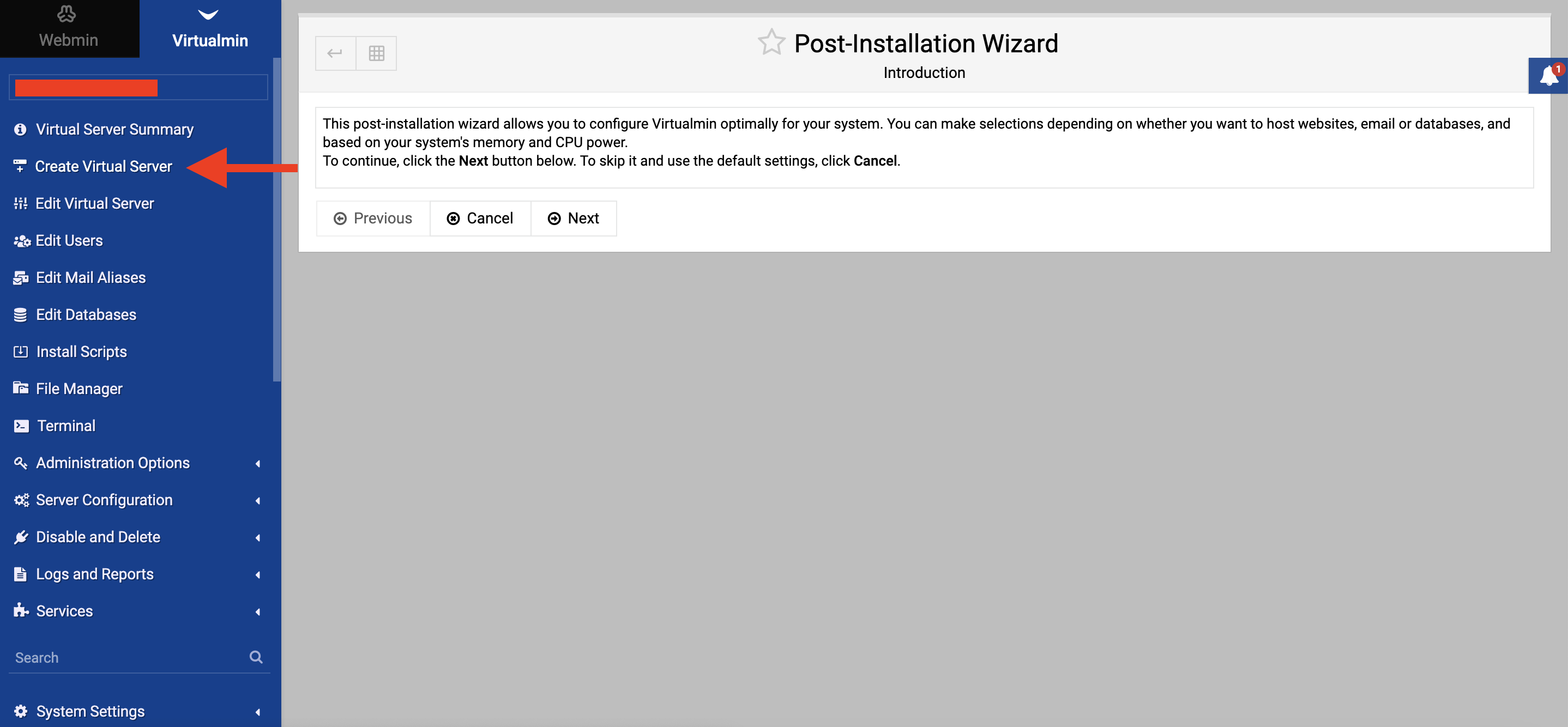
First of all, you need to create a virtual server.
Enter Domain name, write a description, create a strong password.
Enable all necessary features.
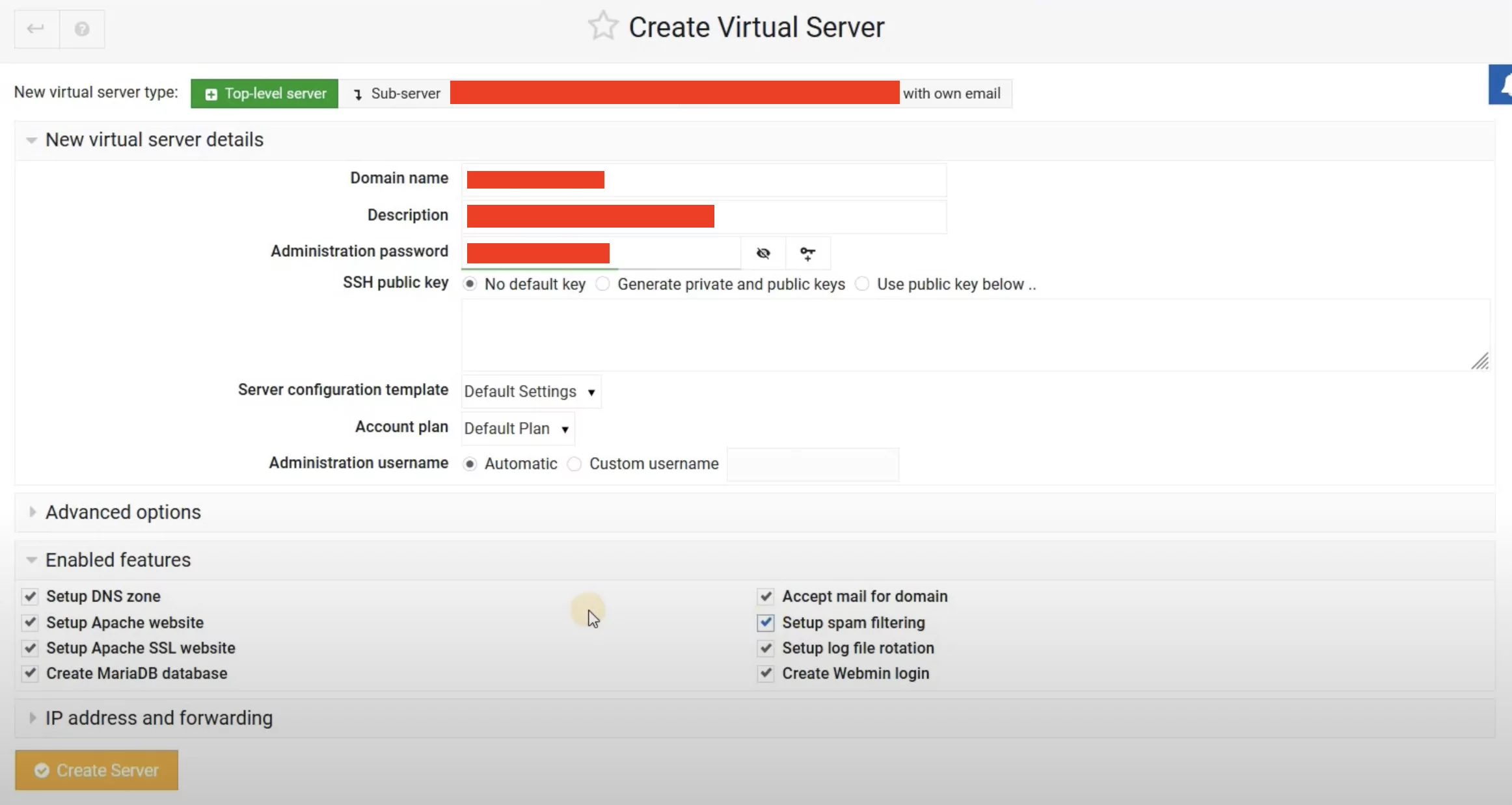
And hit the Create Server button.
Go to server configurations, and then PHP options.
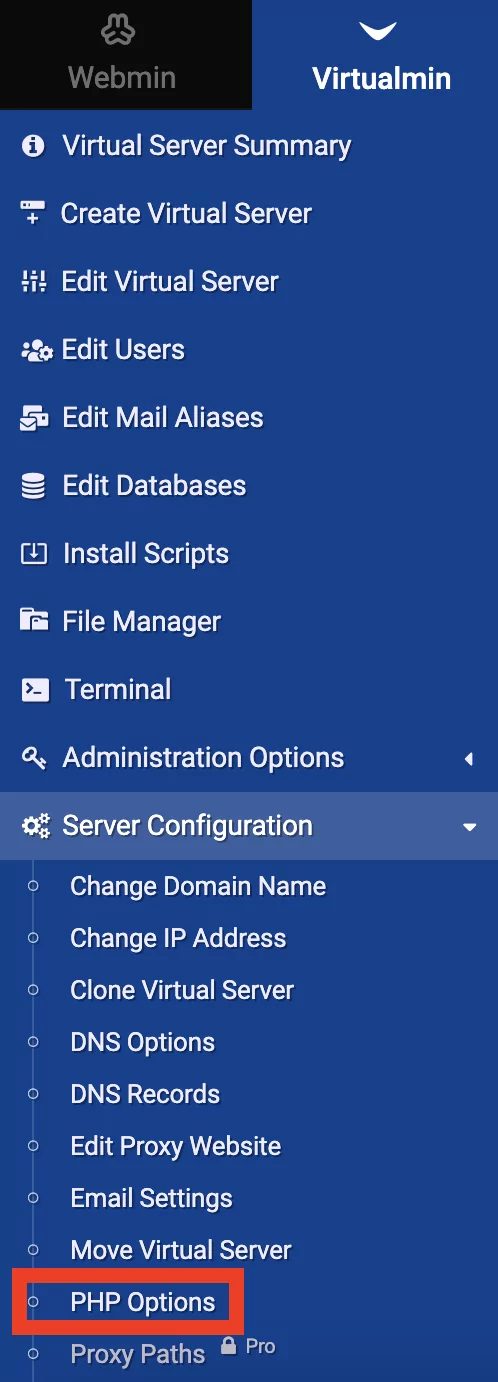
Select FPM and click Save.
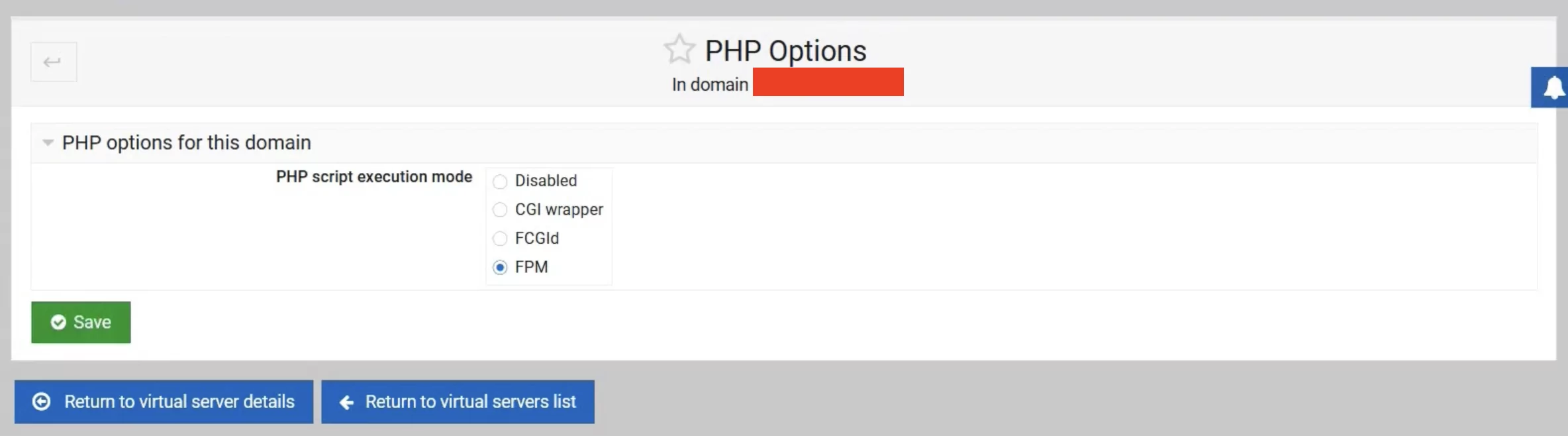
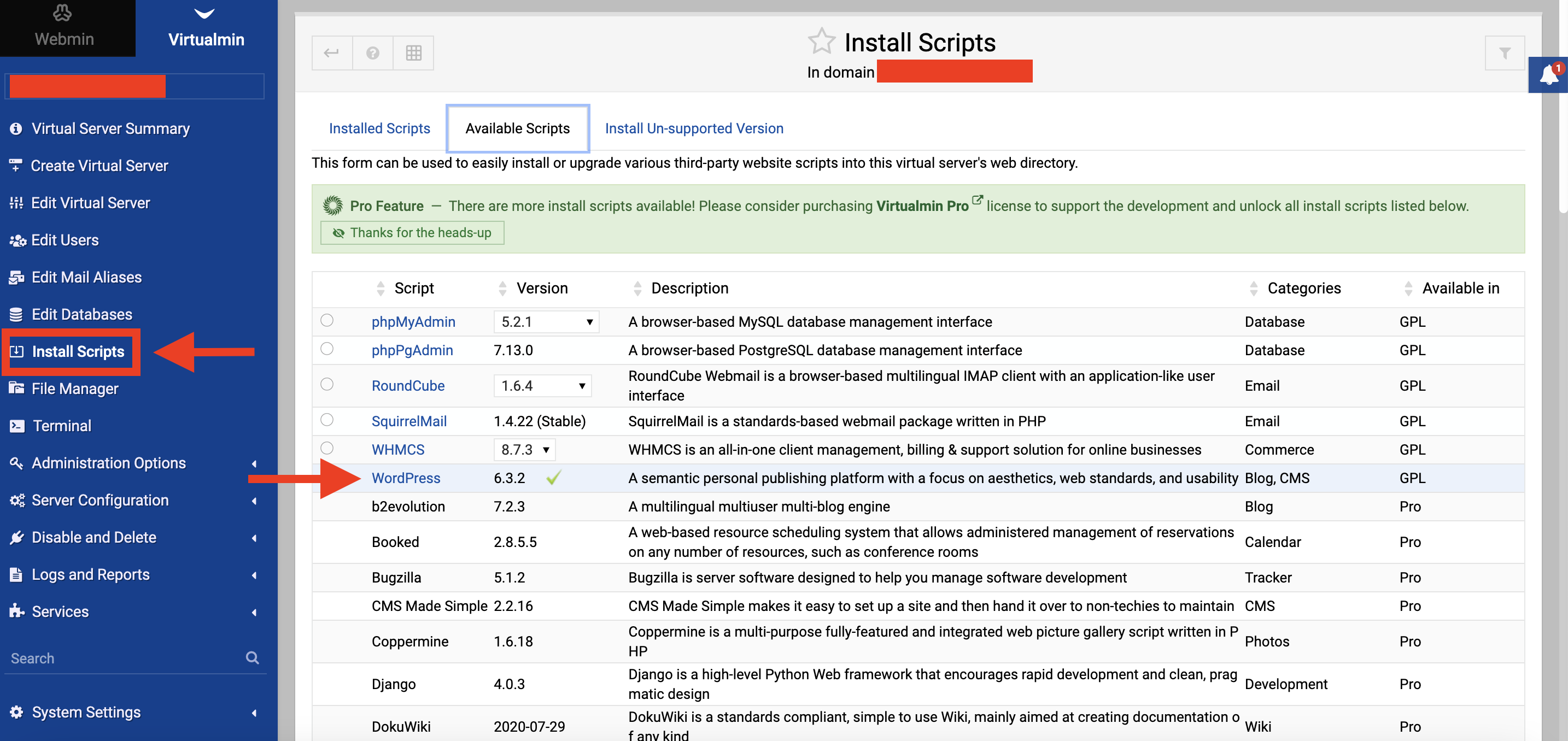
Click Install Scripts and find WordPress. Click green V symbol near it.
Create Username and Password for your WordPress site. You will log into your website admin panel using these credentials.
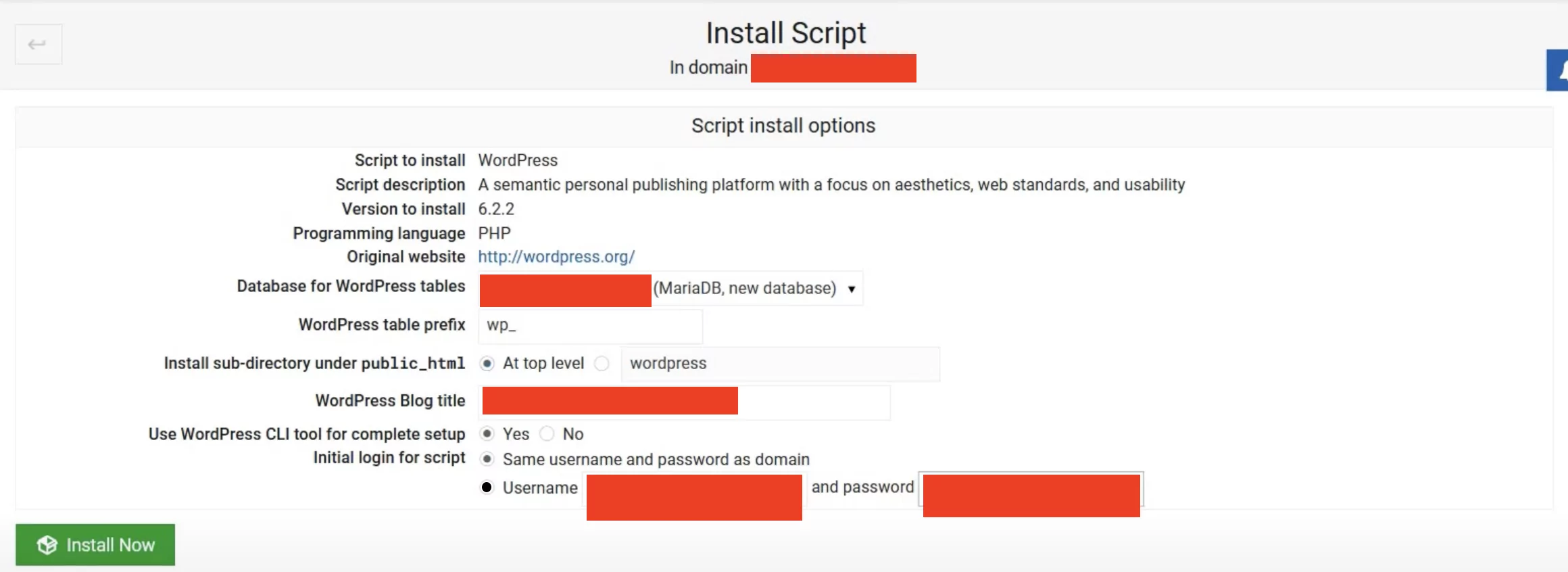
Click Install Now. Done.
Installing SSL certificate
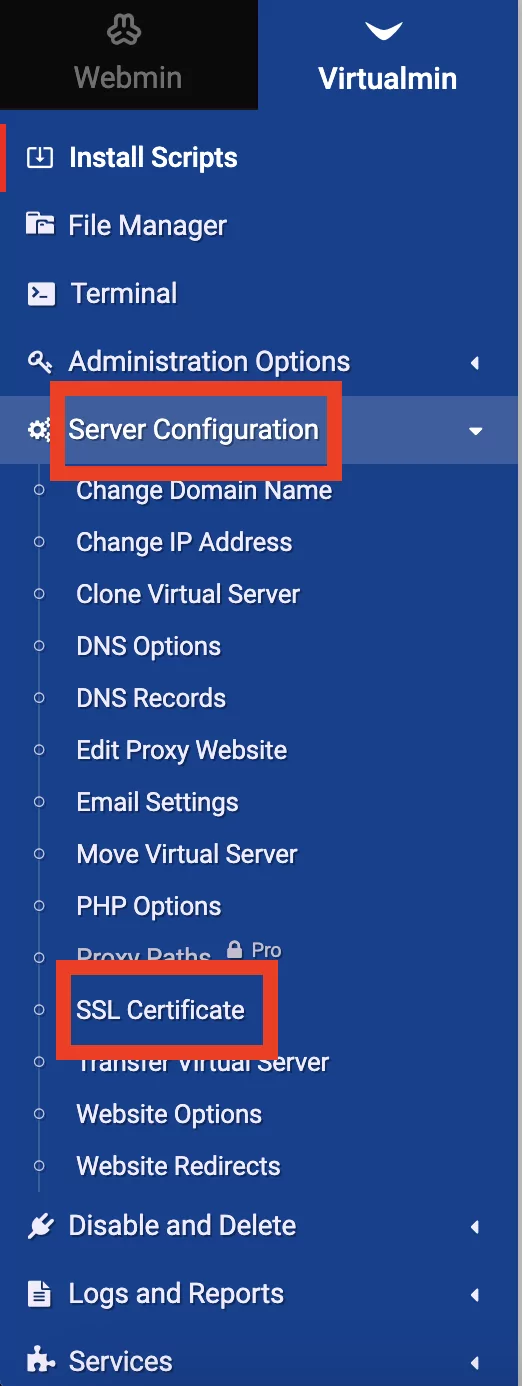
Go to the Server Configuration. Click SSL Certificate.
Click Let’s Encrypt.
Hit the radio button Domain names listed here and type in your domain name and domain name with www.
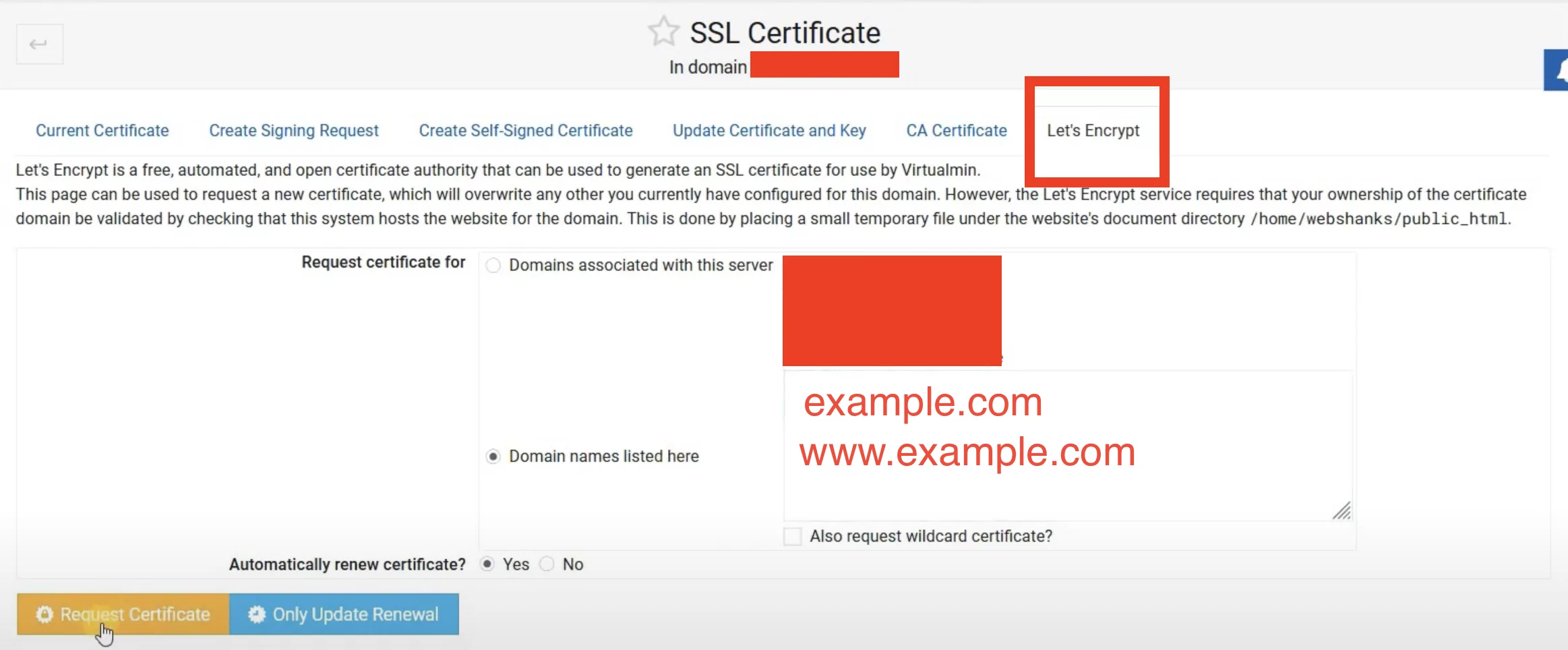
Click Request Certificate.
Go to Server Configuration. Click Website Options. Redirect all requests to SSL site – Yes.
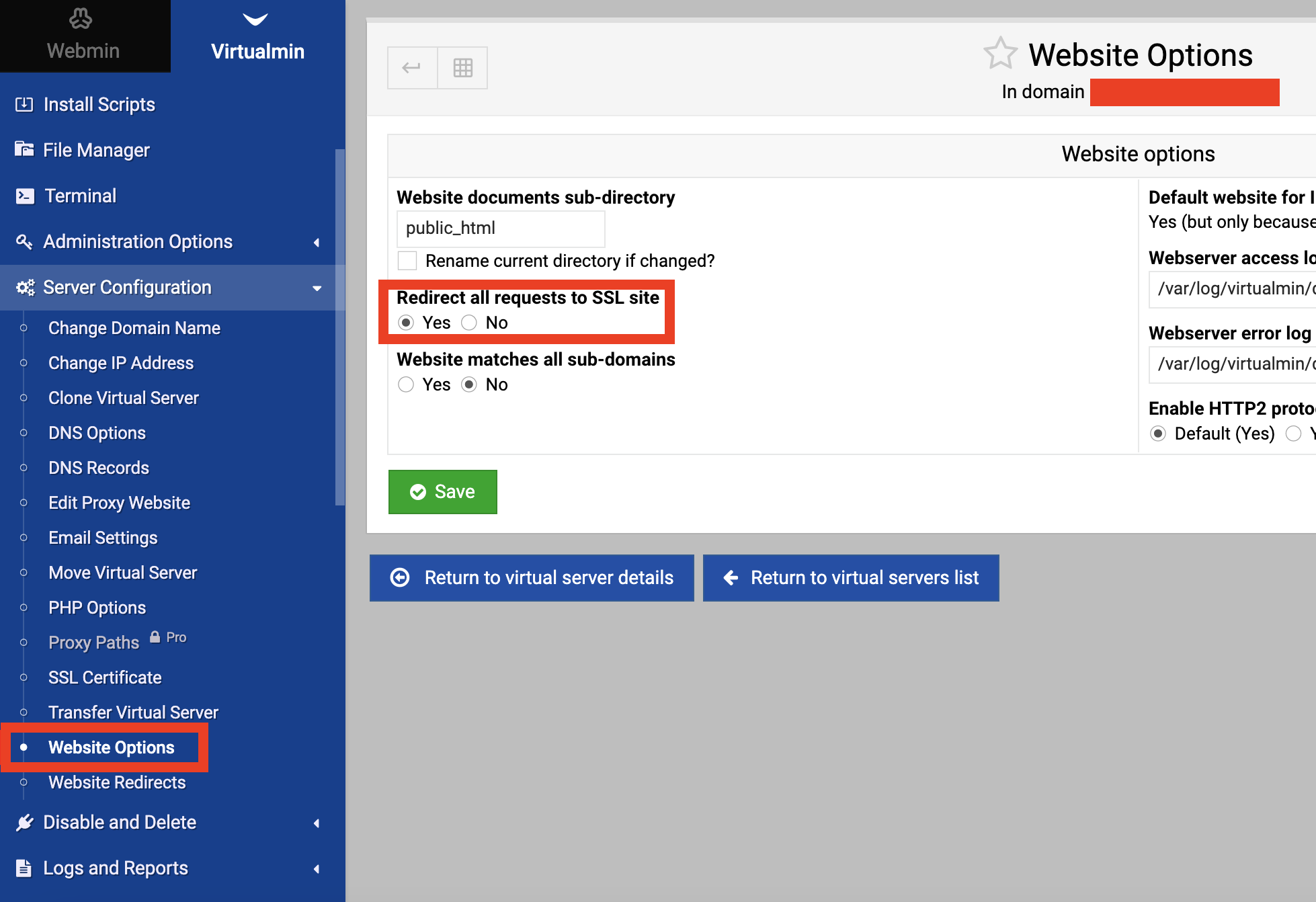
Save.
You are a delight! Now you can log into your Wordpress site.
To access your admin login page go visit your website and write /wp-admin/ after it.
For example https://example.com/wp-admin/
Picking up Wordpress theme
A WordPress theme is a pre-designed template or framework that determines the overall look, layout, and web design of a WordPress website. You do not need a web designer for that matter.
There are thousands of free and premium WordPress themes available, and you can choose one that best aligns with your website’s purpose and aesthetic preferences.
You’ll want to prioritize themes that are lightweight, well-optimized, and built for speed. Here are some popular and fast-loading WordPress themes that you can consider:
- Astra: Astra is a highly customizable and lightweight theme known for its speed and performance. It’s compatible with popular page builders and offers a range of starter templates to help you get started.
- GeneratePress: GeneratePress is another fast and lightweight theme. It’s designed with speed in mind and is fully compatible with popular page builder plugins. It offers a variety of customization options.
- Neve: Neve is a lightweight, SEO-friendly, and fast theme. It integrates well with popular page builders and is suitable for a wide range of website types.
Before selecting a visually appealing theme, be sure to check its compatibility with your specific plugins and website requirements. Additionally, consider your design preferences and the type of content you’ll be publishing. It’s a good practice to run performance tests on your chosen theme to ensure it meets your speed expectations.
Plugins
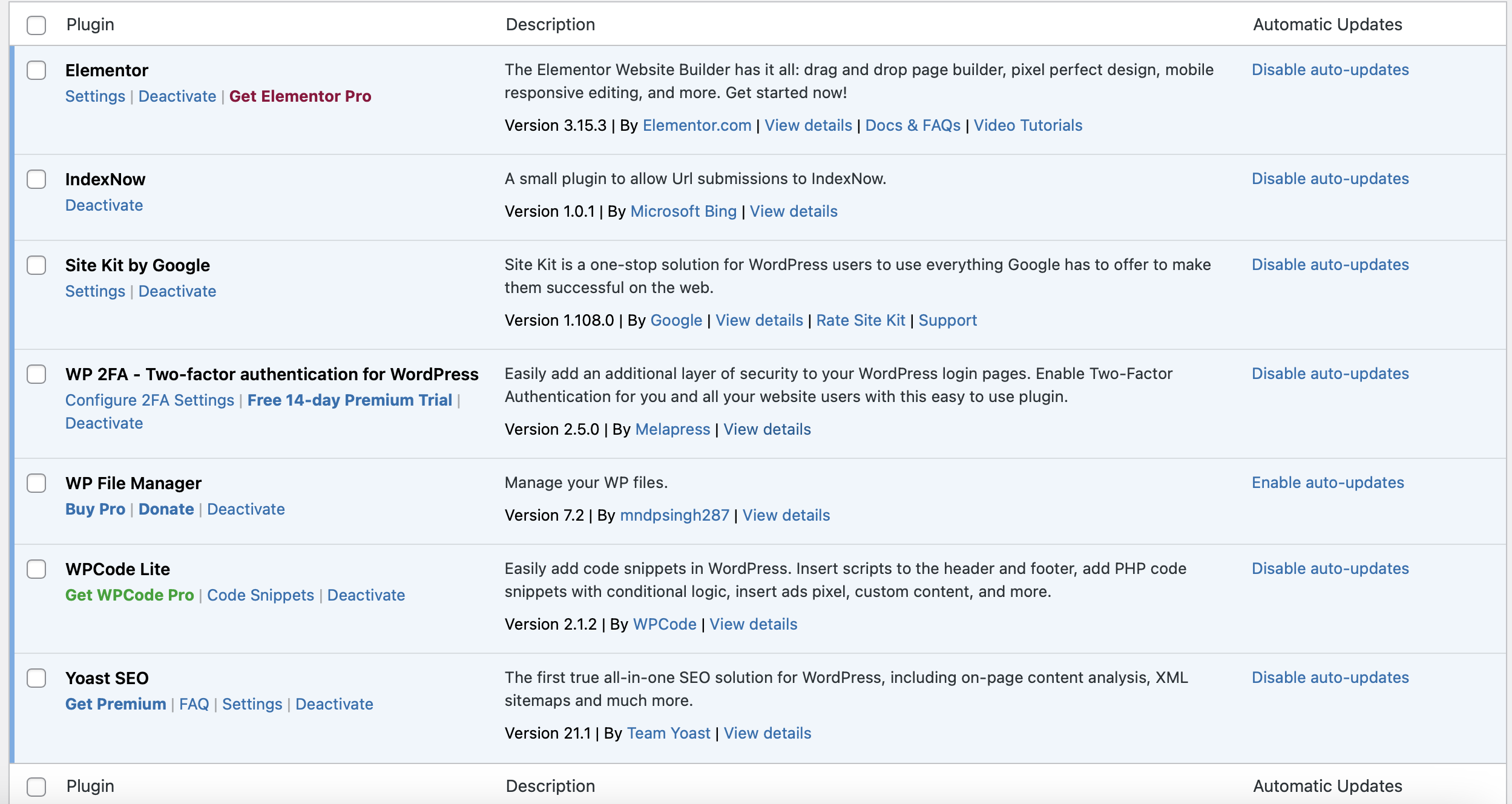
Plugins are extensions which give your website extra functionality features.
The most notable are:
Elementor – allows you to customize your website layout.
IndexNow – makes auto submissions to the search engine and helps be visible on the Internet.
WP File Manager – allows you to upload and download files from server.
WPCode Lite – add code snippets without editing your source code. Essential to add ad codes.
Yoast SEO – analyze on-page content, create XML sitemaps, and other things which help you improve your ranking.
WP 2FA – Two-factor authentication for WordPress – protect your website from hacker attacks.
Site Kit by Google – connect Google Analytics to your website.
Step 3: Drive traffic without wasting money
Traffic
I recommend going all out and using every trick in the book to drive traffic, whether it’s free or paid. But keep off from using fraud and bot traffic.
SEO Traffic
When users type words into search engines like Google or Bing, these engines work their magic to find websites that might have the answers users seek. To make the most of this, you’ve got to remember two important things:
- Get Noticed by Search Engines: Your website needs to be visible to search engines like Google and Bing.
- Get Noticed by Users: Equally important is that your website should be easy for users to find.
The first part is handled with the help of WordPress plugins. You’ll need:
Yoast SEO: This plugin helps you create a sitemap, structure your blog posts, generate custom thumbnails for social sharing, and even rates your content’s readability.
IndexNow: This one automatically gets your site indexed by Bing Search Engine.
Site Kit by Google: Use this to connect your website to your Google Analytics account. This way, all your landing pages and blog posts become visible to search engines, and users can discover them.
However, just getting to the second page of search results won’t do you any good. That’s where the real competition begins, and the number one spot is where the magic happens.
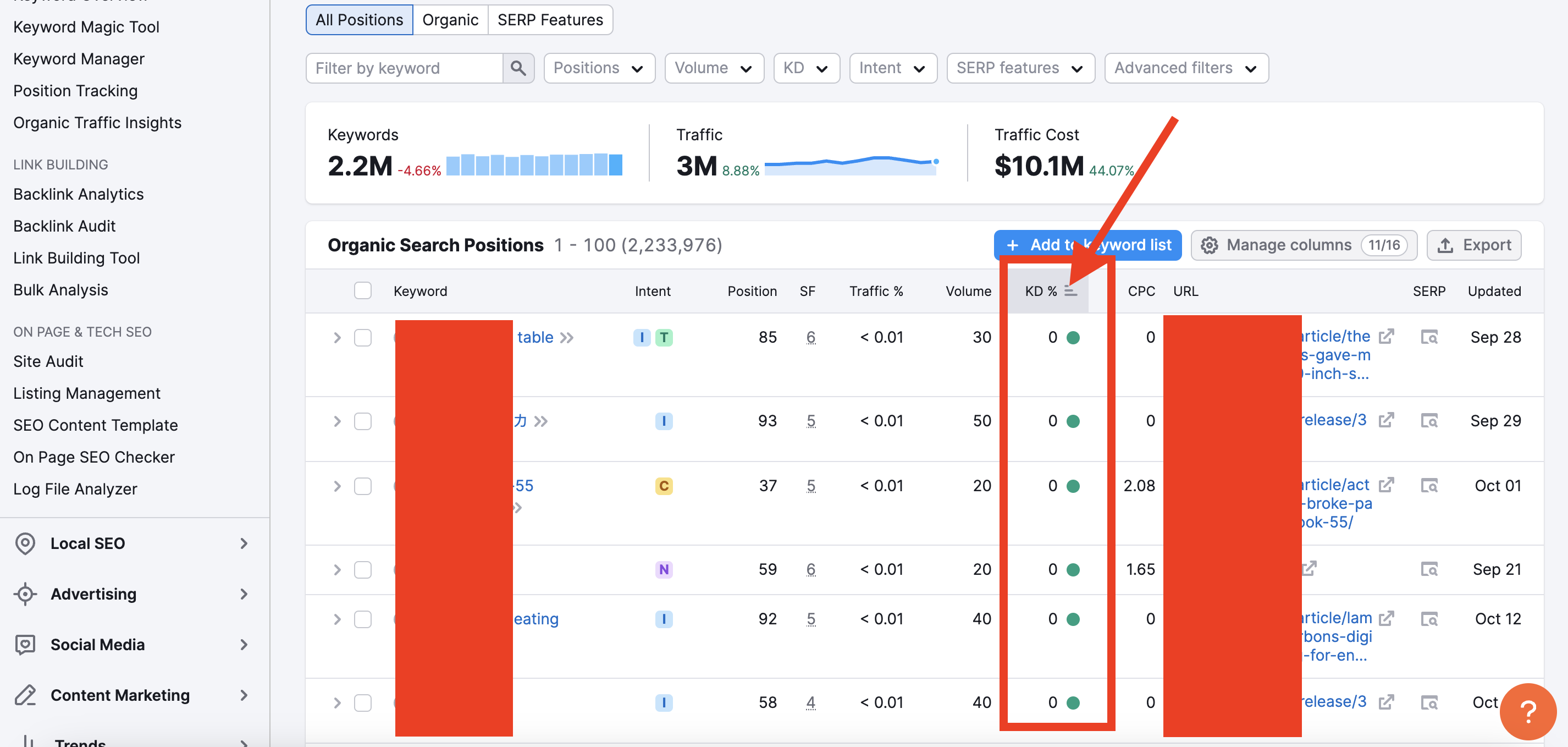
It’s tough, but here’s a secret: choose relevant keywords and pay attention to two key metrics – “keyword difficulty” and “estimated search volume.”
If the keyword difficulty is low, it’s absolutely possible to rank number one for that keyword. How? You’ve got to outshine your competition with high-quality content. Write a comprehensive article that incorporates those low-competition keywords you’re targeting. Beat your competitors with better, more valuable content, and you’ll be on your way to the top spot in search results.
How to find low competition keywords?
Indeed, there are various platforms and tools that can help you assess keyword difficulty and make informed decisions about your SEO strategy and respectively find out how to earn from ads more effectively. Here are a few notable ones:
SEMrush
Similarweb
Ahrefs
Moz Keyword Explorer
KWFinder
Ubersuggest
Google Keyword Planner
Let’s look at an example using a random keyword and a keyword difficulty metric from one of the popular SEO tools.
Imagine you have a website about gadgets and computers. Go to Google and search for something connected to your niche. Let’s say “how to install Linux”. You would see what websites work in the same niche. Copy their names.
After that, go to any platform and find one of these domains.
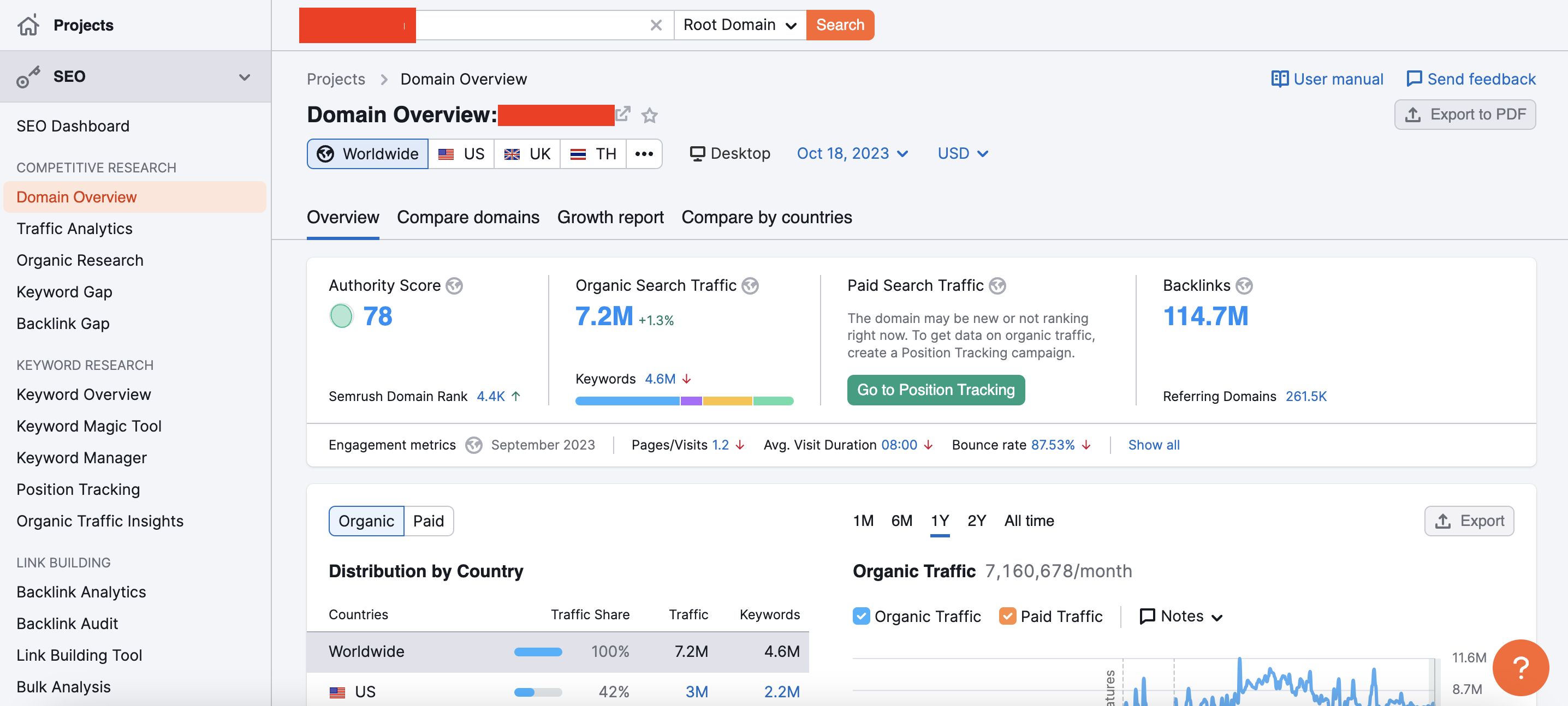
Scroll down and you would find Top Organic Keywords.
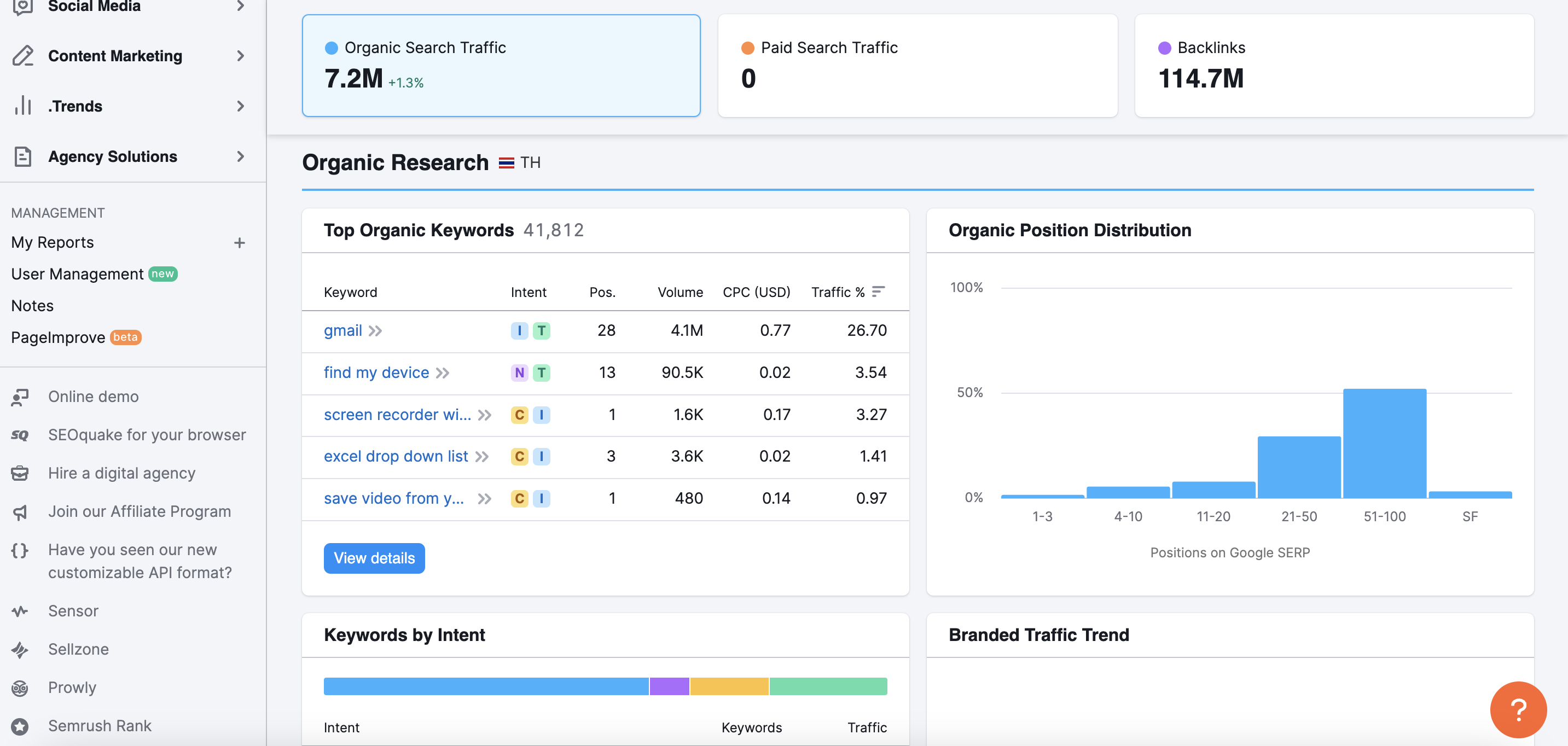
Click View Details and you would see a table with all the keywords. Sort by Keyword difficulties.
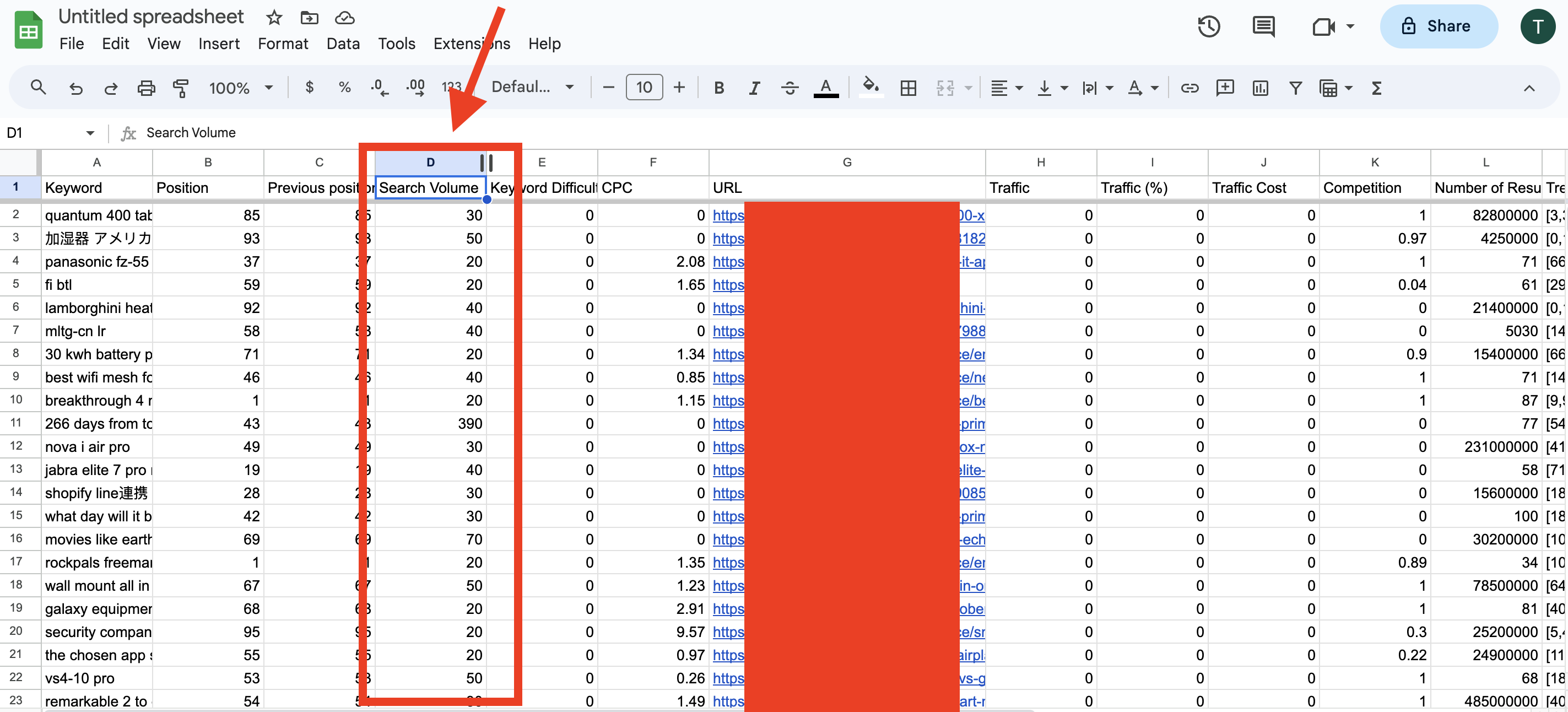
Now download CSV file and upload it to your Google Spreadshit. Use Export button to download the Keywords.
When conducting keyword research, you want to strike a balance between keyword difficulty and search volume. High search volume keywords can potentially bring more traffic to your website, but they often come with higher competition. On the other hand, low search volume keywords may be easier to rank for, but they might not generate substantial traffic.
You can see a column called Search Volume. This is estimated amount of serch quaries per month. As you can guess, it is not very productive to spend time creating content and competing for such low search volume keywords. That is why we are going to sort the sheet and find the highest serch results.
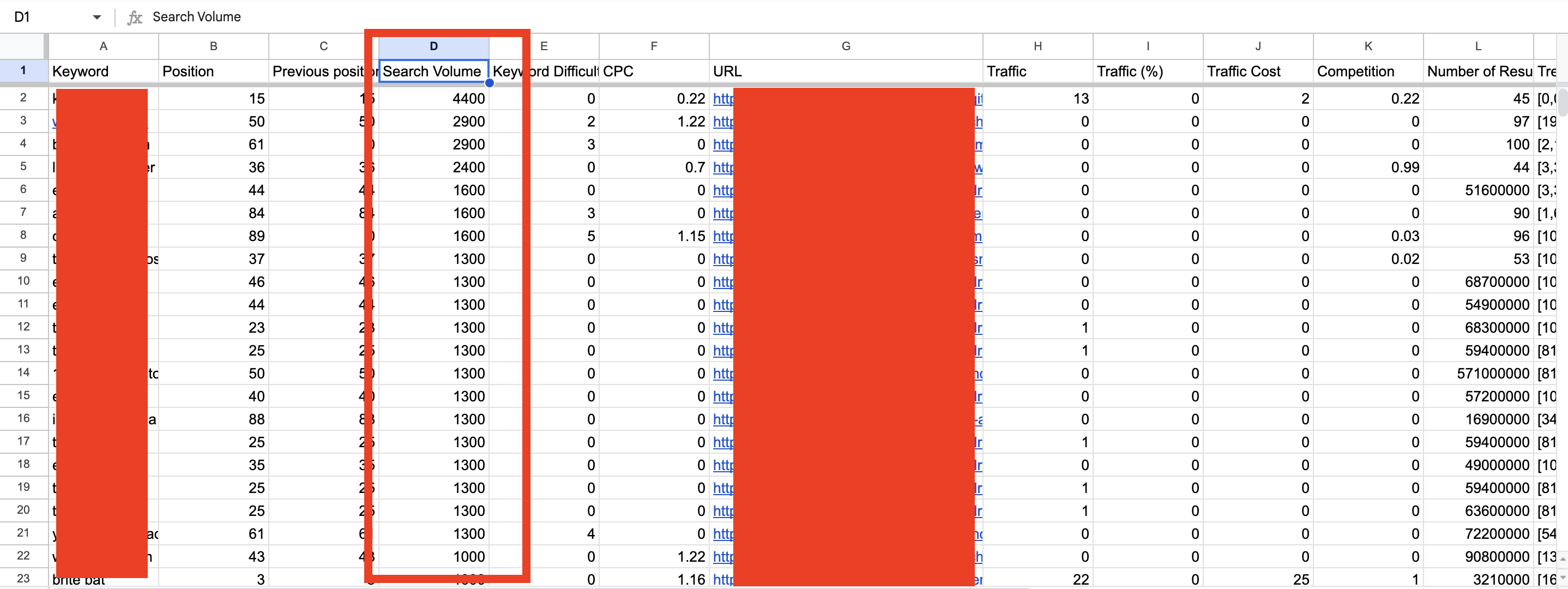
Identifying and targeting those low-competition keywords with decent traffic volume is a smart SEO strategy. These keywords can be your golden ticket to building strong content that has the potential to rank prominently in search engine results.
Repeat the process, find new competitors and make a keyword research again and again.
Also check our blog post about SEO writing.
What about backlinks?
High-quality backlinks are crucial for SEO success, but they can indeed be expensive and should be approached with caution. Low-quality or spammy backlinks can harm your website’s ranking and reputation, so it’s essential to avoid them.
If you don’t have a budget to afford high quality backlinks, it’s better to focus on the high quality content and keyword research.
If you do have budget, it is better to spend some money to hire some professional who would write strong content for your website.
That is why, me personally don’t see any reason why you should think about backlinks in the beginning of your online journey.
But if you can reach out some high authority website and negotiate a guest post for free, it would be great!
Adsterra SEO course
This one’s going to say for itself: https://adsterra.com/blog/seo-and-traffic-boost/
Step 4: Monetize with proven revenue streams
Social media offers the advantage of delivering near-instant results, whereas SEO can take time to yield significant results. Achieving virality on social media can indeed bring a substantial influx of traffic and potential earnings. However, it’s important to note that viral success can be fleeting, and maintaining a stable online presence is essential.
Here are some notable social media platforms that can be real value for promoting your website:
- Snapchat
- Tik Tok
- Youtube
- Linked In
- Quora
- Medium com
- Gab
We already published case studies about some of the platforms. By the way, if you already have a story how you monetize traffic from Instagram, Tik Tok, Reddit, Linked In, Quora, Medium or any other platforms feel free to share with us!
You can read the stories of our publishers and learn what ad formats they used with Facebook, Pinterest, Twitter, and Youtube traffic.
The general advice here is to follow the trends, and create content around something people interested right now. Use trend tracking tools such as YouScan or BuzzSumo. Or simply you can use Google trends.
Use trending keywords and hashtags to promote your posts, and read our tutorials and case studies on how to work with social media platforms.
Social media submissions might be good for your SEO too.
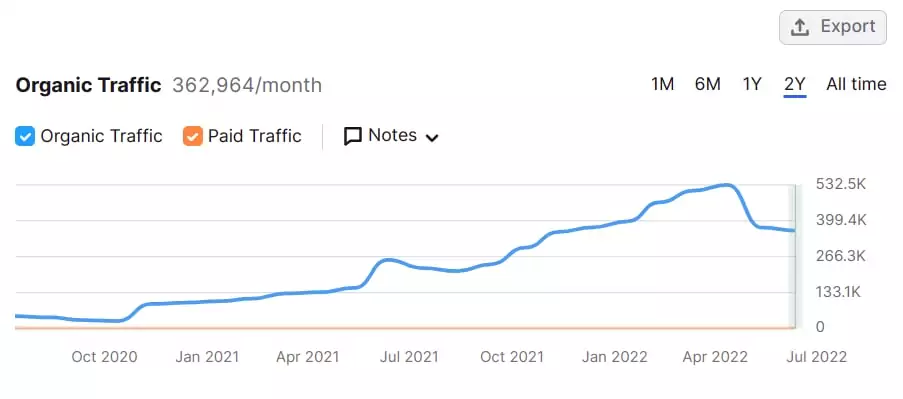
Here is what one of our publishers sent me in 2022. He had a blog about South African music.
In October 2020 he started “Pinterest and other social media submissions”. It was a long two year journey, but he managed to boost his traffic a lot.
Step 5: Choose website monetization options
Now, we name a few proven ways of how to make your website profitable and generate passive income:
1. Selling ad space
When your website is all set up and running, when you fill it with valuable content, and traffic starts to flow, it is time to make money with some ads.
How it works: Place ads on your site and earn based on views or clicks. The most profitable combination to try out first would be Popunder and Social bar.
The amount you can earn from ads depends on several factors, including niche, target audience location, ad type, and web traffic level. The good news is that you can earn substantial income if you play your cards right. Websites can make thousands to millions of dollars from ads depending on the aforementioned factors.
Best for: Blogs with loyal audience.
Tools and platforms:
- Google AdSense (with stricter-rules moderation),
- Ezoic, Mediavine (for higher traffic),
- Adsterra (for any amount of traffic and with flexible moderation), etc.
Registering is the first step to establish partnership on a suitable ad network. Then, the ad network provides a piece of code to add to your website. Add this code to the required website section, and you should see ads on your site in no time. Adsterra is an excellent example of an ad network that gives you access to 16,000+ high-quality advertisers that will compete to show their ads on your site.
2. Affiliate marketing
How it works: Promote companies products/services and earn a commission on each sale by promoting affiliate links.
Best for: Review sites, niche content sites to become affiliate marketing websites.
Tools and platforms: Amazon Associates, ShareASale, CJ Affiliate.
3. Sponsored content
How it works: Get paid by brands to publish promotional posts, online reviews, and any other sponsored content.
Best for: Sites with an engaged audience in a specific niche that can accommodate sponsored posts.
Tools and platforms: Media kit with metrics on your audience characteristics to pitch to sponsors.
4. Selling digital products or services online
How it works: Offer eBooks, templates, custom products, coaching or consulting services directly from your online store.
Best for: Educational or niche expert sites as paid courses, ecommerce store, or online marketplace.
Tools and platforms: E-commerce plugins like WordPress WooCommerce Sensei plugin.
There are also monetization options like membership websites where you offer early access to content or gate exclusive content, or offer subscriptions.
5. Email list monetization
How it works: Build a mailing list and promote digital products or products offers through email marketing.
Best for: Any content site focused on long-term growth.
Tools: Mailchimp, ConvertKit, MailerLite, ActiveCampaign.
Step 6: Create content that ranks in Google and AI Overviews
Here are a few working content creation strategies on how to make a profitable and successful website:
- Create evergreen content. Focus on topics that remain ever-relevant. You can create tutorials, how-to guides, and product reviews. This secures ongoing traffic and your passive income.
- Repurpose content across other platforms and online communities. Transform blog articles into videos, infographics, or social media posts. Enhance your reach without building your content anew.
- Go for keyword clusters. Build topic clusters by linking related articles around a central pillar (main) article. This boosts your SEO, prolongs time on site, and builds topical authority for your profitable website.
- Use irresistible CTAs and effective monetization strategies. Integrate affiliate links, lead magnets, or product recommendations naturally within your content to drive conversions, generating revenue streams.
- Apply AI and SEO. To rank in AI Overviews, create content that directly answers specific user questions in a clear, structured way: you want simple language, headings, and concise explanations. Focus on topical authority by covering related subtopics and ensuring you’re well-sourced and easy for AI systems to extract and summarize.
Real case studies of profitable websites
Here, we also gathered profitable website stories from real-life, digital fields:
Case study 1
“My earnings have comprised around $7,000 from writing quick and catchy articles on hot topics, attracting visitors via Google Discover. India was my biggest country source for both traffic and money, while the United States and Canada provided better rates of CPMs. It is pretty clear from my experience that Tier 2 and 3 countries could deliver results too, provided users involved and interested in clicking ads. In this respect, all I did was to work efficiently using a website like WordPress and the Rank Math SEO plugin.”
Karan, News platform owner, SEO expert
Case study 2
“In the changing environment of the blogging sphere, which is getting highly competitive, we have found our way to success that lets us earn $2,700 each month in a very effective way. We concentrate on choosing low-competition keywords from a local angle, employ ChatGPT for free content generation in the user-friendly format. Then we promote the generated content in local communities using social media such as WhatsApp, Facebook, and Telegram. We also use Smartlink and Popunder for monetization.”
Zaeem Insha, Ramzan Jani, News bloggers, Google Discover and SEO experts
Case study 3
“In creating a profitable website, I utilize efficient search engine optimization techniques plus appropriate advertising revenue models. As a result, my earnings currently stand at about $20,000. In developing my website, I ensure that I create quality content optimized for search engines while simultaneously attracting steady traffic from engines like Google. By continuously optimizing content, improving page performance, and testing ad setups, I am able to significantly increase earnings.”
Patel, Online entrepreneur and blogger
Final thoughts
Even the most complicated technical details of our job can be explained in such a way that anyone can understand them. As a result, launching your website becomes much simpler. We hope this guide will serve you well as a beginning.
We stand for the take that Adsterra is about quality care at any stage and effective onboarding. Therefore, a full-fledged Partner Care Program with a 24/7 multilingual online chat is always at your service. Join Adsterra today to start making money from a website as soon as possible, without complex setup. We’ll be happy to have you!
How to make a profitable website? FAQ
Do website owners get paid?
Yes, website owners can get paid, and it depends on how the site is used. Earnings can be different. Some people may earn nothing while others earn enough to run their own business from home. Normally, you need to attract visitors to your site and ensure that your monetization strategies are solid enough to earn you money after a few months, which means $1,000 at an average.
Your earnings are usually counted per 1,000 views and depend on many factors, such as niche, ad network, and traffic, but don’t be afraid to aim as high as possible. So it can be $1 or less, a few dollars, and up to $5, $10, $20, etc., and each of these figures may be taken as a good result in their settings.
How does a website generate income?
Making money from a website comes from adding value to the people who visit it. There are several ways of earning money, including using advertisements, affiliate programs, selling goods or services, subscriptions, and sponsorships. Some websites make money from capturing leads for companies. The main idea is to get constant visits to your site that find what you offer valuable.
How does a website generate income?
To monetize a website successfully, you don’t need advanced skills in coding or any other expertise. The availability of site builders such as WordPress, Wix, Google Sites, and others make building a profitable website so easy now. The most important thing is to know who your audience is, create useful content, know something about internet marketing, and be able to make data-based decisions.
How to identify a profitable niche for a new website?
Identifying a successful niche involves recognizing problems that people are actively searching solutions to solve. It should be something that is popular enough, but not too difficult to compete with. This can be done by investigating trends, keywords, and competitor sites. Something that you know about or like can work wonders!
Niches like VPN, Utilities, iGaming and Sports websites, Sweepstakes, and News websites are there to make money. Prefer a SEO-driven blog. Choose one niche and dive deeper on how to create a website that makes money. Build authority and monetize with banner ads and unique affiliate links for steady income.